Microsoft Planner

Microsoft Planner

다운로드: App Store다운로드: Google Play
Spark by MWM logo
로고: Microsoft Planner

Microsoft Planner: 간편한 시각적 팀워크 및 작업 관리

직관적인 보드를 통해 작업을 시각적으로 정리하고, Office 365 내에서 원활하게 협업하며, 팀이 계획대로 진행되도록 유지하세요. 현대 전문가를 위해 설계되었습니다.

개발사

Microsoft Corporation

카테고리

Productivity

다운로드

6M+

사용자 평점

4.6/5

총 평가 수

29K+

지원 언어

29

팀워크에 집중

이 인터페이스를 사용하는 6M+ 명의 사용자.

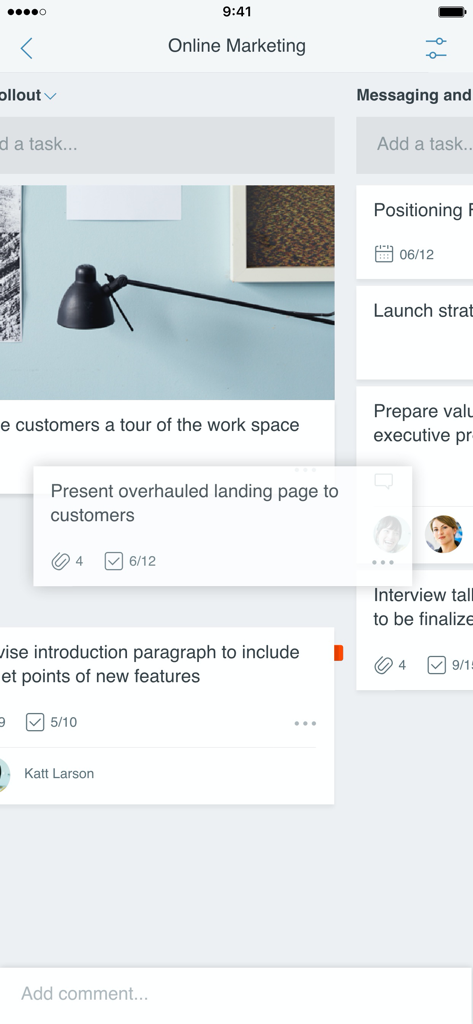
Microsoft Planner 모바일 앱 인터페이스로 프로젝트 작업 관리를 위한 시각적 칸반 보드를 보여줌

Microsoft Planner 모바일 앱 인터페이스로 프로젝트 작업 관리를 위한 시각적 칸반 보드를 보여줌

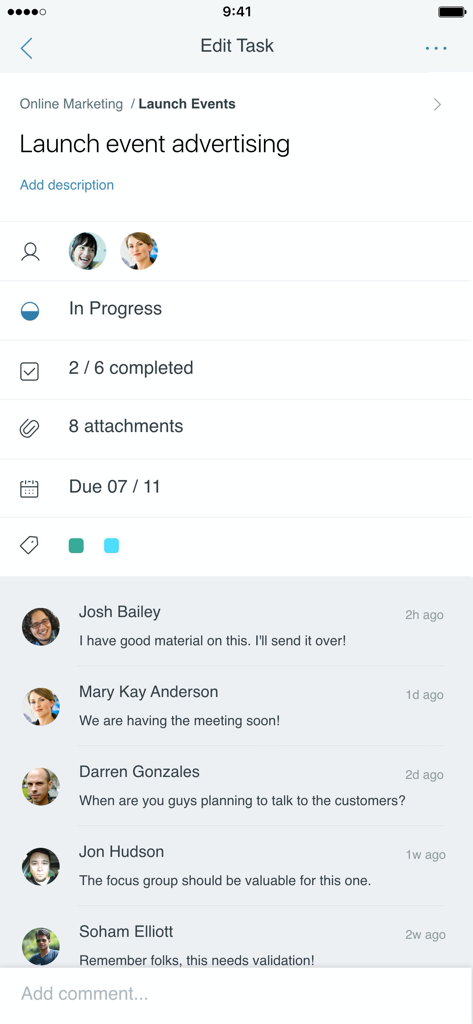
Microsoft Planner 모바일 앱 인터페이스로 상태 진행 상황과 팀 댓글이 포함된 작업 세부 정보를 보여줌

Microsoft Planner 모바일 앱 인터페이스로 상태 진행 상황과 팀 댓글이 포함된 작업 세부 정보를 보여줌

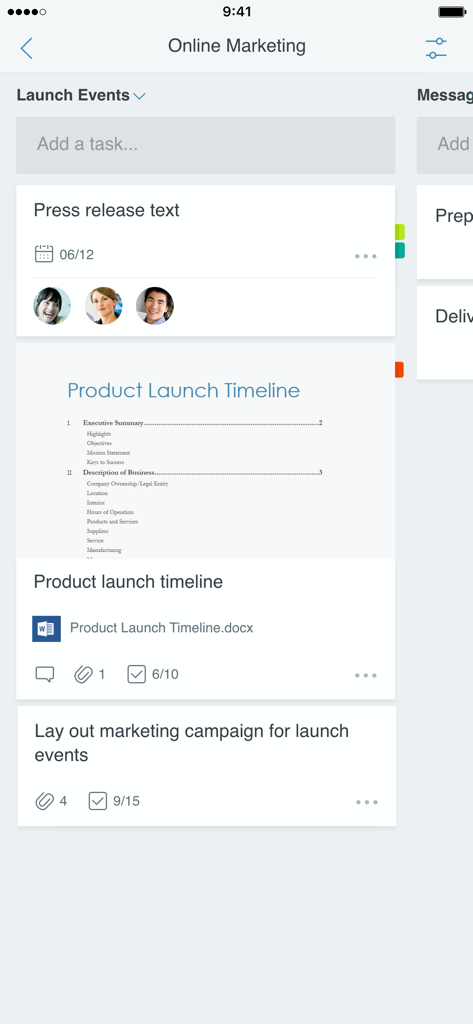
Microsoft Planner의 모바일 인터페이스로 팀 할당 및 첨부 파일이 있는 온라인 마케팅 프로젝트용 작업 보드를 보여줌

Microsoft Planner의 모바일 인터페이스로 팀 할당 및 첨부 파일이 있는 온라인 마케팅 프로젝트용 작업 보드를 보여줌

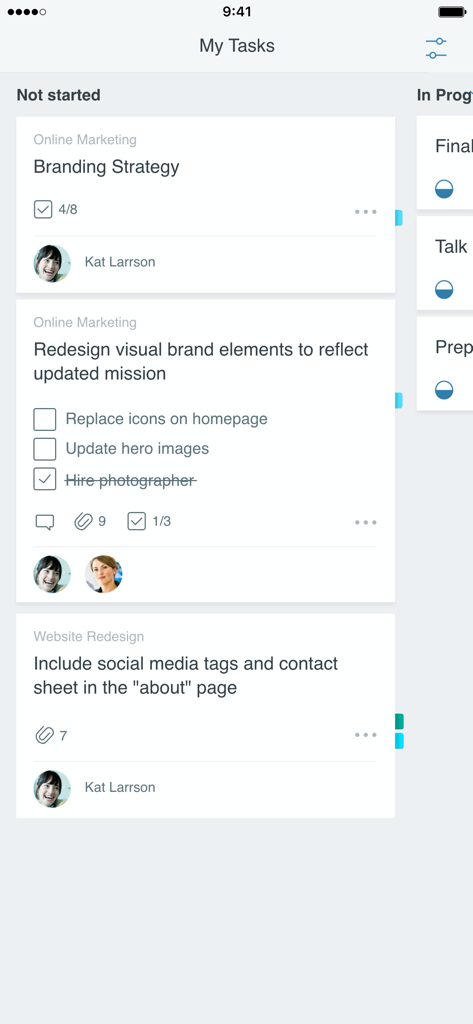
Microsoft Planner 앱 인터페이스로 시작 안 함 열에 정리된 작업 카드가 있는 칸반 보드를 보여줌

Microsoft Planner 앱 인터페이스로 시작 안 함 열에 정리된 작업 카드가 있는 칸반 보드를 보여줌

시각적 정확성으로 업무 흐름 마스터하기

이 앱을 돋보이게 하는 도구, 6M+ 명의 사용자가 선택.

📊

직관적인 칸반 보드

작업을 시각적인 칸으로 정리하고 간단한 드래그 앤 드롭 기능으로 상태 변경을 관리하세요.

🖇️

원활한 365 통합

안전한 Microsoft 생태계 내에서 파일, 사진, 토론을 작업에 직접 연결하세요.

실시간 프로젝트 가시성

모든 계획에서 누가 무엇을 하고 있는지에 대한 즉각적인 업데이트를 받아 팀의 완전한 책임감을 보장하세요.

전 세계 사용자들에게 사랑받는 앱

Trusted by 6M+ 명이 이 앱을 사랑합니다.

"

"Planner는 저희 마케팅 팀이 대규모 캠페인을 처리하는 방식을 완전히 바꾸어 놓았습니다. 진행 상황을 칸으로 시각화하고 작업을 완료로 드래그할 수 있다는 점이 매우 만족스럽습니다. 이는 저희가 끝없는 상태 업데이트 이메일 루프에서 벗어나 실제 업무에 집중하는 데 필요한 '단일 진실 공급원'입니다."

Sarah Jenkins, 마케팅 프로젝트 매니저
"

"고객 현장과 사무실을 계속 이동해야 하는 저에게 모바일 경험은 정말 큰 도움이 됩니다. iPhone에서 작업 상태를 업데이트하면 팀이 데스크톱에서 즉시 볼 수 있다는 것을 압니다. 기존 Office 365 설정과 완벽하게 통합되어 협업을 원활하고 안전하게 만듭니다."

David Liang, 선임 운영 컨설턴트

리뷰 분석

사용자 리뷰 인사이트.

감정 점수

16%
부정적

요약

The mobile app receives overwhelmingly negative feedback, primarily due to its significant lack of premium plan compatibility which many users find makes the app "useless". Key criticisms include pervasive performance issues like slow loading times and a critical disparity in features compared to the web version, such as missing task duration, filtering, and reminders. Additionally, users frequently highlight poor integration with other Microsoft services, leading to a disjointed and frustrating user experience. While some appreciate existing functionalities like recurring tasks and the app's potential for quick overviews, the overall sentiment reflects a strong demand for substantial improvements in functionality and performance to match its desktop counterpart.

주요 테마

Enhanced Mobile Functionality(17)
Premium Plan Functionality Demand(16)
Recurring Task Feature(1)
Multi-Account Support Request(1)
Dark Mode Support Request(1)
Quick Overview Capability(1)
Stability and Clarity(1)

앱 소개

에 대해 알아야 할 모든 것 Microsoft Planner.

설명

Microsoft Planner requires an eligible Office 365 work or school subscription. This app does not support Office 365 personal accounts (for example: name@outlook.com or name@hotmail.com). If you are not sure about your company’s subscription or the services you have access to, please contact your IT department. Planner provides a simple, visual way to organize teamwork. Planner makes it easy for your team to create new plans, organize and assign tasks, share files, chat about what you’re working on, and get updates on progress. -- Organize work visually -- Each plan has its own board, where you can organize tasks into buckets. You can categorize tasks based on their status or on whom they’re assigned to. To update the status or change assignments, just drag and drop tasks between columns. -- Visibility -- The My Tasks view provides a comprehensive list of all your tasks and their status across all your plans. When working together on a plan, team members always know who is working on what. -- Collaborate -- Built for Office 365, Planner lets you work together on the same tasks, attach captured photos directly to them, and even have conversations around tasks without switching between apps. With Planner, all your team’s discussions and deliverables stay with the plan and don’t get locked away across disparate applications. -- Works across devices -- Planner works across all your devices. And with Planner, everyone is always on the same page. Continue conversations and updates tasks while on-the-go or at your desk. Terms of service: https://go.microsoft.com/fwlink/?linkid=846830 Privacy policy: https://go.microsoft.com/fwlink/?LinkId=521839 To learn more, please visit https://go.microsoft.com/fwlink/?linkid=849067 The Microsoft Planner app will request permission to access your photos and your camera: When you try to attach a photo to a Planner task, the app requests permission to access your Photos app in order to select images. If you choose to take a photo to attach to a Planner task, the app will request permission to access your Camera app.

최신 버전

1.17.11

크기

150.6 MB

출시일

2017년 5월 18일

어디서든 팀워크 정리

프로젝트를 간소화할 준비가 되셨나요? 직장 또는 학교 계정으로 로그인하고, 수백만 명의 전문가와 함께 모든 기기에서 팀을 동기화 상태로 유지하세요.

다운로드: App Store다운로드: Google Play
FAQ

자주 묻는 질문

에 대해 알아야 할 모든 것 Microsoft Planner

Microsoft Planner란 무엇인가요?

Microsoft Planner는 팀워크를 구성하는 간단하고 시각적인 방법을 제공합니다. 팀이 계획을 만들고, 작업을 구성하고 할당하고, 파일을 공유하고, 진행 상황에 대한 업데이트를 받을 수 있습니다.

Microsoft Planner를 사용하려면 Office 365 구독이 필요한가요?

예, Microsoft Planner를 사용하려면 적격한 Office 365 업무 또는 학교 구독이 필요합니다. Office 365 개인 계정은 지원하지 않습니다. 회사 구독에 대해 확실하지 않은 경우 IT 부서에 문의하십시오.

Microsoft Planner는 작업을 어떻게 구성하나요?

Microsoft Planner는 시각적으로 작업을 구성합니다. 각 계획에는 버킷으로 구성된 작업이 있는 자체 보드가 있습니다. 사용자는 상태 또는 담당자로 작업을 분류하고 열 간 드래그 앤 드롭으로 업데이트합니다.

팀은 Microsoft Planner 내에서 협업하고 채팅할 수 있나요?

예, Microsoft Planner는 Office 365를 위해 구축되었으며 팀이 직접 협업할 수 있도록 합니다. 사용자는 다른 애플리케이션 간에 전환하지 않고도 함께 작업하고, 사진을 첨부하고, 작업에 대한 대화를 나눌 수 있습니다.

Microsoft Planner는 여러 장치에서 액세스할 수 있나요?

예, Microsoft Planner는 모든 장치에서 작동합니다. 이 기능은 팀 구성원이 동기화 상태를 유지하도록 하여 모바일이든 책상에 있든 대화를 계속하고 작업을 업데이트할 수 있도록 합니다.

사용자는 Microsoft Planner에서 할당된 모든 작업을 어떻게 볼 수 있나요?

사용자는 Microsoft Planner의 '내 작업' 보기를 통해 할당된 모든 작업을 봅니다. 이를 통해 모든 계획에 걸쳐 모든 작업과 해당 상태에 대한 포괄적인 목록을 제공하여 개인의 기여도에 대한 가시성을 확보합니다.

Microsoft Planner의 작업에 파일과 사진을 첨부할 수 있나요?

예, Microsoft Planner의 작업에 파일과 사진을 첨부할 수 있습니다. 이 앱은 사진 앱에 액세스할 수 있는 권한을 요청하여 이미지를 선택하거나 카메라 앱에 액세스하여 새 사진을 찍어 작업에 직접 첨부합니다.