
i-FlashDevice HD



Take control of your storage with physical USB backups. Save your photos and contacts instantly to your own drive—no monthly fees, no internet required, and no privacy risks.
Publisher
Category
UtilitiesDownloads
1M+User Rating
Total Ratings
1K+Locales
22Discover the interface used by 1M+ users.
The tools that make this app stand out, trusted by 1M+ users.
Quickly offload thousands of photos and videos to any external USB drive, freeing up space for new memories without deleting a thing.
Perfect for travelers and rural areas. Secure your data on the go without needing Wi-Fi, cell service, or a data plan.
Keep your personal files out of the cloud and in your hands. Enjoy total peace of mind with physical storage that no hacker can reach.
Trusted by 1M+ people who love this app.
"I was constantly getting the 'Storage Full' alert during my kids' sports games and refused to pay for another monthly cloud subscription. i-FlashDevice HD is the perfect solution. I just plug in my drive, offload all my videos without needing Wi-Fi, and I'm ready to keep recording. It is a lifesaver for anyone who prefers physical storage over the cloud."
"As a contractor working in remote areas with zero cell service, being able to back up my site photos to a USB drive without a network is essential. This app makes it incredibly simple to manage files and transfer them to my office PC later. It is a straightforward, no-nonsense utility that does exactly what I need it to do."
Insights from user reviews.
Sentiment Score
Summary
Users overwhelmingly report significant issues with the app, citing frequent crashes, freezing, and devices not being recognized. Many experience data loss, with photos and videos failing to open or disappearing after transfer. Connectivity problems are widespread, leading to devices being perpetually "offline" or failing to connect, particularly noted by users with iPhone 16 Pro Max. The app also frequently quits unexpectedly when attempting to view media, a bug specifically mentioned by iPhone 15 users, while one user noted it stopped working after upgrading from iPhone 13 Pro to 17 Pro Max.
Common Themes
Everything you need to know about i-FlashDevice HD.
Description
Latest Version
1.8.2
Size
73.0 MB
First Released
May 2, 2016
Stop paying for monthly cloud subscriptions. Securely back up your memories to your physical USB drive today—no internet connection required.
Everything you need to know about i-FlashDevice HD
The i-FlashDevice HD app primarily connects to a USB drive via a wired connection. It enables users to manage and back up various files and contacts to and from the USB drive.
Yes, i-FlashDevice HD allows users to back up photo album files to a connected USB drive. It also supports restoring these files back to the photo album.
Yes, i-FlashDevice HD supports backing up contacts to a USB drive. Users can also restore their contacts from the USB drive using the app.
No, the i-FlashDevice HD app performs backup operations without requiring any network access, ensuring offline functionality.
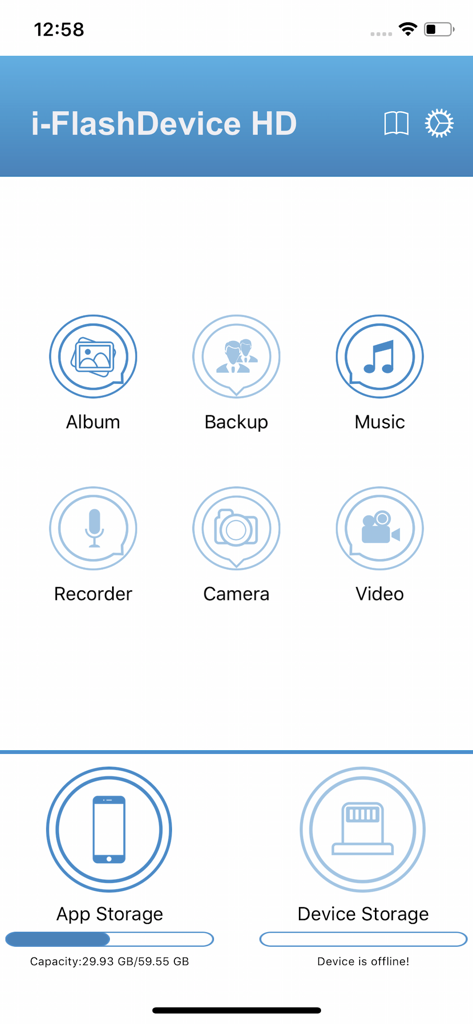
The i-FlashDevice HD app manages files such as albums (photos), backups, music, recordings, camera files, and videos, as indicated by its main screen icons.
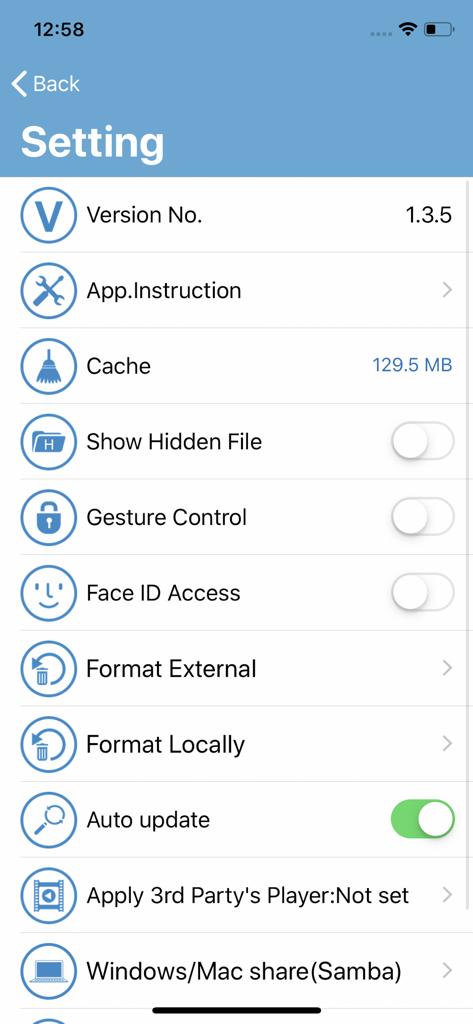
Yes, the i-FlashDevice HD app includes a setting for Face ID Access to enhance user security for the application.
Yes, i-FlashDevice HD provides options to format both external and local storage drives through its settings menu.
Yes, i-FlashDevice HD supports file sharing with Windows and Mac systems using Samba, as shown in the app's settings.
Yes, i-FlashDevice HD displays the current capacity and usage for "App Storage" and indicates the status of "Device Storage" on its main screen.
Yes, the i-FlashDevice HD app includes a setting labeled "Show Hidden File" that users can enable or disable.
Apps with similar features and user experience

Maktar Inc.

SanDisk Corporation

SanDisk Corporation

Shenzhen Dianzhui Culture Technology Co., Ltd.

Shenzhen Dianzhui Culture Technology Co., Ltd.

ALL BOND TECHNOLOGY CO., LTD

天海 何

金铃 梁

伟才 韦