Invoice2go: Easy Invoice Maker

Invoice2go: Easy Invoice Maker

Download on App StoreDownload on Google Play
Spark by MWM logo
Logo of Invoice2go: Easy Invoice Maker

Invoice2go: Professional Invoices for Small Businesses in Under a Minute

The #1 tool for freelancers and contractors to create branded estimates, track expenses, and get paid instantly. Look professional and manage your business on the go with ease.

Publisher

Invoice2go.com

Category

Business

Downloads

3M+

User Rating

4.8/5

Total Ratings

114K+

Locales

6

Professionalism in Motion

Discover the interface used by 3M+ users.

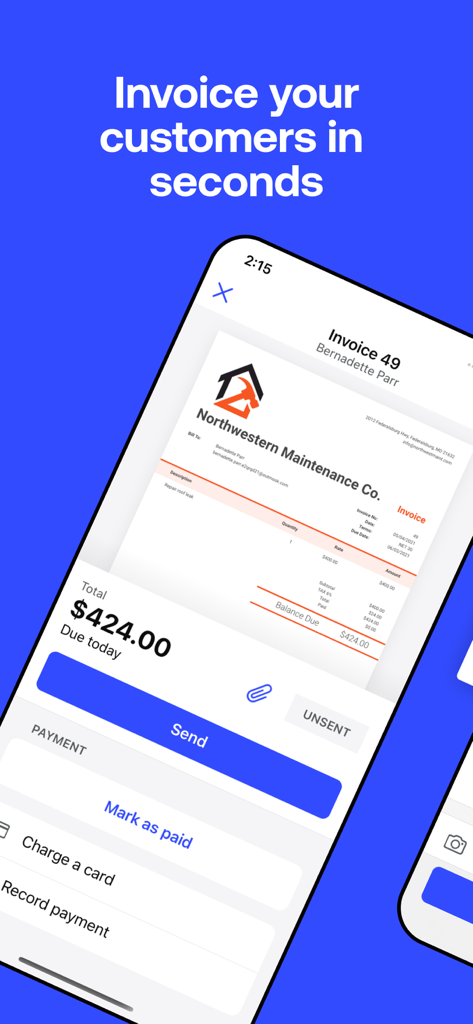
Mobile app interface showing a professional business invoice with a Send button

Mobile app interface showing a professional business invoice with a Send button

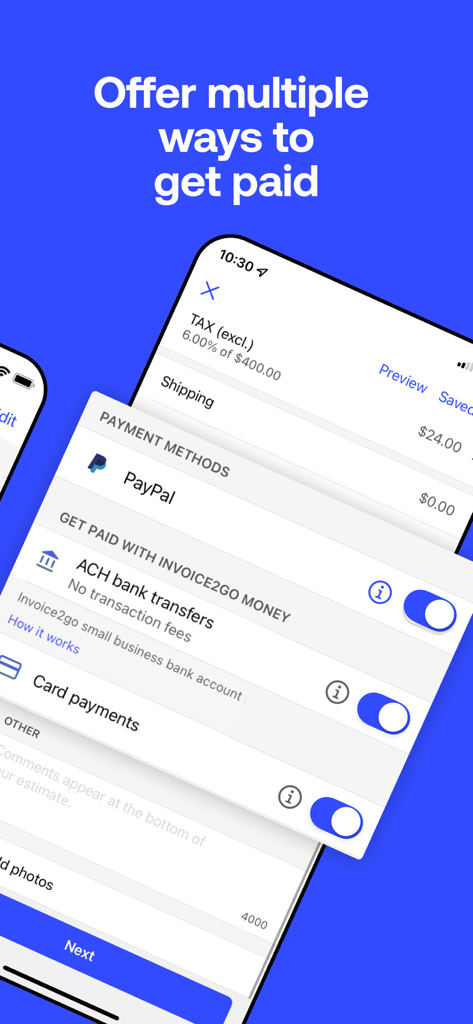
Invoice2go app interface displaying multiple payment methods like PayPal and ACH bank transfers

Invoice2go app interface displaying multiple payment methods like PayPal and ACH bank transfers

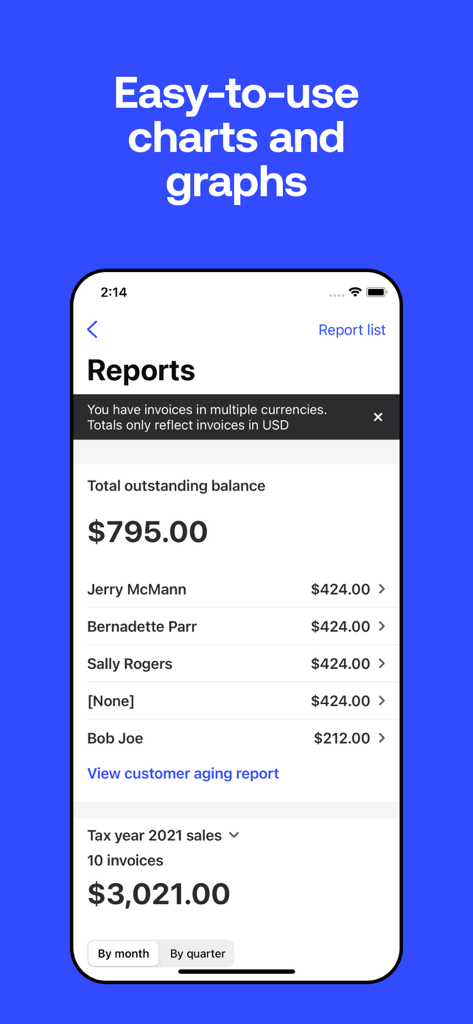
Invoice2go mobile app reports screen showing outstanding balance and sales summary

Invoice2go mobile app reports screen showing outstanding balance and sales summary

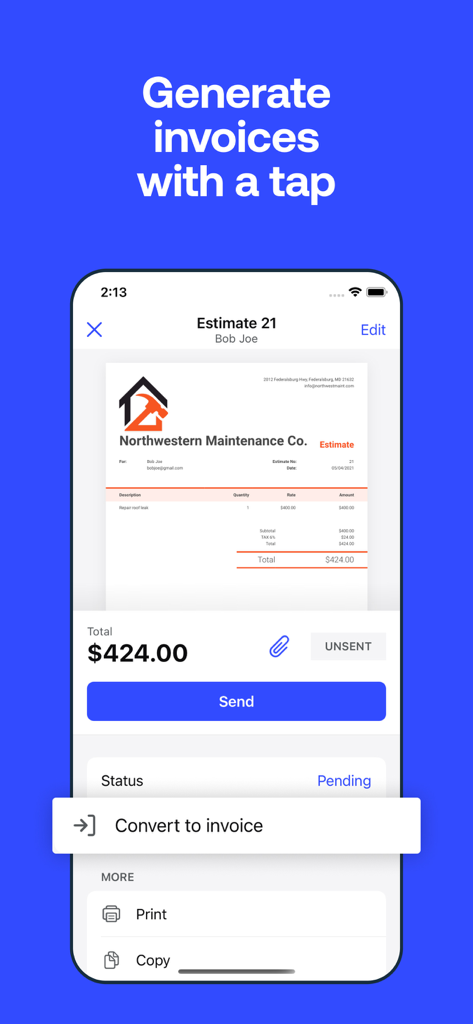
A business estimate being converted to an invoice on a mobile phone screen

A business estimate being converted to an invoice on a mobile phone screen

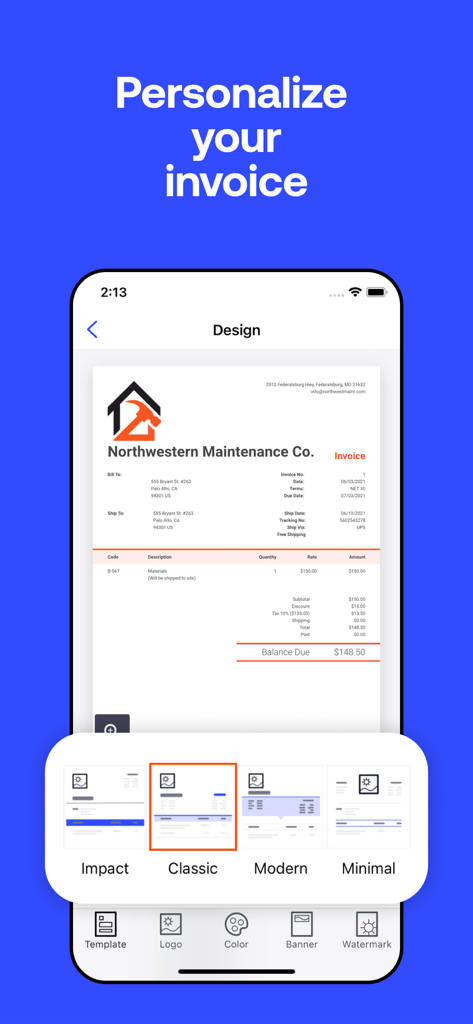
A mobile interface for personalizing invoices with different design templates like Impact, Classic, Modern, and Minimal.

A mobile interface for personalizing invoices with different design templates like Impact, Classic, Modern, and Minimal.

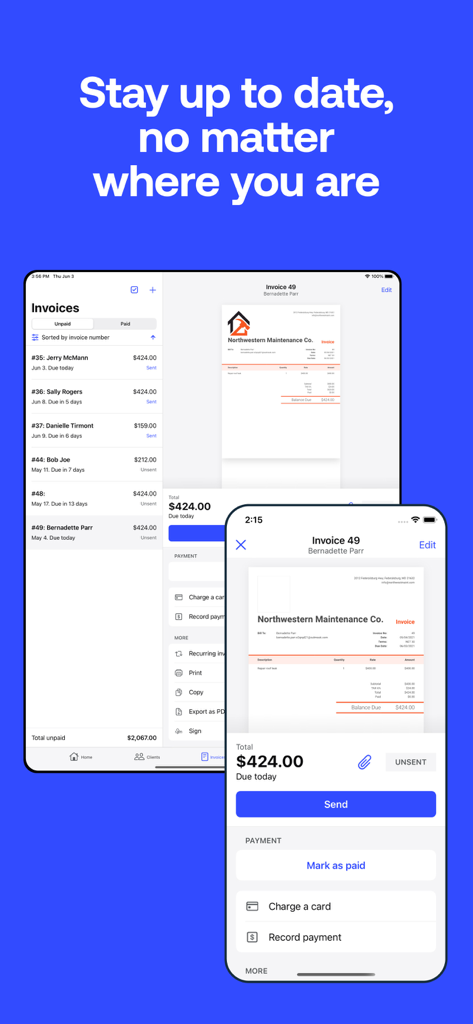
Invoice2go mobile app interface on iPhone and iPad showing professional business invoices

Invoice2go mobile app interface on iPhone and iPad showing professional business invoices

Empower Your Business Growth

The tools that make this app stand out, trusted by 3M+ users.

Professionalism in Seconds

Impress your clients with 8 stunning, customizable templates. Add your logo and brand colors to look like a big company, even if you’re a one-person show.

💳

Get Paid on the Spot

Stop chasing checks. Accept credit cards, PayPal, and Apple Pay directly on your invoices so you can see money in your account the moment the job is done.

📸

Ditch the Shoebox

Snap photos of receipts and track expenses on the go. Stay tax-ready and organized year-round without the administrative headache or paperwork piles.

Loved by users worldwide

Trusted by 3M+ people who love this app.

"

"Invoice2go has completely changed how I run my contracting business. I used to spend hours every Sunday catching up on paperwork, but now I can send a professional invoice in under a minute right from my truck. My clients love the easy payment options and I love getting paid days faster than before."

Marcus J., General Contractor
"

"Being a one-person creative shop means I wear every hat and the finance hat was always my least favorite. This app makes me look like a high-end agency with its beautiful branded templates. The expense tracking and receipt capture have been lifesavers for tax season. I cannot imagine running my business without it."

Elena R., Freelance Photographer

About the app

Everything you need to know about Invoice2go: Easy Invoice Maker.

Description

Invoice with ease using Invoice2go from BILL. Quickly create & send professional invoices for small businesses, consultants, contractors & freelancers in minutes. Invoice and accept payments with ease using Invoice2go. Set up Invoice2go Money to easily keep track of your payments and expenses in one central place. Small business owners in over 160 countries trust Invoice2go to send professional invoices and estimates to clients. Whether you need to create an invoice or quote, business receipt for your side gig, or small business, Invoice2go is the #1 free invoice app for the job. Create estimates for your clients so they’ll know what to expect. When the job is done, convert estimates into invoices with a tap and send them out. Track invoices to keep up with every payment. Create great-looking, professional invoices, and estimates, and get paid faster using one simple app. Accept all the ways your clients want to pay online. Capture your expenses as you incur them. Invoice2go is the on-the-go invoicing tool for all types of small businesses, freelancers, and contractors, from dog walkers to web designers to musicians. All of your information is automatically synced and available on your iPhone, iPad, and computer. Invoice2go has been the #1 invoice app for 10+ years and counting. Here’s why people choose Invoice2go: BUSINESS INVOICES - Invoice maker with 8 professional invoice templates optimized for easy use. - Add a logo for your business. Upload your own or create one using our custom logo designer. - Match your brand. Sync the color of your logo to your invoice. EASY INVOICES & ESTIMATES - Create and send an invoice in under 1 minute. - Make invoices without any training. If you can send an email, you can use Invoice2go. - Review your edits before you send an estimate or invoice. - iOS Widgets: Instantly see all outstanding payments from your home screen - Siri Shortcuts: Ask Siri to create invoices and estimates or to view reports ESTIMATE CREATOR - Create an estimate template for your project. - Share estimates with your client and save it for invoicing. - Convert an estimate into an invoice in seconds. FAST BILLING - Send invoices on the spot. Improve your turnaround time and save yourself the paperwork. - Accept payments instantly. Add the payments feature so clients can pay your invoices using American Express, Visa, Mastercard, Discover, Paypal, and Apple Pay. - Never miss a thing. Keep an eye on overdue invoices and send automatic payment reminders. SMALL BUSINESS ACCOUNTING - Easily track your expenses. Simply snap a photo of your receipt to safely store and claim business expenses. - Save for next time. Add expenses directly to your invoice and save recurring expenses for future use. - No more overflowing shoeboxes. Organize all of your expenses and print expense reports with one tap. STAY ORGANIZED - Know what happens to your invoice after you hit “send.” - See when customers have viewed your invoices and who still needs to make a payment. - Schedule appointments and organize your day. - Keep track of your receipts and time on the job so you can bill accurately. - Run reports and get all the information you need in one statement. Just select a client and we’ll take care of the rest. - The home screen showcases your most critical business insights, making it easier to make faster, informed decisions SUBSCRIPTION PRICING AND TERMS A subscription is required to use Invoice2go, and there’s three plans you can choose from. When you sign up, you’ll get the first 30 days free. Subscriptions automatically renew unless turned off in Account Settings at least 24 hours before end of current period. Payment is charged to your iTunes account. Unused portion of free trial is forfeited after purchase. Read more about our terms and conditions here - https://invoice.2go.com/tosInline/ Read more about our privacy policy here - https://invoice.2go.com/privacyInline/

Latest Version

11.167.0

Size

179.7 MB

First Released

Aug 7, 2012

Ready to Get Paid Faster?

Join over 3 million solopreneurs and contractors who have traded paperwork for professional invoicing. Start your 30-day free trial today and send your first invoice in under 60 seconds.

Download on App StoreDownload on Google Play
FAQ

Frequently Asked Questions

Everything you need to know about Invoice2go: Easy Invoice Maker

What is Invoice2go and what does it do?

Invoice2go is an application designed for small businesses, consultants, contractors, and freelancers. It allows users to quickly create, send, and track professional invoices and estimates, as well as accept payments and manage expenses.

Can I quickly create an invoice using Invoice2go?

Yes, Invoice2go simplifies invoice creation, allowing users to create and send a professional invoice in under one minute without requiring prior training.

What payment options does Invoice2go offer for clients?

Invoice2go supports various payment methods including American Express, Visa, Mastercard, Discover, PayPal, Apple Pay, and ACH bank transfers through Invoice2go Money.

Does Invoice2go allow converting estimates into invoices?

Yes, Invoice2go allows users to create estimates for clients. Once a job is complete, these estimates convert into invoices with a single tap.

How does Invoice2go assist with tracking business expenses?

Invoice2go facilitates expense tracking by allowing users to snap photos of receipts. It also enables saving recurring expenses and generating comprehensive expense reports.

Can I personalize the invoices created with Invoice2go?

Invoice2go offers customization options including 8 professional invoice templates, the ability to add a business logo or create one, and syncing brand colors to match the invoice design.

Is Invoice2go accessible across different devices?

Yes, Invoice2go provides automatic syncing of all information across iPhone, iPad, and computer, ensuring access and organization from any device.

Is a subscription necessary to use Invoice2go?

Yes, Invoice2go requires a subscription to use its features. Users can select from three available plans and receive the first 30 days free as a trial period.

What features does Invoice2go offer for invoice organization and tracking?

Invoice2go helps users stay organized by tracking when customers view invoices, identifying outstanding payments, and sending automatic payment reminders for overdue invoices.