KIRI Engine:3D Scanner & LiDAR

KIRI Engine:3D Scanner & LiDAR

Download on App Store
Spark by MWM logo
Logo of KIRI Engine:3D Scanner & LiDAR

KIRI Engine: Professional 3D Scanning & AI-Powered Modeling

Transform real-world objects into high-quality 3D assets in minutes. From Gaussian Splatting to production-ready exports for Blender and Unreal Engine, capture everything your creative pipeline needs with pro-grade precision.

Publisher

KIRI Innovation (Hongkong) Limited

Category

Photo & Video

Downloads

235K+

User Rating

4.4/5

Total Ratings

1K+

Locales

7

Reality, Digitized

Discover the interface used by 235K+ users.
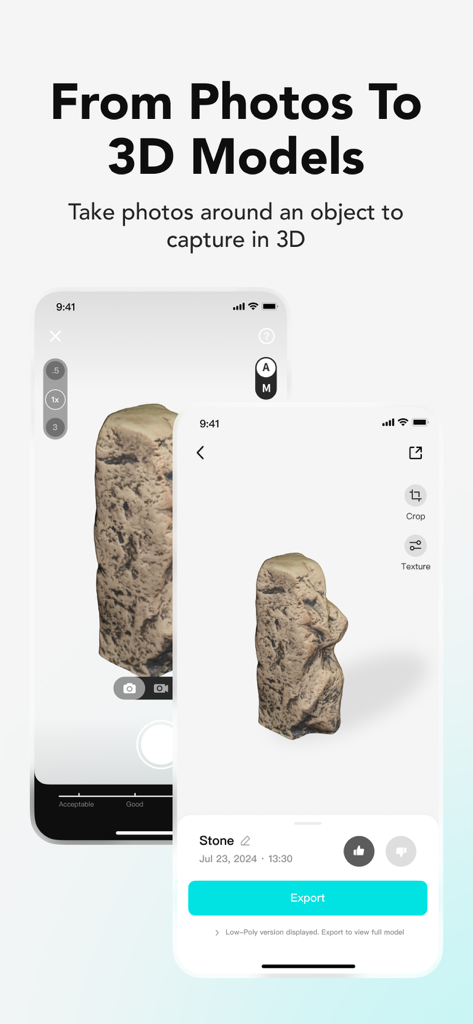
KIRI Engine mobile interface demonstrating the process of capturing photos and converting them into 3D models

KIRI Engine mobile interface demonstrating the process of capturing photos and converting them into 3D models

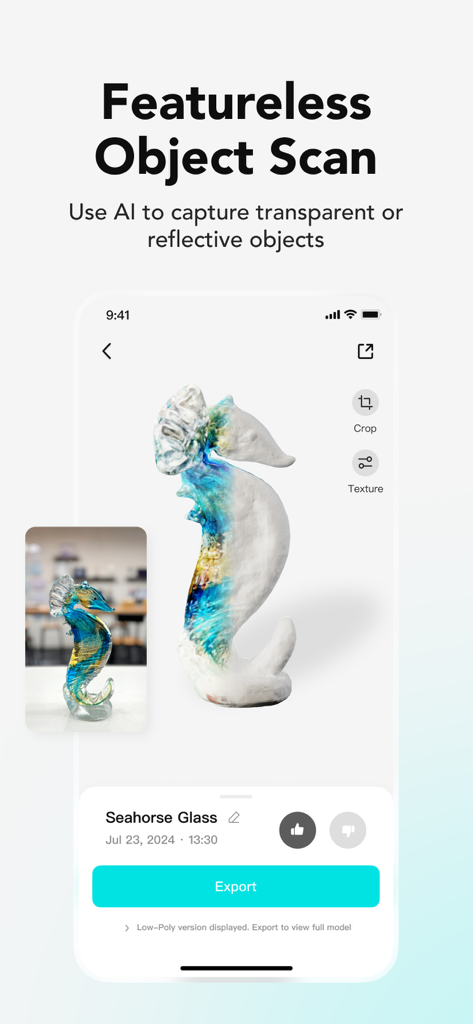
KIRI Engine app interface showing a 3D scan of a transparent glass seahorse using AI for featureless objects

KIRI Engine app interface showing a 3D scan of a transparent glass seahorse using AI for featureless objects

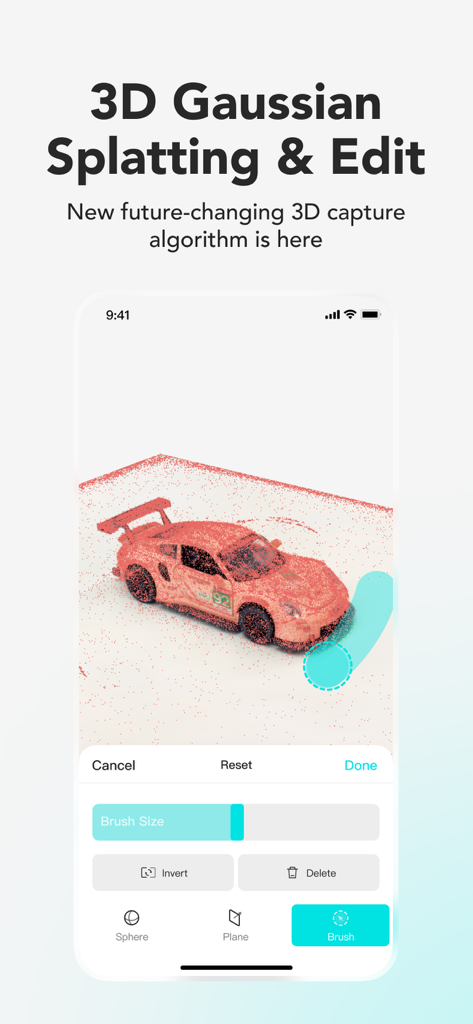
Editing a 3D model of a red car using 3D Gaussian Splatting in the KIRI Engine app

Editing a 3D model of a red car using 3D Gaussian Splatting in the KIRI Engine app

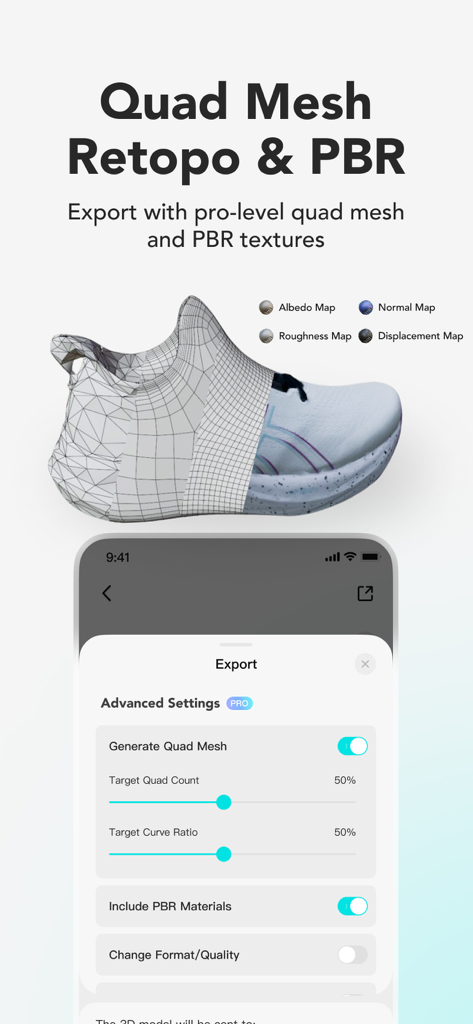
Interface of KIRI Engine showing professional quad mesh retopology and PBR texture export settings for a 3D shoe model.

Interface of KIRI Engine showing professional quad mesh retopology and PBR texture export settings for a 3D shoe model.

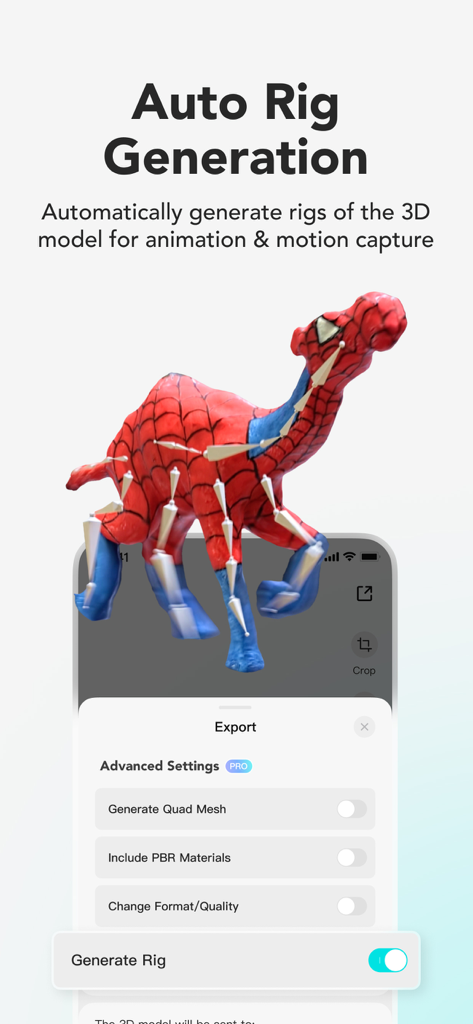
Auto rig generation in KIRI Engine for 3D model animation and motion capture

Auto rig generation in KIRI Engine for 3D model animation and motion capture

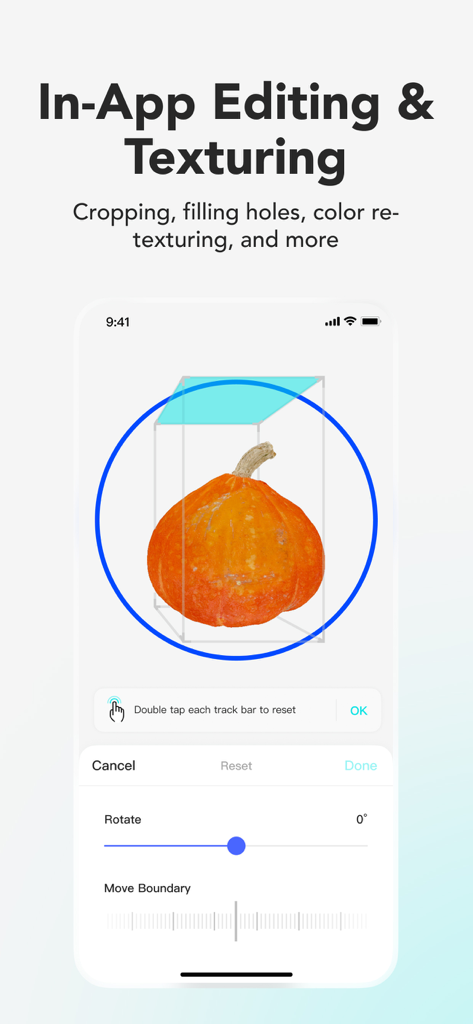
In-app 3D editing and texturing of a scanned pumpkin in KIRI Engine

In-app 3D editing and texturing of a scanned pumpkin in KIRI Engine

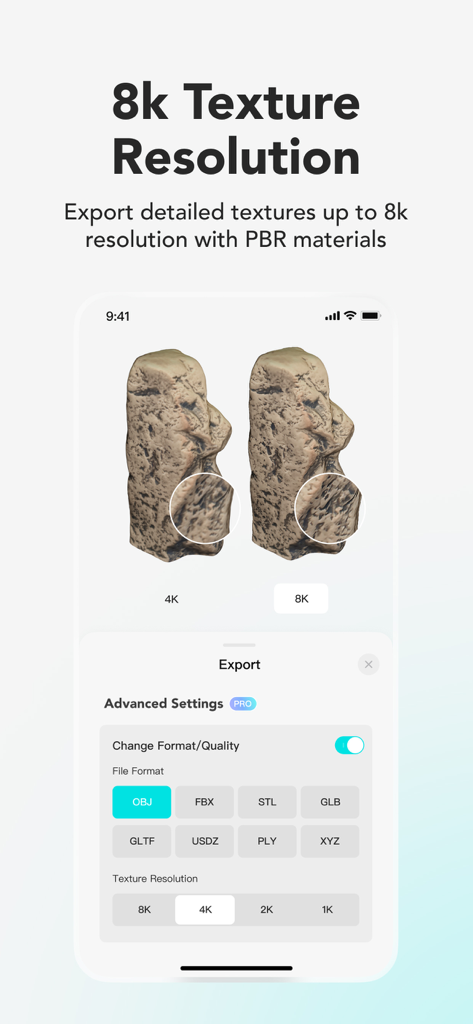
KIRI Engine app screenshot showing a side-by-side 4K vs 8K texture resolution comparison on a 3D model and advanced export settings for various file formats.

KIRI Engine app screenshot showing a side-by-side 4K vs 8K texture resolution comparison on a 3D model and advanced export settings for various file formats.

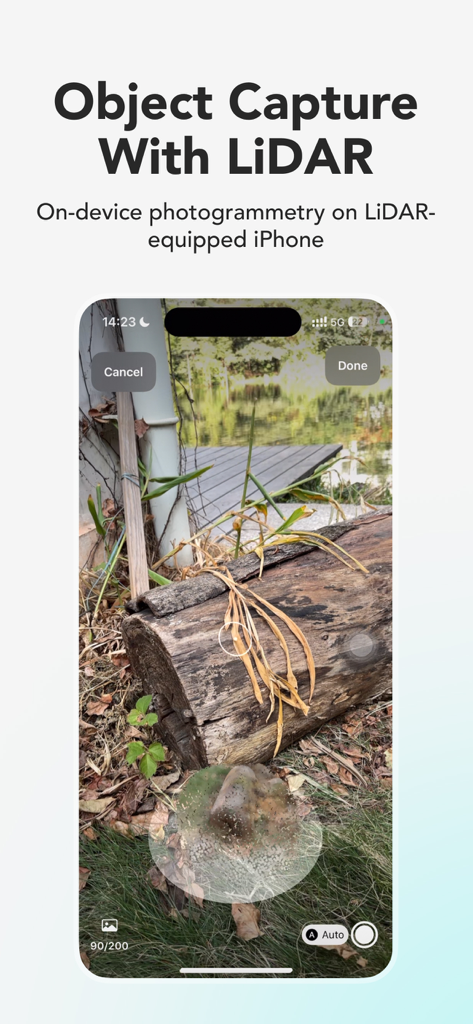
KIRI Engine app interface showing on-device 3D object capture of a wooden log using LiDAR on an iPhone

KIRI Engine app interface showing on-device 3D object capture of a wooden log using LiDAR on an iPhone

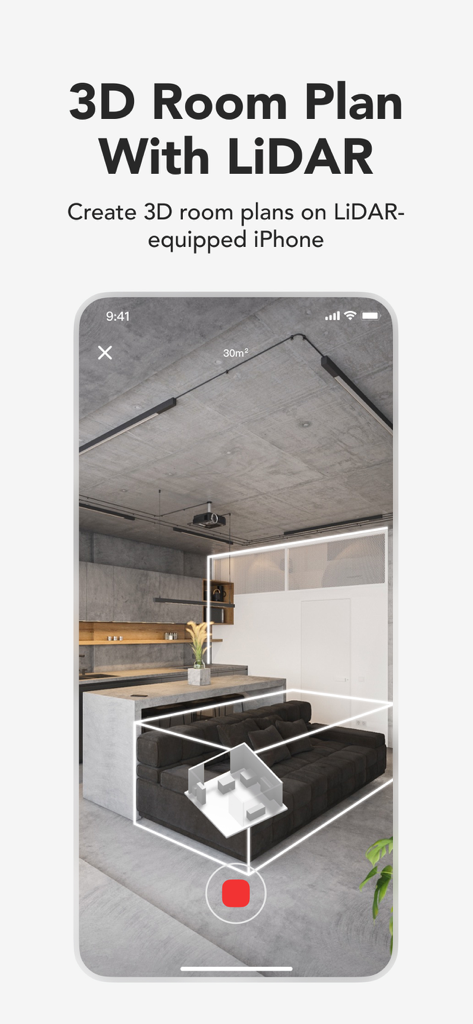
A smartphone interface using KIRI Engine LiDAR technology to scan and create a 3D floor plan of a modern living room.

A smartphone interface using KIRI Engine LiDAR technology to scan and create a 3D floor plan of a modern living room.

Turn Reality into High-Fidelity 3D Assets

The tools that make this app stand out, trusted by 235K+ users.

📸

Scan the Unscannable

Go beyond basic photogrammetry. Use Neural Surface Reconstruction (NSR) to capture shiny, reflective, or featureless objects that other scanners simply can't handle.

🛠️

Production-Ready Exports

Streamline your workflow with auto quad-mesh retopology and AI-generated PBR materials. Export directly to Blender, Unreal Engine, or Unity in OBJ, STL, and FBX.

Next-Gen Spatial Capture

Harness 3D Gaussian Splatting to turn simple videos into immersive 3D scenes. Capture complex environments with realistic reflections and cinematic detail instantly.

Loved by users worldwide

Trusted by 235K+ people who love this app.

"

"I used to spend hours trying to manually model replacement parts for my 3D printer, but KIRI Engine changed everything. I scanned a custom vintage handle, exported the STL, and had a perfect replacement printing in under an hour. The level of detail you get without needing an expensive dedicated scanner is absolutely insane!"

Mark R., Maker & 3D Printing Hobbyist
"

"KIRI Engine has become an essential part of my environment design workflow. The Featureless Object Scan is a lifesaver for capturing those tricky reflective surfaces that usually fail in photogrammetry. Being able to export clean quad-meshes directly into Blender has cut my asset creation time in half. It is a professional-grade tool right in my pocket."

Sarah J., Lead Environment Artist

About the app

Everything you need to know about KIRI Engine:3D Scanner & LiDAR.

Description

3D scanning has never been simpler with KIRI Engine: create high-quality 3D models on your phone within minutes. Dive into 3D scanning and modeling tailored for artists, designers, engineers, and 3D printing enthusiasts. Unleash the Power of 3D Scanning: • Photogrammetry: 3D scan with Photo Scan to transform your photos into high-quality 3D models. • NSR (Neural Surface Reconstruction): 3D Scan featureless/shiny objects with a video processed by Neural Radiance Fields (NeRF) integrated Featureless Object Scan. • 3D Gaussian Splatting: Obtain full 3D visualizations with a video, scan and capture all elements in your scene, including reflections. Create Your Own 3D Model through a Delightful Experience: • Capturing: Snapping photos replaces your 3D modeling process, obtain a detailed 3D mesh in just minutes from scanning to generating. • Functional Free Version: Dive into the world of photogrammetry without paying a cent for subscriptions, a LiDAR sensor, or an expensive 3D Scanner. Upload unlimited 3D scans and export at least 3 times per week. Edit, Refine, and Personalize Your Creations: • Edit: Refine 3D models with editing tools; adjust your files in Photo Scan, Featureless Object Scan, and 3D gaussian splats. • Precision: Choose specific photos for processing to ensure detailed, high-quality 3D models. • Cleanup: Auto Object Masking for noise-free, clean models during capture by eliminating background elements. This feature also allows the object to be moved during the capture. • Preview: Employ the 3D viewer and augmented reality panels to directly visualize and adjust your completed 3D model. Share, Export, and Make Use of Your 3D Models: • For Free: free registration and unlimited scanning, with at least 3 exports weekly. • Share: On various platforms such as Sketchfab, Thingiverse, GeoScan, and more. • Formats: Export in OBJ, STL, FBX, GLTF, GLB, USDZ, PLY, XYZ, compatible with Blender 3D, Unreal Engine, Autodesk Maya, etc. • Wide usage: For game development, VFX, VR/AR 3D content creation, 3D printing, 3D visualization, and many more. • Precision Without LiDAR: KIRI’s advanced algorithms provide scanning quality that is on par with LiDAR sensors. KIRI Engine Pro – For Those Who Demand More: • Upload: Pro users can leverage camera rolls, ensuring a flexible 3D scanning experience. • Quad-Mesh Retopology: Refine scanned 3D models with automatic quad-mesh adjustment. • AI PBR Material Generation: Attain lifelike textures with AI-generated PBR materials. • Advanced Camera System: Perfect each shot with fine-tuned camera settings for impeccable 3D scans. • Featureless Object Scan: Utilizes Neural Surface Reconstruction (NSR) for scanning shiny/reflective surfaces, a first in practical 3D scanning with KIRI Engine. • 3D Gaussian Splatting: Experience the future of 3D scanning and capture accurate 3D scenes with a short video; edit using tools like sphere/plane cutters and brushes. Export in native format or OBJ. • WEB Version Access: KIRI Engine WEB offers professional-grade model creation from DSLR photo sets or drone scans, enhancing accuracy in mappings and drone-based 3D surveys. Engage with Our Caring Community: Join our Discord community for sharing, feature voting, giveaways, and engaging with fellow enthusiasts. Dive into 3D Scanning with KIRI Engine Today! Download the KIRI Engine 3D Scanner app and embark on your 3D scanning journey with your device. Available in these languages:  English: KIRI Engine: 3D Scanner App Chinese (中文): 3D 扫描仪App Japanese (日本語): 3Dスキャナーアプリ French (Français): Application Scanner 3D Russian (Русский): Приложение 3D-сканера Privacy Policy: https://www.kiriengine.app/privacy-policy Terms Of Service: https://www.kiriengine.app/user-agreement

Latest Version

4.0.4

Size

135.7 MB

First Released

Dec 27, 2021

Your Professional 3D Pipeline Starts Here

Join the next generation of creators using AI-powered scanning for Blender, Unreal Engine, and 3D printing. No expensive LiDAR required—just your phone and your vision. Download KIRI Engine for free and start capturing today.

Download on App Store
FAQ

Frequently Asked Questions

Everything you need to know about KIRI Engine:3D Scanner & LiDAR

What is KIRI Engine and what does it do?

KIRI Engine is a 3D scanner app that creates high-quality 3D models from photos or videos using photogrammetry, Neural Surface Reconstruction (NSR), and 3D Gaussian Splatting technologies. It supports editing, refinement, and various export formats.

How does KIRI Engine create 3D models?

KIRI Engine utilizes photogrammetry to convert photos into 3D models. It also offers Neural Surface Reconstruction (NSR) for featureless objects from video and 3D Gaussian Splatting for full 3D visualizations, including reflections, from video.

Can KIRI Engine scan shiny or featureless objects?

Yes, KIRI Engine's Neural Surface Reconstruction (NSR) feature processes video scans to effectively capture featureless or shiny objects. This technology is integrated into the Featureless Object Scan capability.

Is KIRI Engine free to use?

Yes, KIRI Engine provides a functional free version. This includes unlimited 3D scans and at least three exports per week without requiring subscriptions, LiDAR sensors, or expensive 3D scanners.

What 3D model export formats does KIRI Engine support?

KIRI Engine supports exporting 3D models in OBJ, STL, FBX, GLTF, GLB, USDZ, PLY, and XYZ formats. These formats ensure compatibility with software like Blender 3D, Unreal Engine, and Autodesk Maya.

Does KIRI Engine require a LiDAR sensor?

No, KIRI Engine does not require a LiDAR sensor for its primary functions; its algorithms provide comparable scanning quality. However, the app supports on-device photogrammetry and 3D room plans on LiDAR-equipped iPhones.

What features are included in KIRI Engine Pro?

KIRI Engine Pro offers features like camera roll uploads, quad-mesh retopology, AI PBR material generation, an advanced camera system, enhanced Featureless Object Scan, 3D Gaussian Splatting editing, and WEB version access.

Can KIRI Engine edit 3D models directly in the app?

Yes, KIRI Engine provides in-app editing tools to refine 3D models, allowing adjustments, precise photo selection, Auto Object Masking for cleanup, and model preview using a 3D viewer and augmented reality panels.

What is Auto Object Masking in KIRI Engine?

Auto Object Masking in KIRI Engine ensures noise-free and clean 3D models by automatically eliminating background elements during capture. This feature also allows objects to be moved while scanning.

What texture resolution options does KIRI Engine offer?

Yes, KIRI Engine allows exporting textures up to 8K resolution. Users can select from 1K, 2K, 4K, and 8K options for detailed texture output, especially with PBR materials.