
LightBlue®



The industry-standard app to scan, debug, and simulate Bluetooth Low Energy peripherals. Effortlessly test your firmware, explore device services, and bridge the gap between hardware and software.
Publisher
Category
UtilitiesDownloads
1M+User Rating
Total Ratings
2K+Locales
1Discover the interface used by 1M+ users.
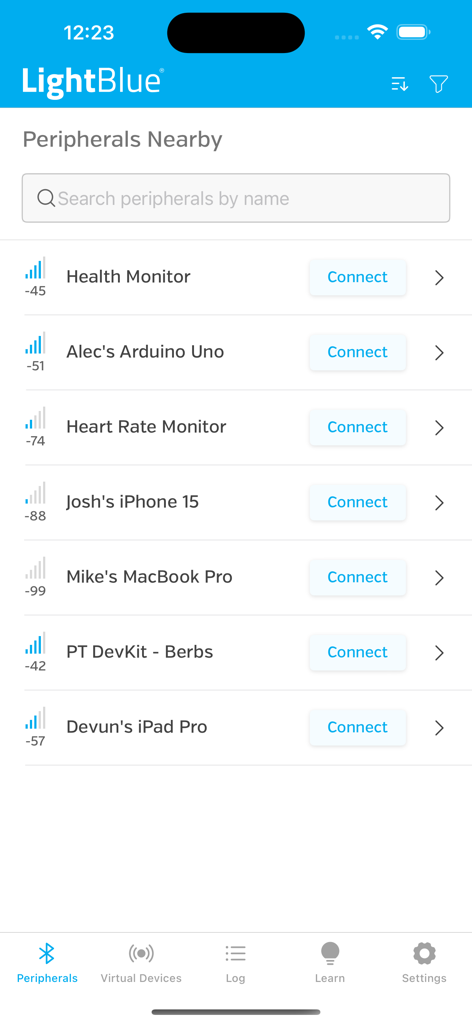
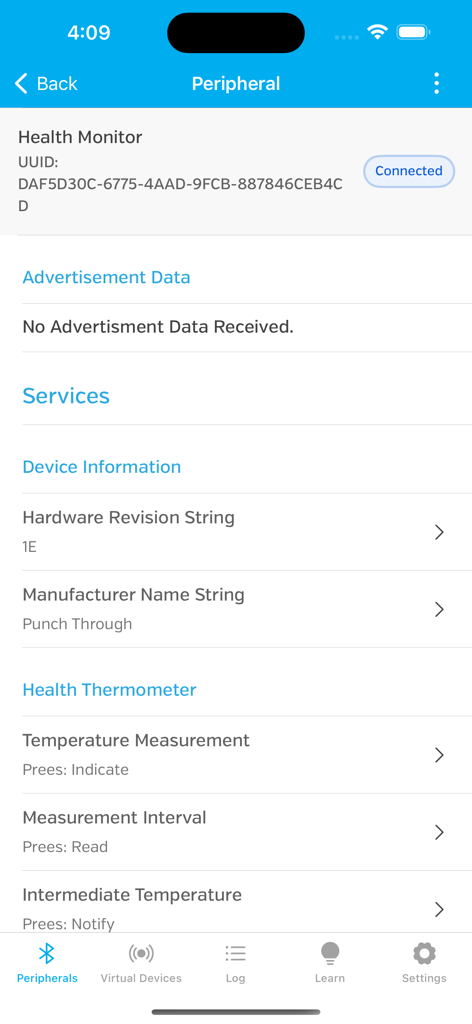
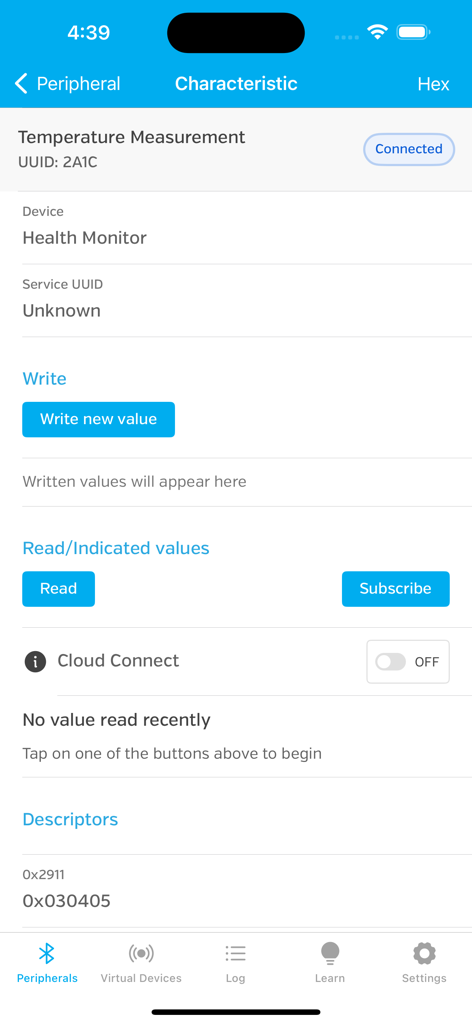
The tools that make this app stand out, trusted by 1M+ users.
Scan, connect, and explore. Browse every service and characteristic with full support for reading, writing, and subscribing to notifications with real-time RSSI tracking.
Accelerate development by advertising as a BLE peripheral. Clone existing hardware profiles or create custom virtual devices to test your mobile apps without physical prototypes.
Monitor every interaction with a detailed event log. Export data in Hex, Oct, or Binary, and bridge your hardware to the cloud via AWS IoT or Adafruit IO integration.
Trusted by 1M+ people who love this app.
"LightBlue is an absolute essential for my daily workflow. Whether I'm debugging firmware on a new wearable or simulating a peripheral to test my app's logic, this tool saves me hours of headache. The virtual device feature is a total game-changer for mobile developers."
"Finally, a way to actually see what my DIY sensors are broadcasting! I used it to troubleshoot my custom home automation setup and it worked perfectly. Being able to read and write characteristics in Hex and ASCII makes testing my Arduino projects so much easier."
Everything you need to know about LightBlue®.
Description
Latest Version
5.3.5
Size
21.3 MB
First Released
Sep 8, 2012
Join over 1 million engineers and makers who trust LightBlue® as their essential tool for debugging, peripheral simulation, and hardware prototyping. Download the industry-standard BLE utility today.
Everything you need to know about LightBlue®
LightBlue® is an application that connects to devices using Bluetooth Low Energy (BLE). It enables users to scan for, connect to, and interact with BLE peripherals in both central and peripheral modes.
LightBlue® operates in central mode to scan for and connect to BLE devices nearby. Once connected, users can view detailed device profiles, read, write to characteristics, and subscribe to notifications.
Yes, LightBlue® functions as a BLE peripheral. Users can navigate to the 'Virtual Devices' tab to create and advertise a virtual device, customizing its services and characteristics.
LightBlue® supports testing various BLE devices, including Heart Rate Monitors, temperature sensors, Microchip AVR-BLE and PIC-BLE development boards, TI CC2540 Keyfobs, Nordic uBlue, and Panasonic PAN1720.
LightBlue® displays the signal strength (RSSI) of connected peripherals, helping users determine their proximity to the BLE device.
Yes, LightBlue® includes a log tab that tracks all significant BLE events, such as device discovery, connection, reading, and writing. Users can also share the log content.
Yes, LightBlue® can send data from notifications and indications to AWS IoT or Adafruit IO. This functionality is available through the app's Cloud Connect feature.
LightBlue® allows writing to characteristics in Hex, Oct, Bin, Decimal, or ASCII formats. Users perform this action within the characteristic detail view.
Yes, LightBlue® supports cloning peripheral profiles. Users connect to a device in central mode, then tap the 'Clone' button to save its profile as a virtual peripheral.
LightBlue® provides basic device information for discovered peripherals, including the UUID and RSSI. It also allows browsing available services and characteristics.
Apps with similar features and user experience
Proxyman LLC

Minimalist Network Co., Ltd.

Hangzhou OrangeJuice Technology Co., Ltd.

Stephen Bove

Vuong Anh

Ahammam Lahcen

Stream Lab Inc.

And a Dinosaur

Surge Networks Inc.