Onshape 3D CAD

Onshape 3D CAD

Download on App StoreDownload on Google Play
Spark by MWM logo
Logo of Onshape 3D CAD

Onshape 3D CAD: Professional Parametric Design Anywhere

The cloud-native platform for modern engineering teams. Create, collaborate, and edit mechanical assemblies in real-time with professional tools and Apple Pencil precision, all without the hassle of file management.

Publisher

PTC Inc.

Category

Productivity

Downloads

693K+

User Rating

3.7/5

Total Ratings

600

Locales

9

Precision in Motion

Discover the interface used by 693K+ users.
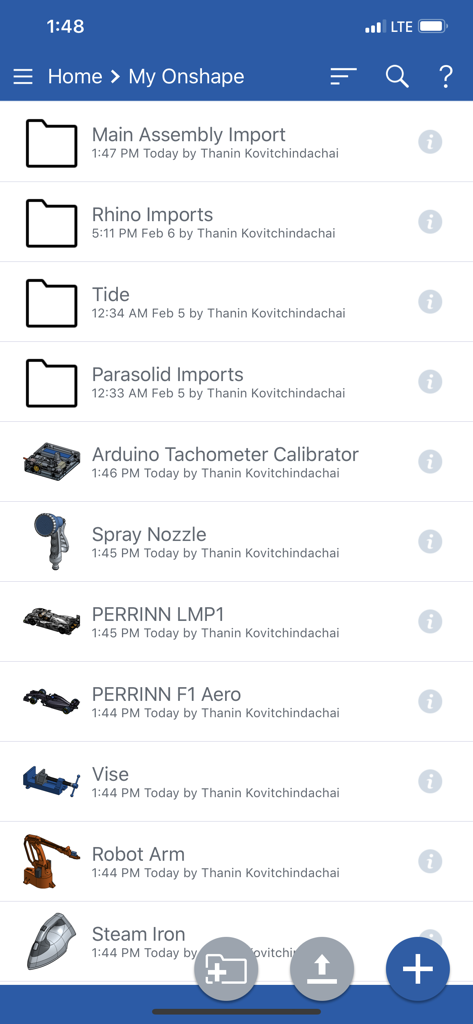
Onshape mobile app home screen showing a list of 3D CAD projects and folders

Onshape mobile app home screen showing a list of 3D CAD projects and folders

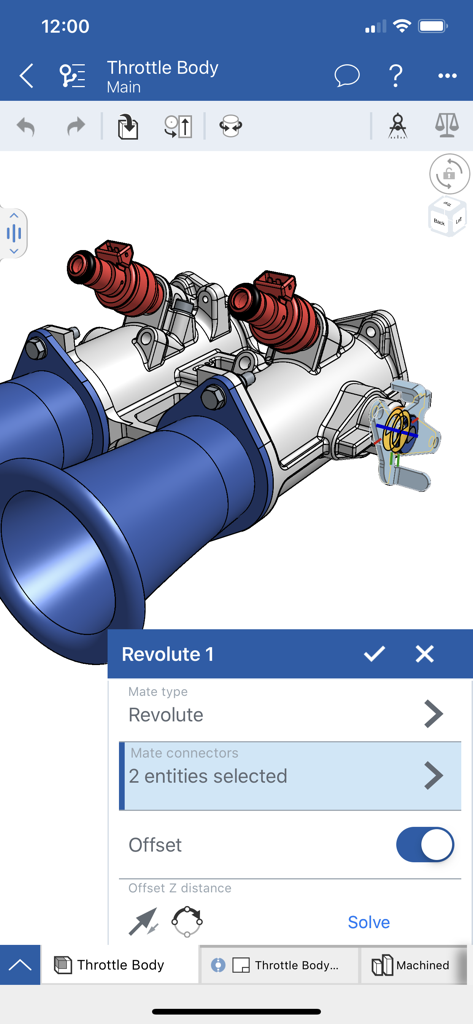
A professional 3D CAD model of a throttle body assembly being edited in the Onshape mobile interface with a revolute mate configuration menu open.

A professional 3D CAD model of a throttle body assembly being edited in the Onshape mobile interface with a revolute mate configuration menu open.

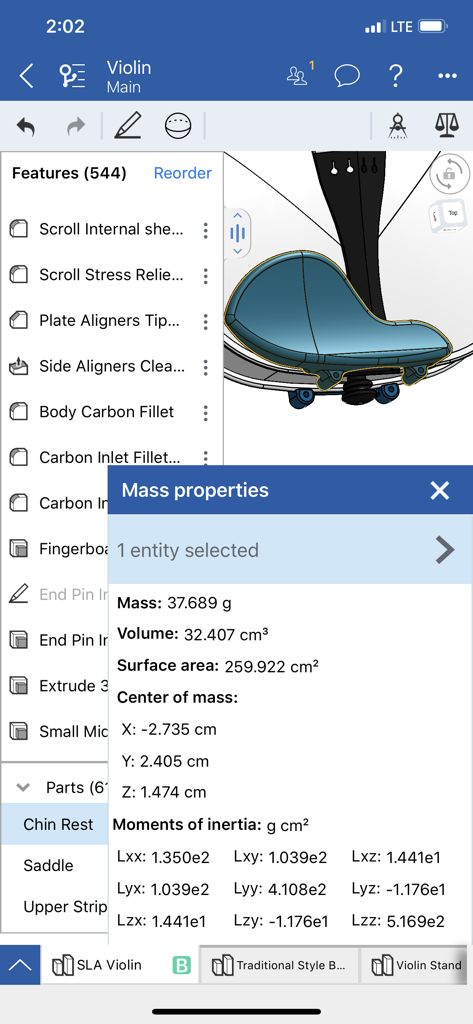
Onshape 3D CAD mobile interface showing mass properties and parametric modeling details of a violin part

Onshape 3D CAD mobile interface showing mass properties and parametric modeling details of a violin part

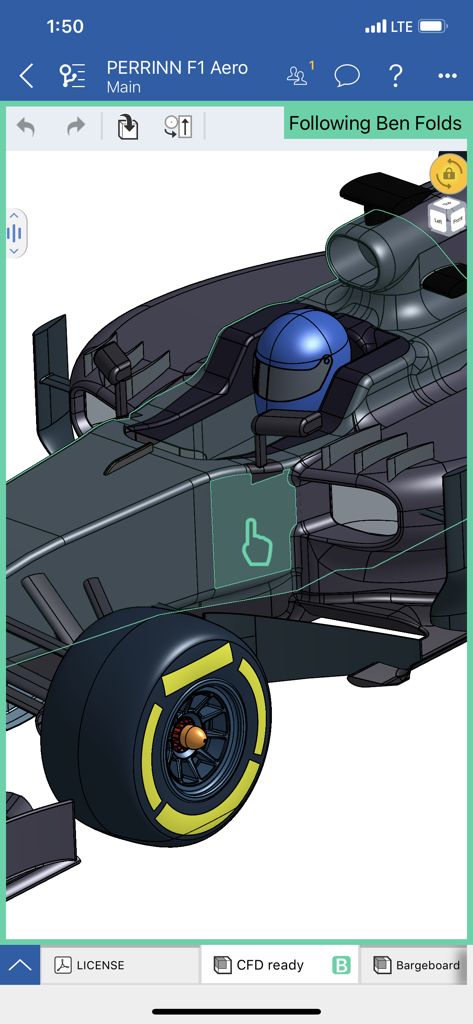
Onshape 3D CAD mobile app interface showing real-time collaboration on a Formula 1 car model

Onshape 3D CAD mobile app interface showing real-time collaboration on a Formula 1 car model

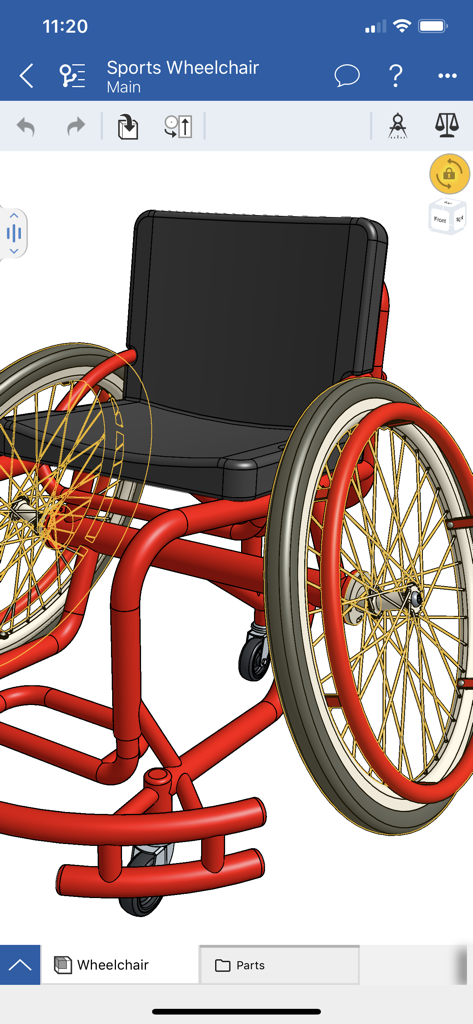
Detailed 3D parametric model of a sports wheelchair in the Onshape CAD mobile interface

Detailed 3D parametric model of a sports wheelchair in the Onshape CAD mobile interface

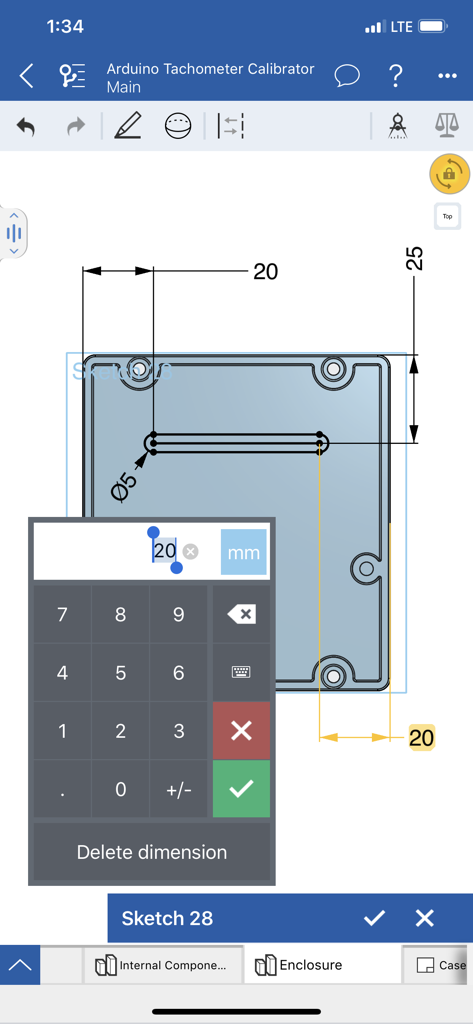
Editing dimensions on a 2D sketch in the Onshape 3D CAD mobile app

Editing dimensions on a 2D sketch in the Onshape 3D CAD mobile app

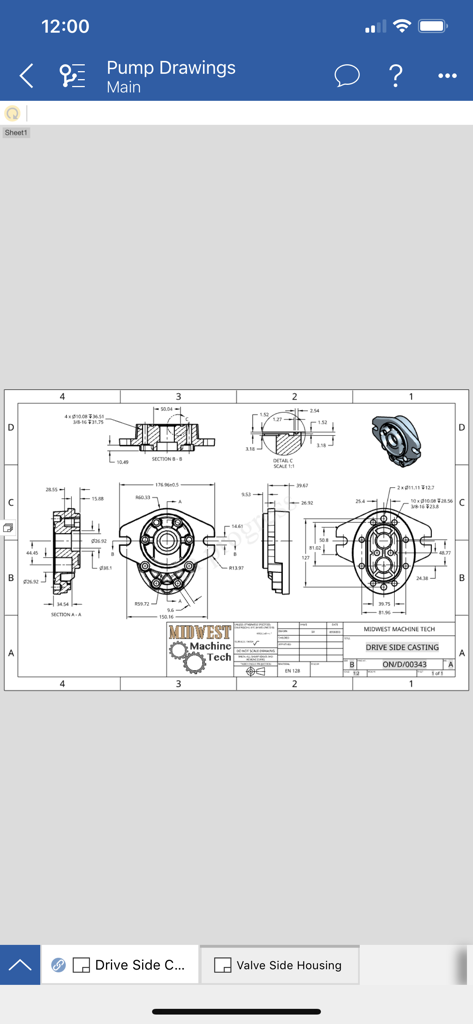
Detailed 2D mechanical engineering drawing of a drive side casting on the Onshape mobile app

Detailed 2D mechanical engineering drawing of a drive side casting on the Onshape mobile app

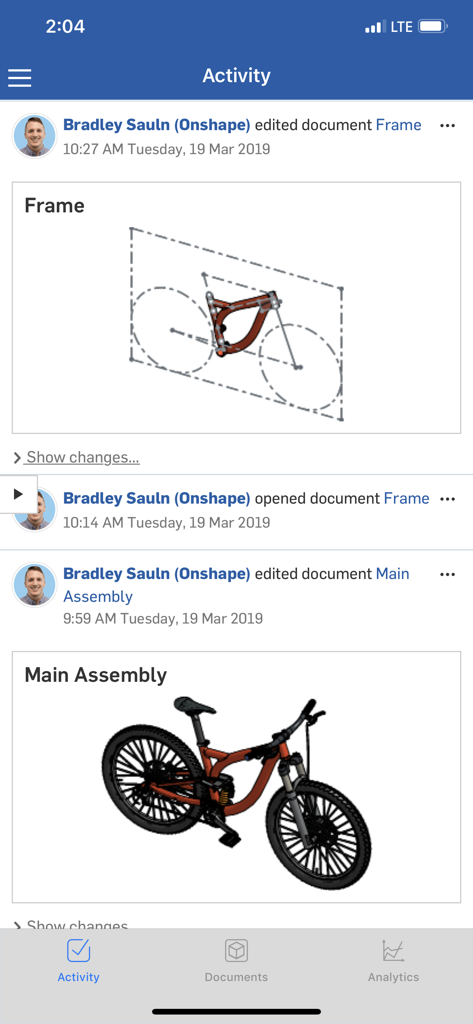
Activity feed in Onshape 3D CAD showing document edits and a 3D bike assembly model

Activity feed in Onshape 3D CAD showing document edits and a 3D bike assembly model

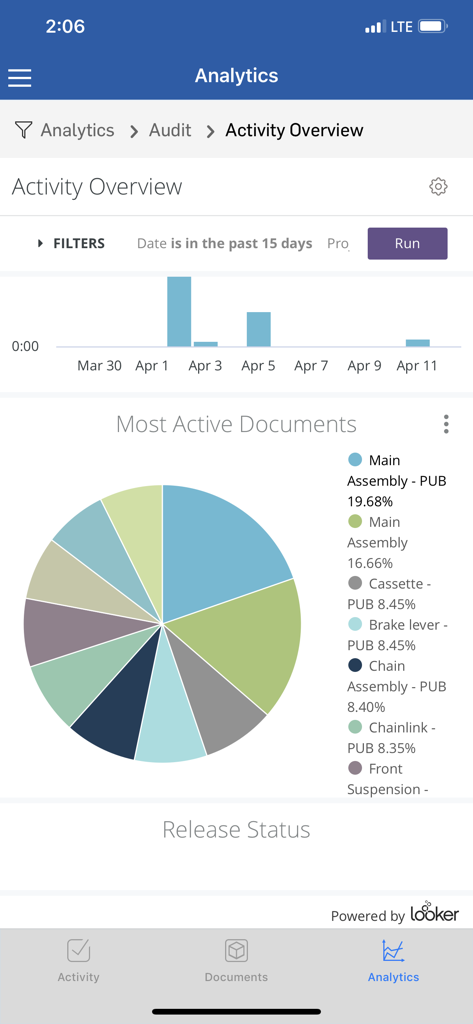
Analytics dashboard in Onshape 3D CAD showing activity overview and most active documents charts

Analytics dashboard in Onshape 3D CAD showing activity overview and most active documents charts

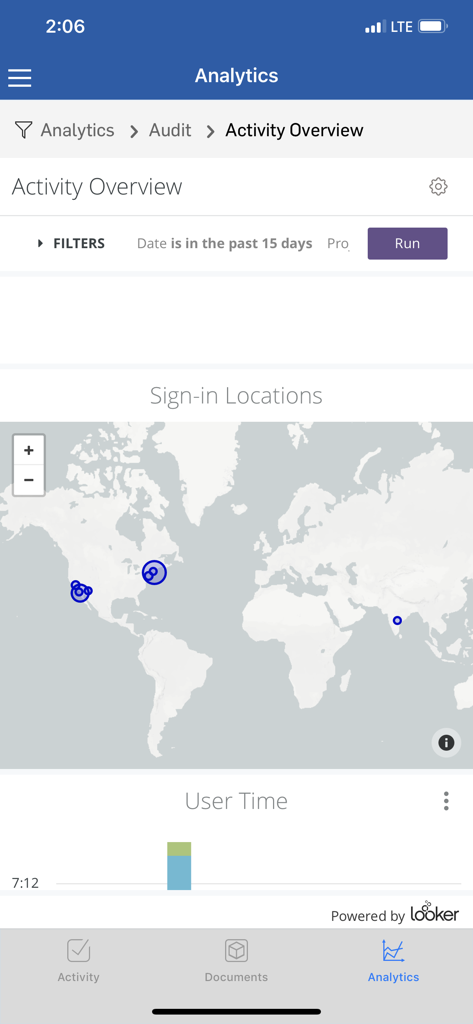
Onshape 3D CAD mobile app interface showing analytics dashboard with world map sign-in locations and user activity data

Onshape 3D CAD mobile app interface showing analytics dashboard with world map sign-in locations and user activity data

Professional CAD, Reimagined for Mobility

The tools that make this app stand out, trusted by 693K+ users.

⚙️

True Parametric Modeling

Don't just view—create. Edit complex parts and assemblies with a full suite of professional tools, maintaining full precision without a desktop workstation.

☁️

Single Source of Truth

Eliminate the hassle of file versions. Your work is automatically saved and synced across all devices, ensuring your team always works on the latest design.

✏️

Optimized for Apple Pencil

Experience professional sketching and navigation. Leverage high-precision input and intuitive touch gestures designed for the modern engineer's workflow.

Loved by users worldwide

Trusted by 693K+ people who love this app.

"

"Onshape has revolutionized our hardware startup's workflow. Being able to perform full parametric modeling on my iPad Pro during site visits is incredible. The real-time collaboration features mean our team is always working on the same version, eliminating the headache of traditional file management."

Sarah Chen, Industrial Designer
"

"As a student working on a robotics project, Onshape is a lifesaver. The ability to jump from my laptop to my phone to check assemblies in the workshop is so seamless. It's powerful, intuitive with the Apple Pencil, and the best part is the cloud-native approach that keeps everything synced automatically."

Liam O'Connell, Engineering Student

About the app

Everything you need to know about Onshape 3D CAD.

Description

Onshape is a full mechanical CAD platform designed for professional users and extended teams. Create, edit, collaborate, and comment in real time with others from any computer or mobile device with an internet connection (free sign-up required). With Onshape’s secure cloud workspace teams can work together from anywhere on any device without the hassles of file management, IT overhead, and license key distribution, helping engineers focus more on doing their best work. Parametric CAD: • Design parts together in Part Studios with a full suite of parametric modeling tools • Create mechanical Assemblies to capture complex motion Ease of Access: • Create, edit, and view from any computer or mobile device (internet connection required) • Begin a project from one device and seamlessly continue from another Collaboration: • Instantly share your CAD data with your teams and partners. Monitor, change, and revoke permissions at any time • Work together with other users and view changes in real-time as they are made • Use Follow mode to see exactly what your teammate sees and add suggestions using Onshape’s built-in commenting tools Data Management: • Maintain a single source of truth for your data, no more sending around or checking in and out of files • Never worry about losing your work, all of your changes are saved automatically • Explore multiple design ideas in parallel and create professional release and approval processes for your designs Onshape for iOS also features Apple Pencil support for more intuitive sketching, navigation, and precise selection. Onshape proudly supports students and educators free of charge and is available free for non-commercial projects in an open-source public work space. Since Onshape is updated every few weeks with dozens of new features and user-requested enhancements, keep an eye out for update notifications from the Apple App Store.

Latest Version

1.209.8360

Size

73.3 MB

First Released

Mar 9, 2015

Ready to Engineer Without Limits?

Ditch the workstation and take your professional CAD projects everywhere. Download Onshape to experience real-time collaboration and precision parametric modeling on the go.

Download on App StoreDownload on Google Play
FAQ

Frequently Asked Questions

Everything you need to know about Onshape 3D CAD

What is Onshape 3D CAD?

Onshape 3D CAD is a full mechanical CAD platform for professional users and extended teams. It enables real-time creation, editing, collaboration, and commenting from any device with an internet connection.

Can I collaborate with others in Onshape 3D CAD?

Yes, Onshape 3D CAD allows users to collaborate and comment in real time with others from any computer or mobile device. An internet connection and free sign-up are required.

Does Onshape 3D CAD use cloud storage?

Yes, Onshape 3D CAD features a secure cloud workspace. This enables teams to work together from anywhere on any device, eliminating file management and IT overhead.

What parametric modeling tools does Onshape 3D CAD offer?

Onshape 3D CAD provides a full suite of parametric modeling tools to design parts in Part Studios. Users can also create mechanical Assemblies to capture complex motion.

Can I access Onshape 3D CAD projects from different devices?

Yes, Onshape 3D CAD allows users to create, edit, and view projects from any computer or mobile device. Users can seamlessly continue a project from one device to another.

How does real-time collaboration work in Onshape 3D CAD?

Onshape 3D CAD enables real-time collaboration through instant data sharing, permission management, and live viewing of changes. A 'Follow mode' feature is included for observing teammate activity.

Does Onshape 3D CAD automatically save my work?

Yes, Onshape 3D CAD automatically saves all changes, ensuring users never lose their work. It maintains a single source of truth for data and supports parallel design ideas.

Does Onshape 3D CAD support Apple Pencil on iOS?

Yes, Onshape for iOS supports Apple Pencil. This enhances intuitive sketching, navigation, and precise selection within the application.

Is Onshape 3D CAD free for students or non-commercial use?

Yes, Onshape 3D CAD is free for students and educators. It is also available free for non-commercial projects in an open-source public workspace.

How often is Onshape 3D CAD updated?

Onshape 3D CAD is updated every few weeks. These updates include dozens of new features and user-requested enhancements. Users receive notifications from the Apple App Store.

Can Onshape 3D CAD import designs from other CAD software?

Yes, Onshape 3D CAD supports imports from other CAD software. Screenshot #1 shows 'Rhino Imports' and 'Parasolid Imports' as project types, indicating compatibility with external formats.

Does Onshape 3D CAD support mechanical assembly constraints?

Yes, Onshape 3D CAD supports mechanical assembly constraints. Screenshot #2 displays a 'Revolute' mate type dialog, indicating its capability to define complex motion in assemblies.

Can Onshape 3D CAD calculate physical properties of designs?

Yes, Onshape 3D CAD can calculate physical properties of designs. Screenshot #3 shows a 'Mass properties' pop-up for a violin model, displaying mass, volume, surface area, and moments of inertia.

Does Onshape 3D CAD have a 'Follow mode' for collaboration?

Yes, Onshape 3D CAD features a 'Follow mode' for collaboration. Screenshot #4 displays a banner 'Following Ben Folds', indicating real-time observation of another user's work session.

Does Onshape 3D CAD include sketching and dimensioning tools?

Yes, Onshape 3D CAD includes sketching and dimensioning tools. Screenshot #6 shows a 2D sketch with an interactive dimension editor, demonstrating precise control over design geometry.

Can Onshape 3D CAD generate 2D engineering drawings?

Yes, Onshape 3D CAD can generate 2D engineering drawings. Screenshot #7 displays a technical drawing sheet of a pump, complete with multiple views and detailed dimensions.

Does Onshape 3D CAD track design activity and changes?

Yes, Onshape 3D CAD tracks design activity and changes. Screenshot #8 shows an 'Activity' feed detailing user actions like editing and opening documents, including visual previews.

Does Onshape 3D CAD provide analytics on document activity?

Yes, Onshape 3D CAD provides analytics on document activity. Screenshot #9 shows an 'Activity Overview' with a pie chart of 'Most Active Documents' and sign-in locations, confirming this feature.