To do list MinimaList & Widget

To do list MinimaList & Widget

Download on App Store
Spark by MWM logo
Logo of To do list MinimaList & Widget
MinimaList: The Aesthetic Way to Achieve More with Less

Declutter your mind with a minimalist task manager and focus timer designed for your Apple ecosystem. Join 11 million users finding digital zen through simple lists and smart reminders.

Publisher

Inner Grow Limited

Category

Productivity

Downloads

11M+

User Rating

4.8/5

Total Ratings

200K+

Locales

10

Simplicity in Motion

Discover the interface used by 11M+ users.
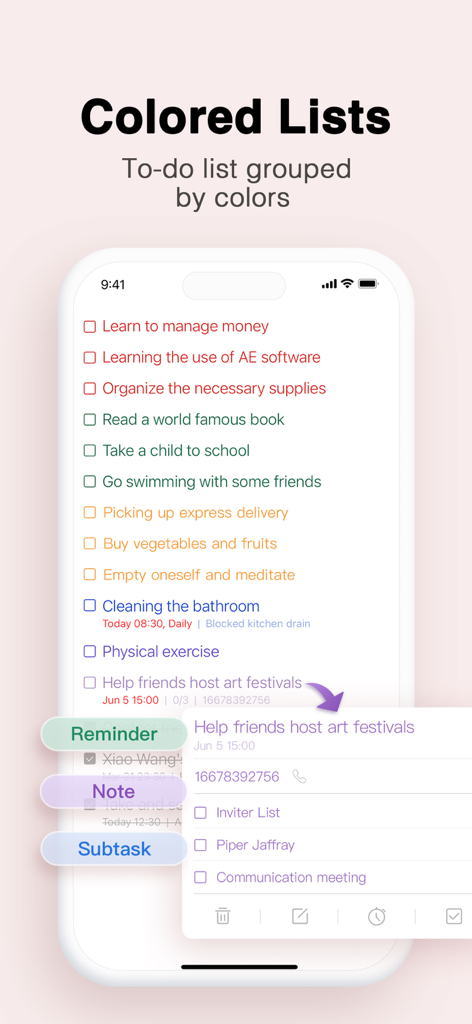
Smartphone screen displaying the MinimaList app with tasks grouped by colors including reminders and subtasks

Smartphone screen displaying the MinimaList app with tasks grouped by colors including reminders and subtasks

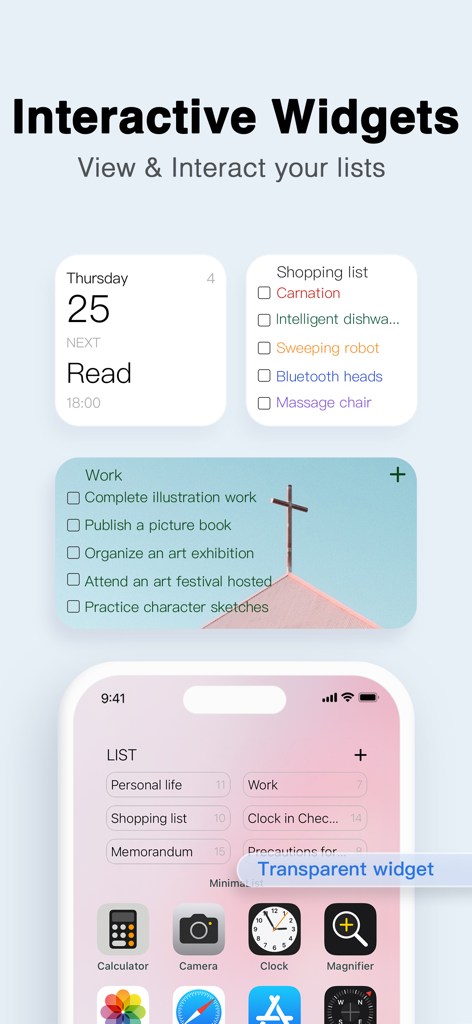
Interactive and transparent home screen widgets for the MinimaList app.

Interactive and transparent home screen widgets for the MinimaList app.

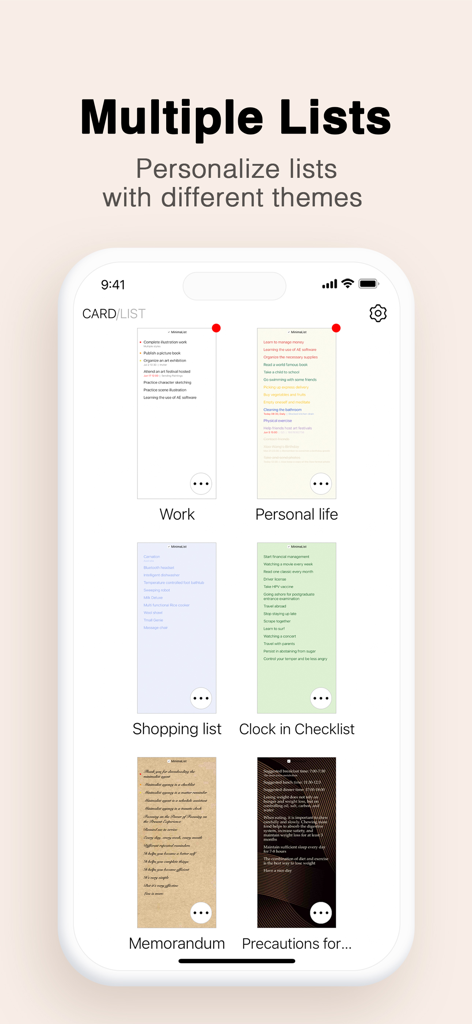
A mobile interface showing multiple to-do lists with various aesthetic themes and colors.

A mobile interface showing multiple to-do lists with various aesthetic themes and colors.

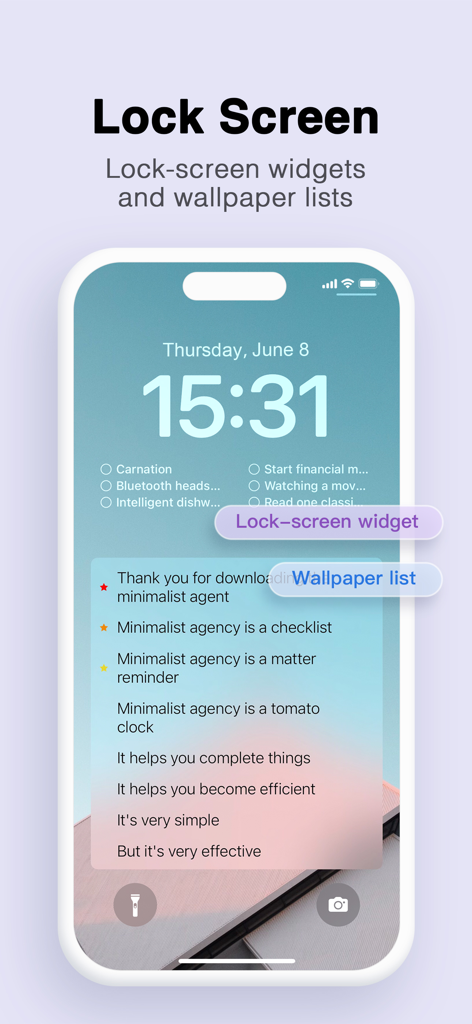
iPhone lock screen featuring minimalist to do list widgets and aesthetic task lists

iPhone lock screen featuring minimalist to do list widgets and aesthetic task lists

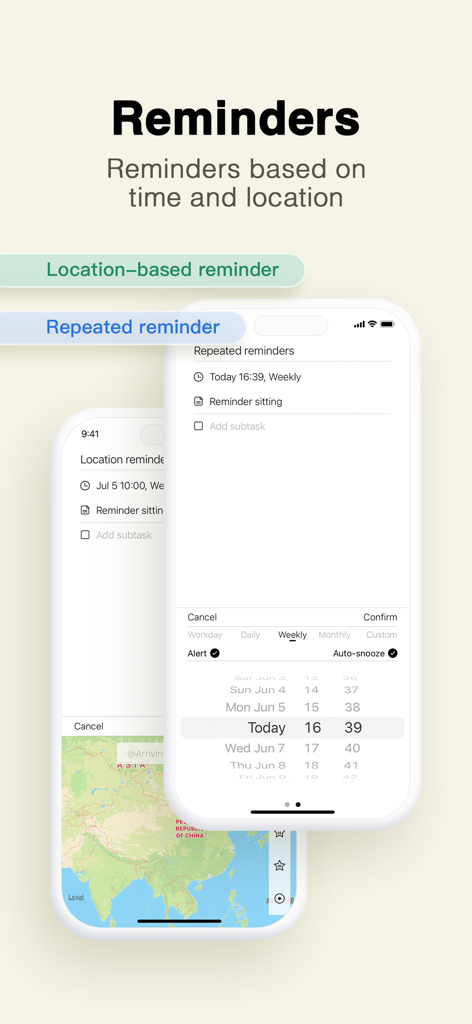
Interface of the MinimaList app showing options for repeated time-based and location-based reminders

Interface of the MinimaList app showing options for repeated time-based and location-based reminders

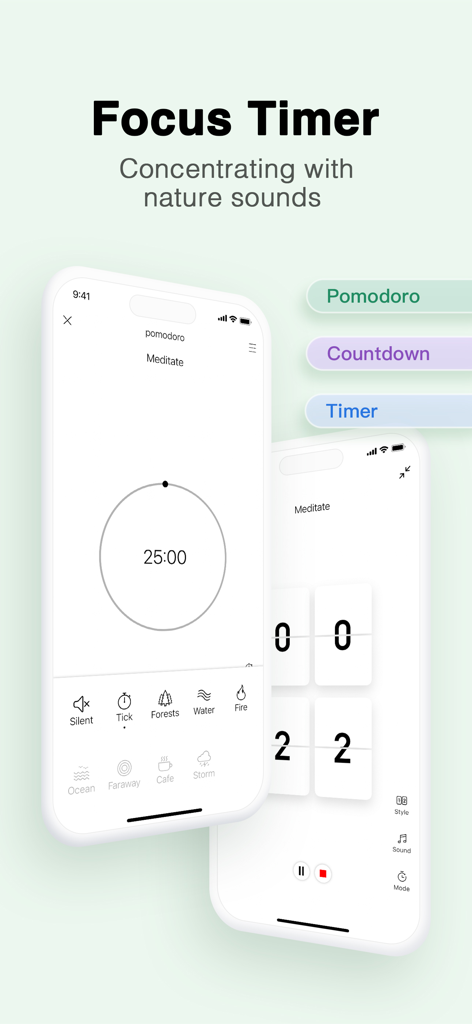
MinimaList app focus timer interface showing pomodoro mode and nature sounds options

MinimaList app focus timer interface showing pomodoro mode and nature sounds options

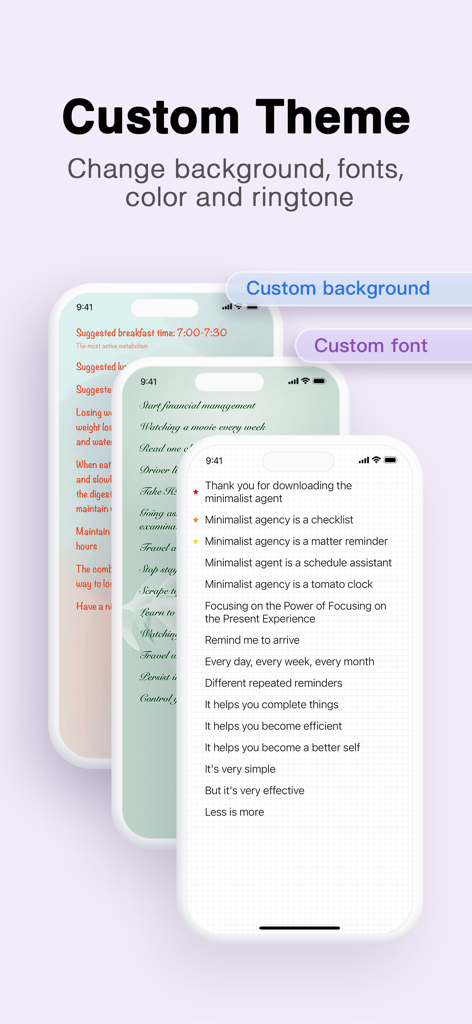
Customizable backgrounds and fonts in the MinimaList app for aesthetic productivity

Customizable backgrounds and fonts in the MinimaList app for aesthetic productivity

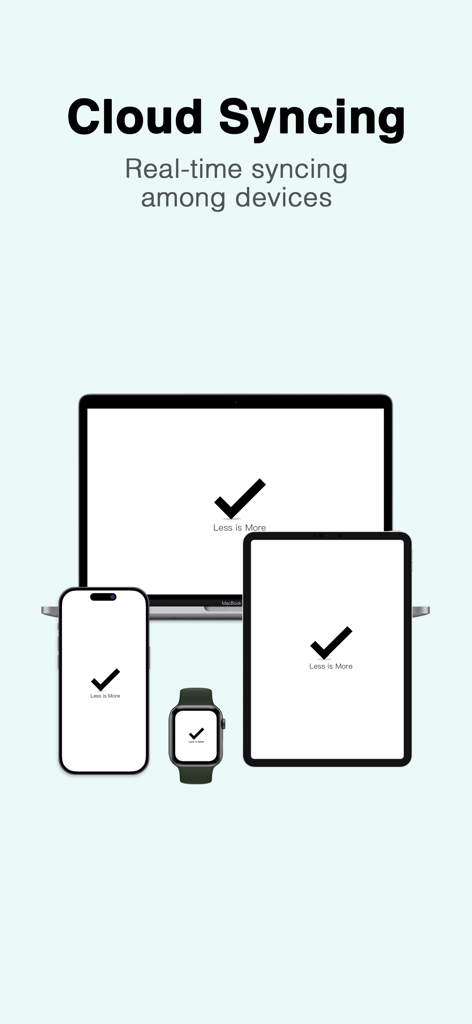
MinimaList app cloud syncing across iPhone iPad Mac and Apple Watch

MinimaList app cloud syncing across iPhone iPad Mac and Apple Watch

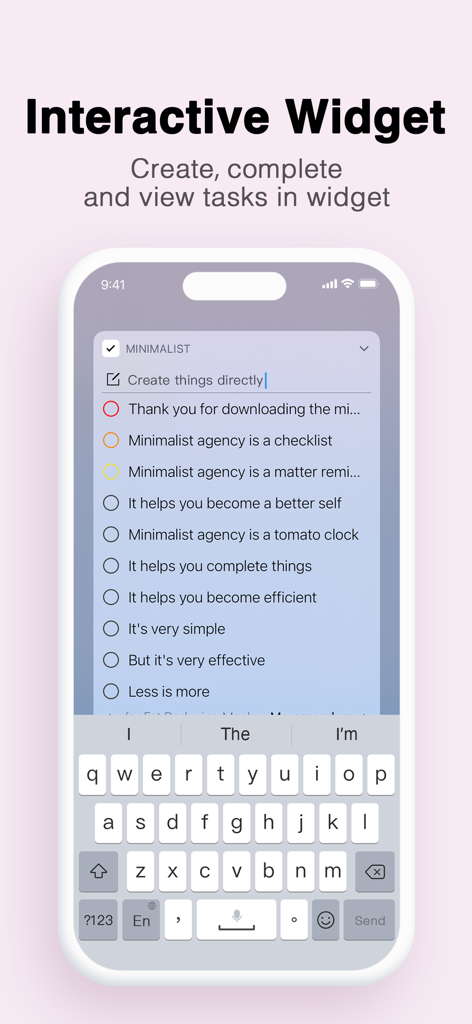
Smartphone screen showing an interactive widget for the MinimaList app allowing users to create and complete tasks directly from the home screen.

Smartphone screen showing an interactive widget for the MinimaList app allowing users to create and complete tasks directly from the home screen.

Designed for Focus, Built for Simplicity

The tools that make this app stand out, trusted by 11M+ users.

⏱️

Focus When It Counts

Master the Pomodoro technique with a built-in timer and ambient sound effects designed to keep you in the flow.

🎨

Your Style, Your Vibe

Customize your experience with elegant themes and aesthetic Home Screen widgets that complement your lifestyle.

Smart, Frictionless Input

Stop clicking and start doing. Type naturally and let our smart input automatically schedule your tasks and reminders.

Loved by users worldwide

Trusted by 11M+ people who love this app.

"

"As a student, I've tried every productivity app out there, but MinimaList is the only one that actually stuck. The Pomodoro timer helps me crush my study sessions, and the widgets look so clean on my home screen. It is the perfect mix of aesthetic and functional!"

Chloe R., University Student
"

"I was overwhelmed by project management tools that felt like extra work. MinimaList is a breath of fresh air. The Mac-to-iPhone sync is flawless, and the 'Less is More' approach keeps my mind clear and my tasks focused. Simple, elegant, and highly effective."

James L., Freelance Graphic Designer

About the app

Everything you need to know about To do list MinimaList & Widget.

Description

​MinimaList, a simple productive app featured on App Store home page. It's a to do list, a reminder, a checklist, a schedule planner and a task manager that helps you to get things done, available for iPhone, iPad, and Mac). ----Main Features---- - Intuitive lists: different lists for different purposes - Colored lists: assign different colors to different tasks - Customizable theme: color/pic background & font style/size/color - Shared lists: simplest way to share the same list with others (Share link must be opened in Safari) - Widgets: Home Screen and Lock Screen widgets - Reminders: repeated time-based and location-based reminders - Memo & Sub-Task: description and sub-tasks - Smart input: automatically detect time in a phrase and set it as a reminder - Auto-snooze: you can set a reminder auto snooze three times (change the time interval in setting - more option) - Focus Timer: Pomodoro, count down and count up timer, with amazing sound effects - Today Widget: create and complete tasks in Today Widget - Cloud Syncing: same lists for all devices (iPhone,iPad, Mac) - TouchID/FaceID: privacy is protected now - Siri ready: remind me to go shopping at 3 pm on MinimaList - Custom setting: your notification sounds, your font, your background - Calendar syncing: syncing with Apple calendar - Continuous Reminder (Notification action, force touch on your notification - where you snooze a reminder) - Supports iPhone iPad and Mac - Url Scheme supports: to create a task: minimalist://x-callback-url/create?list=valueList&content=valueContent&date=yyyy-mm-dd&time=HH:mm&x-success=valueCallback to open a list: minimalist://x-callback-url/open?list=valueList (valueList is the name of the list, valueContent is the task content, valueList and valueContent must be url encoded first,valueCallback is the callback app's url scheme name) MinimaList, a simple list to solve big problems. Less is More. Terms of Use:http://intuitive.studio/minimalist/terms Terms of Use(EULA): https://www.apple.com/legal/internet-services/itunes/dev/stdeula/ Privacy Policy:http://intuitive.studio/minimalist/Privacy MinimaList is free but you can also upgrade to Premium for full access to premium features for $0.99 a month or $5.99 a year (price in usd) through an auto-renewing subscription. Subscriptions for Pro account will be charged to your credit card through your iTunes account. Your subscription will automatically renew unless canceled at least 24-hours before the end of the current period. You will not be able to cancel a subscription during the active period. You can manage your subscriptions in the Account Settings after purchase. Any unused portion of a free trial period, if offered, will be forfeited when the user purchases a subscription to that publication, where applicable.

Latest Version

2.25.4

Size

110.6 MB

First Released

Dec 9, 2015

Ready to Reclaim Your Focus?

Join over 11 million minimalists who choose clarity over clutter. Download MinimaList today and start your journey toward a simpler, more productive day.

Download on App Store
FAQ

Frequently Asked Questions

Everything you need to know about To do list MinimaList & Widget

What is MinimaList app used for?

MinimaList is a productivity application designed as a to-do list, reminder, checklist, schedule planner, and task manager. It assists users in organizing and accomplishing tasks across iPhone, iPad, and Mac devices.

Is MinimaList available on multiple devices?

Yes, MinimaList is available for iPhone, iPad, and Mac. It features cloud syncing to ensure all lists remain updated across every device.

Is MinimaList a free app?

MinimaList is free to download and use. An optional Premium subscription is available for $0.99 per month or $5.99 per year to unlock additional premium features.

How do I cancel my MinimaList Premium subscription?

You can cancel your MinimaList Premium subscription through your iTunes account settings. Cancellation must be made at least 24 hours before the current period ends to prevent automatic renewal.

Does MinimaList offer location-based reminders?

Yes, MinimaList offers both time-based and location-based reminders. It also includes an auto-snooze feature, allowing a reminder to snooze up to three times.

What types of focus timers does MinimaList include?

MinimaList includes a Focus Timer with Pomodoro, countdown, and count-up timer options. It also provides various sound effects to enhance focus during timed sessions.

Can I customize the appearance of my lists in MinimaList?

Yes, MinimaList allows extensive customization of list appearance. Users can personalize themes with custom background colors or pictures, and adjust font styles, sizes, and colors.

Does MinimaList support sharing lists with others?

Yes, MinimaList supports sharing lists, offering a straightforward method for collaboration. Shared links must be opened in Safari to function correctly.

Does MinimaList protect my privacy?

Yes, MinimaList protects user privacy with support for TouchID and FaceID. This feature secures tasks and lists on compatible devices.

Does MinimaList have Home Screen widgets?

Yes, MinimaList offers both Home Screen and Lock Screen widgets. These interactive widgets enable users to view, create, and complete tasks directly from their device screens.