PeakWatch: AI Personal Trainer

PeakWatch: AI Personal Trainer

Download on App Store
Spark by MWM logo
Logo of PeakWatch: AI Personal Trainer

PeakWatch: Your AI-Powered Command Center for Recovery and Performance

Transform your Apple Watch into a professional health lab. Monitor your Body Battery, log meals with AI photo analysis, and optimize your Hybrid or HYROX training with actionable data-driven insights.

Publisher

Future Artifact Labs Limited

Category

Health & Fitness

Downloads

472K+

User Rating

4.8/5

Total Ratings

9K+

Locales

7

The Interface of Optimization

Discover the interface used by 472K+ users.
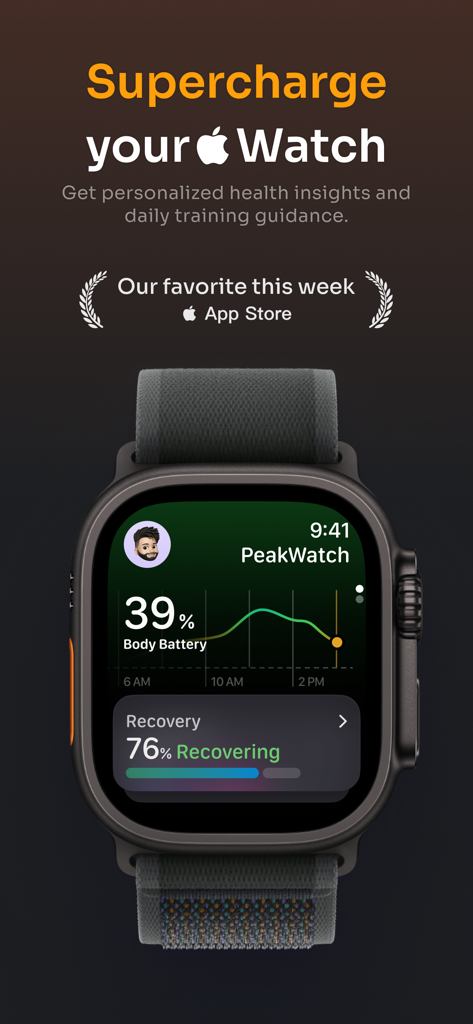
PeakWatch app interface on an Apple Watch displaying body battery and recovery scores

PeakWatch app interface on an Apple Watch displaying body battery and recovery scores

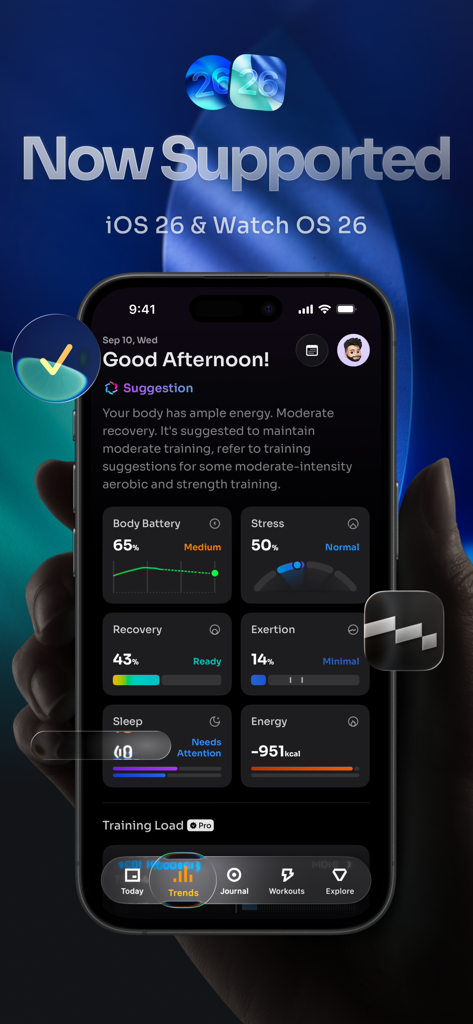
PeakWatch app dashboard on an iPhone showing body battery stress recovery and exertion metrics

PeakWatch app dashboard on an iPhone showing body battery stress recovery and exertion metrics

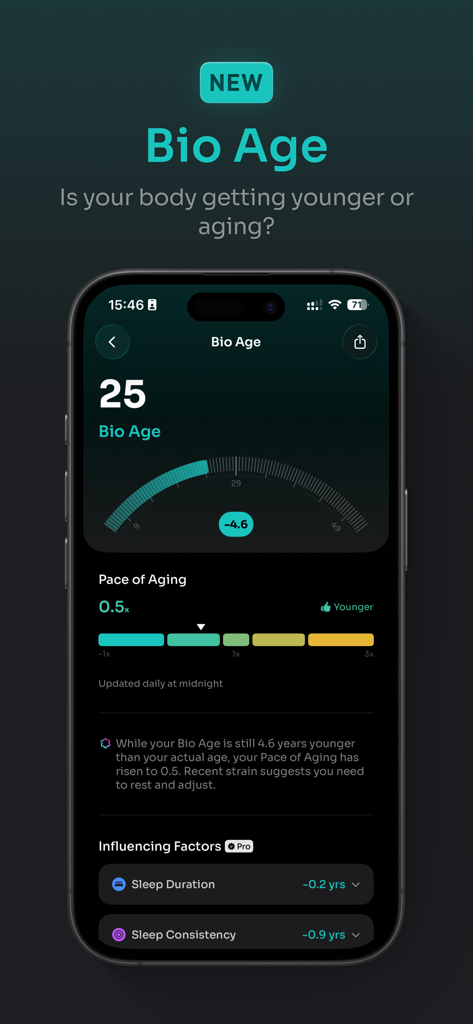
PeakWatch app interface showing Bio Age and Pace of Aging health metrics

PeakWatch app interface showing Bio Age and Pace of Aging health metrics

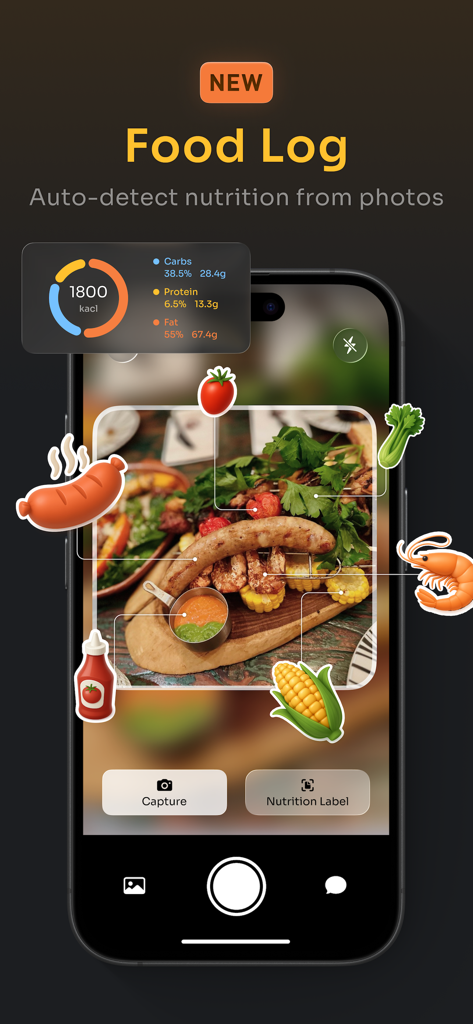
PeakWatch app interface showing AI food log feature auto detecting nutrition and macros from a meal photo

PeakWatch app interface showing AI food log feature auto detecting nutrition and macros from a meal photo

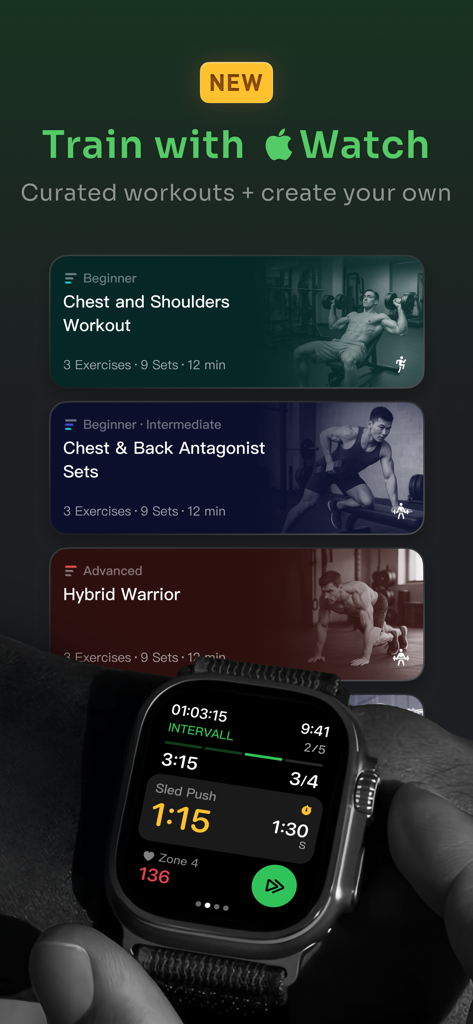
PeakWatch app interface showing curated workout plans and a live training session on Apple Watch

PeakWatch app interface showing curated workout plans and a live training session on Apple Watch

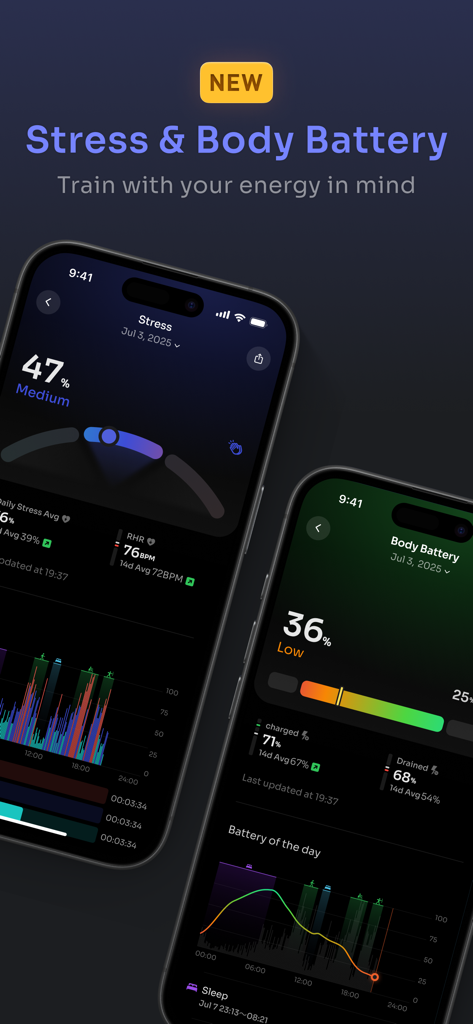
PeakWatch app screens showing Stress levels and Body Battery metrics for energy tracking.

PeakWatch app screens showing Stress levels and Body Battery metrics for energy tracking.

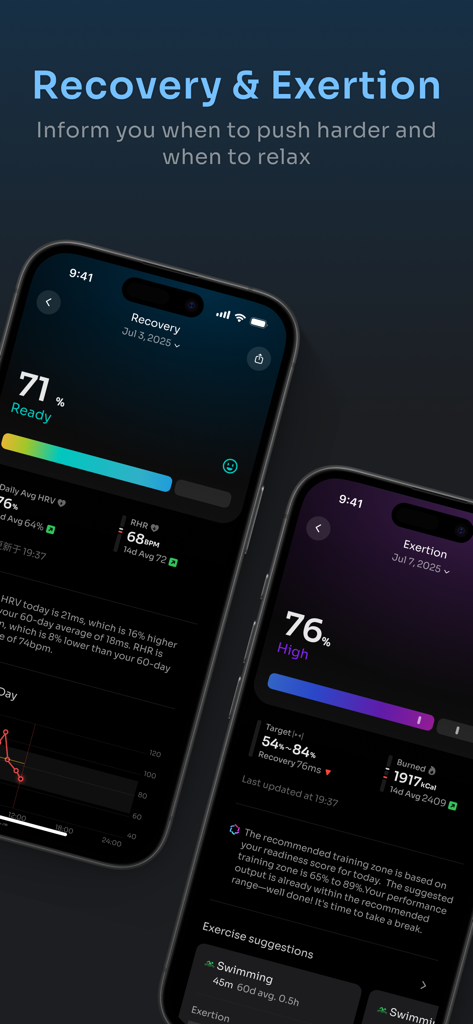
PeakWatch app screens displaying recovery and exertion scores with heart rate data and training insights

PeakWatch app screens displaying recovery and exertion scores with heart rate data and training insights

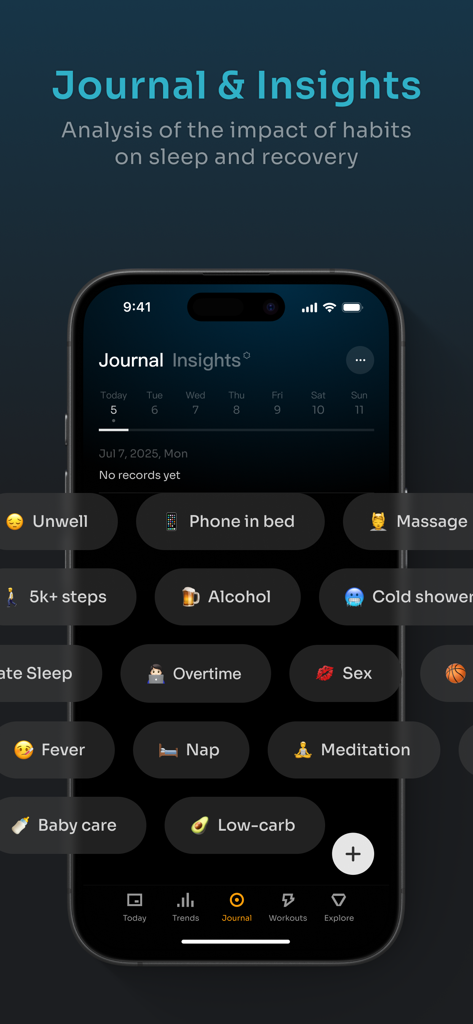
PeakWatch journal screen displaying various habit tracking tags for health analysis

PeakWatch journal screen displaying various habit tracking tags for health analysis

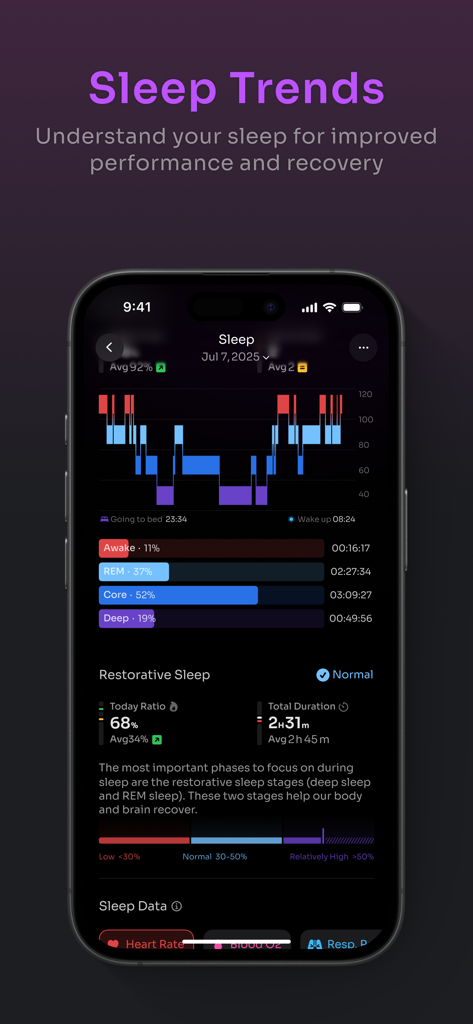
A detailed sleep tracking dashboard in the PeakWatch app showing sleep stages and restorative sleep metrics.

A detailed sleep tracking dashboard in the PeakWatch app showing sleep stages and restorative sleep metrics.

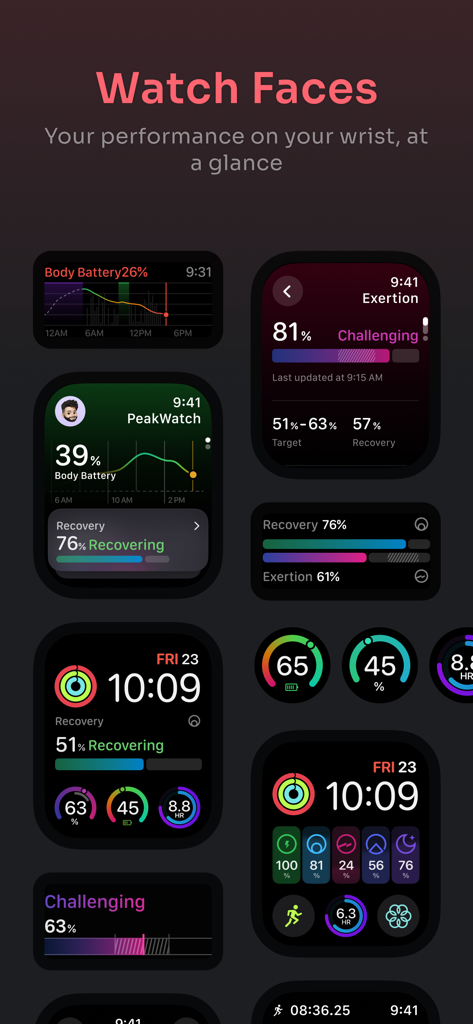
A collection of Apple Watch faces displaying fitness metrics like Body Battery Recovery and Exertion levels from the PeakWatch app

A collection of Apple Watch faces displaying fitness metrics like Body Battery Recovery and Exertion levels from the PeakWatch app

Data-Driven Performance, Refined

The tools that make this app stand out, trusted by 472K+ users.

🔋

Master Your Body Battery

Go beyond raw stats with a single score that syncs HRV, sleep, and strain to tell you exactly when to push for a PR and when to prioritize rest.

📸

Frictionless AI Nutrition

Ditch the tedious manual logging. Simply snap a photo of your meal and let our AI instantly analyze calories and macros to keep your performance fueled.

🏋️‍♂️

Elite Hybrid Training

Access expert-designed workouts for HYROX, CrossFit, and Strength, or build your own custom routines with advanced cardiovascular load tracking.

Loved by users worldwide

Trusted by 472K+ people who love this app.

"

"PeakWatch has completely transformed my Apple Watch into a professional-grade biohacking tool. As a busy consultant, I used to struggle with burnout, but the Body Battery metric gives me a clear, data-driven 'green light' for when to push my hybrid training and when to prioritize recovery. It provides the elite training readiness insights I thought were only possible with a dedicated fitness watch, all while staying within the Apple ecosystem."

Marcus Chen, Strategy Consultant & Hybrid Athlete
"

"The AI photo food log is a total game-changer for my lifestyle. I never had the patience for manual calorie counting, but snapping a photo is effortless and keeps my macros on track. I love how the app integrates my sleep debt and recovery scores into my daily workout recommendations—it takes all the guesswork out of my HYROX prep and ensures I'm training smarter, not just harder."

Sarah Jenkins, Marketing Director & CrossFit Enthusiast

About the app

Everything you need to know about PeakWatch: AI Personal Trainer.

Description

Use PeakWatch to train smarter, recover faster, sleep better and feel healthier. PeakWatch analyzes health data from HealthKit — heart rate, HRV, RHR, sleep, breathing — to show your recovery, exertion and personalized training recommendations. ◎ Key Features =Body Battery= A unique metric that combines Recovery, Sleep, Strain, and Stress to track your cumulative energy level throughout the day. =Stress= Understand stress levels and changes during the day alongside Body Battery. =Recovery= By analyzing your HRV and RHR, PeakWatch calculates your recovery status to guide you on whether to push hard or rest. =Exertion and Training Workout= With continuous heart rate data analysis, PeakWatch calculates your cardiovascular load and suggests a target exercise range based on your recovery status. This helps prevent overtraining and injuries while ensuring optimal results. =Food Log= Take a photo, AI analyzes calories & nutrients Track macros, energy balance and daily intake =Discover Your Next Challenge= The all-new Explore tab brings fresh energy to your training. Access 100+ curated workouts across HIIT, Hybrid, HYROX, and Strength modalities—each designed by experts to suit your needs. =Make Your Very Own Workout= Build your own custom workouts (AMRAP, EMOM, Interval, Open Gym, For Time) with ease, share them with friends. =Long-term Training Balance= Explore vibrant charts displaying short- and long-term exercise loads, helping you assess recovery, cardiovascular load, energy burn, heart rate recovery, and cardiovascular health. =Training Analysis= Delve into each workout with color-coded heart rate zones, effort scores, aerobic and anaerobic insights, cardiovascular fitness, and training impact on HRV. =Journal: focus on what matters= PeakWatch reads your workout history to extract different events and analyzes how these events impact your recovery and sleep. You can also add event by selecting from our pre-defined events library or create your own =Sleep Trend Insights= Boost performance with a better understanding of your sleep. Track sleep stages, restorative sleep, sleep debt, consistency, HRV, heart rate, respiratory rate, and blood oxygen, all visualized in detailed charts. =Multiple Watch Face Options= Get a quick overview of your body status on your Apple Watch. # Contact Us Email: hi@peakwatch.co Instagram: @getPeakWatch We’d love to hear your thoughts! Your feedback fuels our improvements. # Subscription and Terms PeakWatch is available for free with the option to upgrade to PeakWatch PRO with an auto-renewing subscription. You may switch off auto-renew in your Apple ID Account Settings. Purchases of PRO subscriptions will be charged using your Apple ID upon confirmation of purchase. Subscriptions renew on a monthly or yearly frequency unless canceled at least 24 hours before the end of the current period. If canceled, subscriptions remain valid until the end of the current period, and any unused portions are not valid for a refund. PeakWatch reads data from HealthKit. All health data is stored and processed locally on your device. # Subscription and Terms PeakWatch is free to use, with the option to upgrade to PeakWatch PRO for advanced features. Subscriptions auto-renew unless canceled in your Apple ID settings. Terms of Service: https://peakwatch.co/en/service/terms-of-use.html Privacy Policy: https://peakwatch.co/en/service/privacy-policy.html # Disclaimer PeakWatch provides general information and is not a substitute for medical advice or treatment. Consult a healthcare professional for medical concerns. Experience a smarter approach to fitness and wellness with PeakWatch. Start tracking today!

Latest Version

2.2.9

Size

387.5 MB

First Released

Jun 26, 2024

Stop Guessing. Start Optimizing.

Join 470,000+ data-driven athletes using AI to master their recovery and reach peak performance. Download PeakWatch today and turn your Apple Watch data into your personal training advantage.

Download on App Store
FAQ

Frequently Asked Questions

Everything you need to know about PeakWatch: AI Personal Trainer

What is PeakWatch?

PeakWatch is an AI Personal Trainer app that analyzes HealthKit data to provide personalized health insights and daily training guidance for smarter training, faster recovery, and better sleep.

How does PeakWatch calculate recovery status?

PeakWatch calculates your recovery status by analyzing your Heart Rate Variability (HRV) and Resting Heart Rate (RHR) data. This guides users on when to train hard or rest.

Does PeakWatch help prevent overtraining?

Yes, PeakWatch helps prevent overtraining and injuries by calculating your cardiovascular load from continuous heart rate data and suggesting a target exercise range based on your recovery status.

How does PeakWatch analyze food intake?

PeakWatch features a Food Log where users take a photo, and AI analyzes calories and nutrients. It also tracks macros, energy balance, and daily intake.

Can I create custom workouts in PeakWatch?

Yes, PeakWatch allows users to build their own custom workouts, including AMRAP, EMOM, Interval, Open Gym, and For Time. You can also share them with friends.

What is Body Energy in PeakWatch?

Body Energy is a unique metric in PeakWatch that combines Recovery, Sleep, Strain, and Stress. It tracks your cumulative energy level throughout the day.

Is PeakWatch free to use?

Yes, PeakWatch is available for free. Users have the option to upgrade to PeakWatch PRO with an auto-renewing subscription for advanced features.

How does PeakWatch handle my health data?

PeakWatch reads data from HealthKit. All health data is stored and processed locally on your device, ensuring privacy and control over your personal information.

What types of sleep data does PeakWatch track?

PeakWatch tracks sleep stages, restorative sleep, sleep debt, consistency, HRV, heart rate, respiratory rate, and blood oxygen. It visualizes these in detailed charts.

Does PeakWatch integrate with Apple Watch?

Yes, PeakWatch integrates with Apple Watch, providing multiple watch face options. Users get a quick overview of their body status directly on their Apple Watch.

How do I cancel a PeakWatch PRO subscription?

You can cancel your PeakWatch PRO subscription by switching off auto-renew in your Apple ID Account Settings. Subscriptions renew monthly or yearly unless canceled 24 hours prior.

What health data does PeakWatch analyze from HealthKit?

PeakWatch analyzes health data from HealthKit, including heart rate, HRV, RHR, sleep, and breathing. This data informs recovery, exertion, and training recommendations.

Can PeakWatch identify influencing factors for Bio Age?

Yes, PeakWatch identifies influencing factors for Bio Age, such as Sleep Duration and Sleep Consistency, which are noted as Pro features. It also displays Pace of Aging.