StressWatch: AI Stress Monitor

StressWatch: AI Stress Monitor

Download on App Store
Spark by MWM logo
Logo of StressWatch: AI Stress Monitor
StressWatch: AI Stress Monitor for a Balanced Life

Stop guessing and start listening to your body. We translate your HRV data into friendly, visual insights so you can manage burnout and optimize your wellbeing in real-time.

Publisher

One Hundred Bad Ideas Limited

Category

Health & Fitness

Downloads

6M+

User Rating

4.8/5

Total Ratings

180K+

Locales

9

See Stress Clearly

Discover the interface used by 6M+ users.
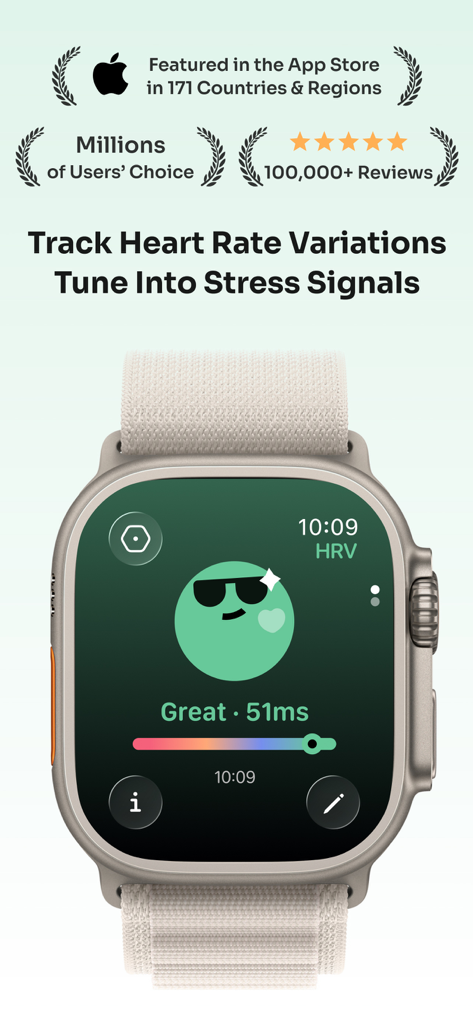
StressWatch app on an Apple Watch showing heart rate variability and a green character indicating low stress

StressWatch app on an Apple Watch showing heart rate variability and a green character indicating low stress

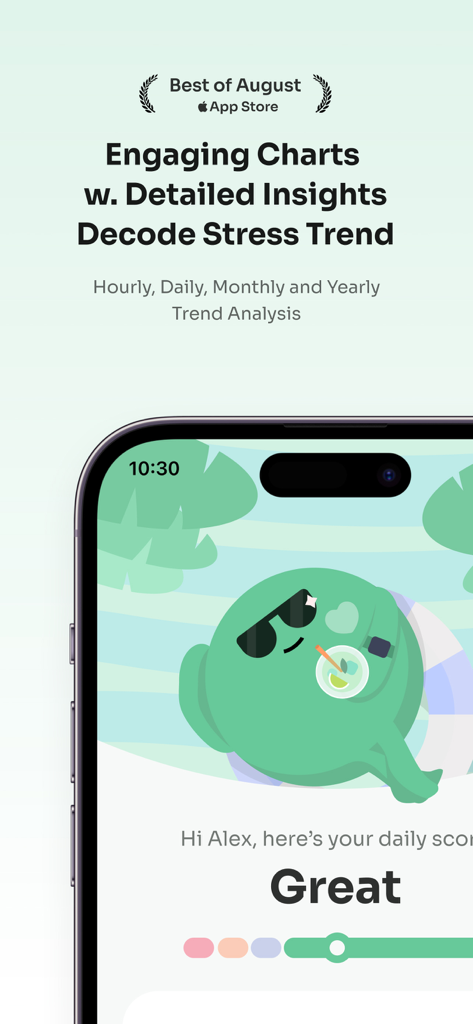
StressWatch app interface showing stress trend insights and the Mr Fizz character with a great daily score

StressWatch app interface showing stress trend insights and the Mr Fizz character with a great daily score

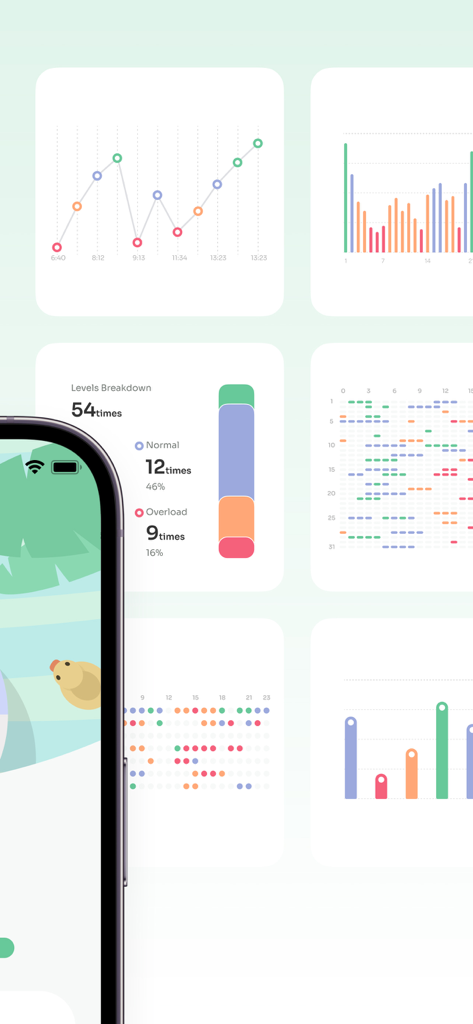
A collection of data visualization cards from StressWatch showing stress level breakdowns and heart rate variability trends.

A collection of data visualization cards from StressWatch showing stress level breakdowns and heart rate variability trends.

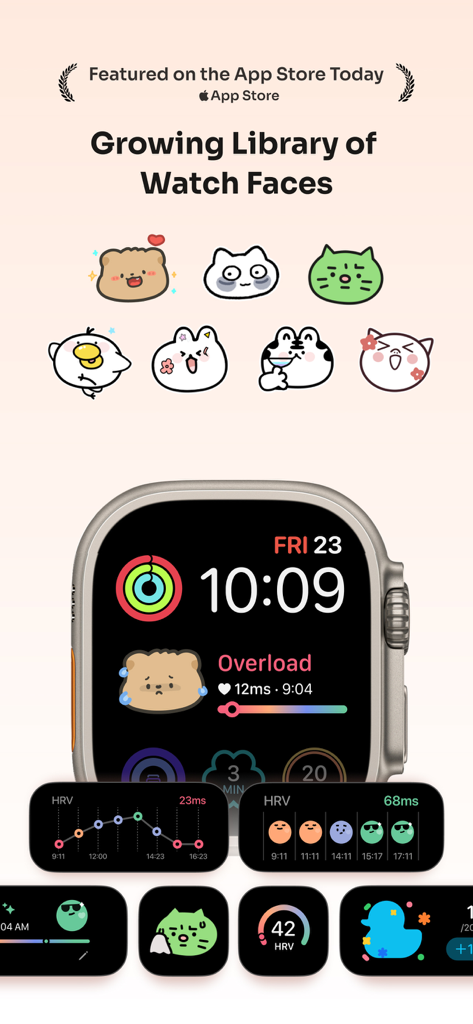
A variety of cute cartoon character watch faces and stress tracking widgets for Apple Watch

A variety of cute cartoon character watch faces and stress tracking widgets for Apple Watch

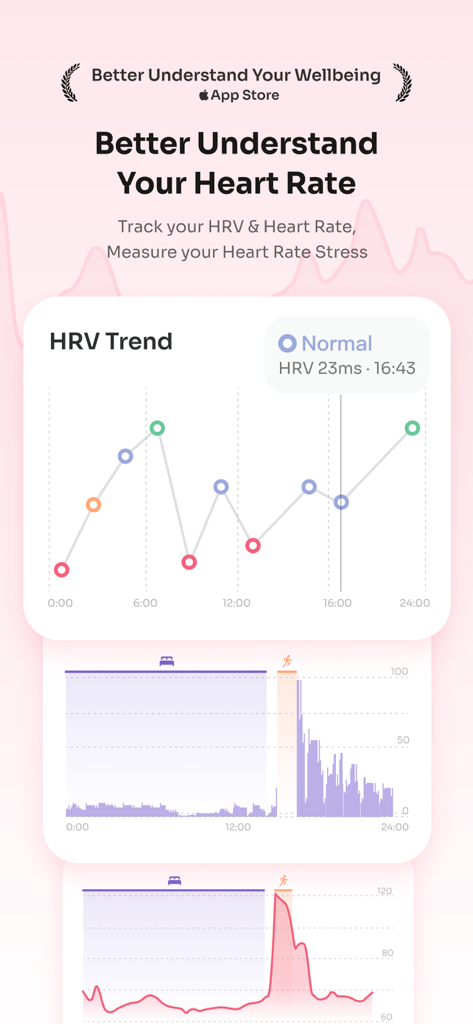
A visual HRV trend chart in the StressWatch app showing heart rate variability and stress levels over 24 hours.

A visual HRV trend chart in the StressWatch app showing heart rate variability and stress levels over 24 hours.

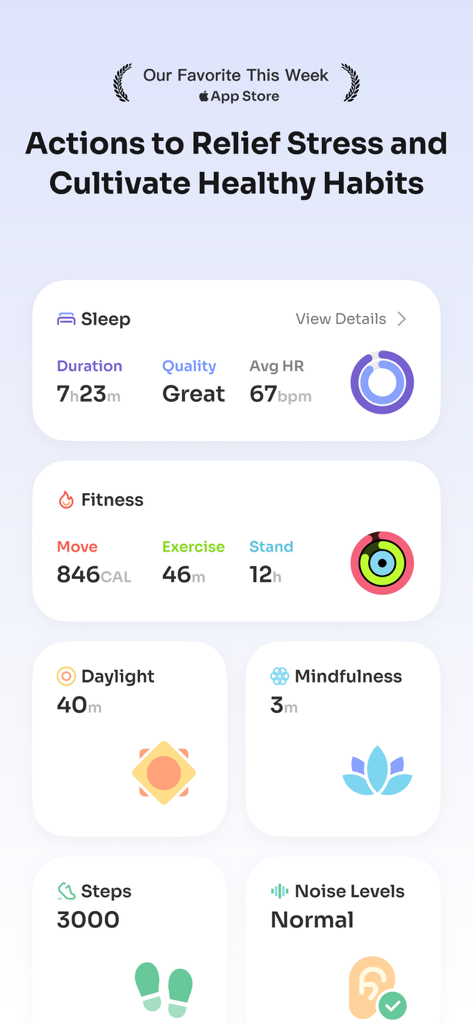
StressWatch app dashboard displaying sleep fitness and mindfulness metrics to help relieve stress

StressWatch app dashboard displaying sleep fitness and mindfulness metrics to help relieve stress

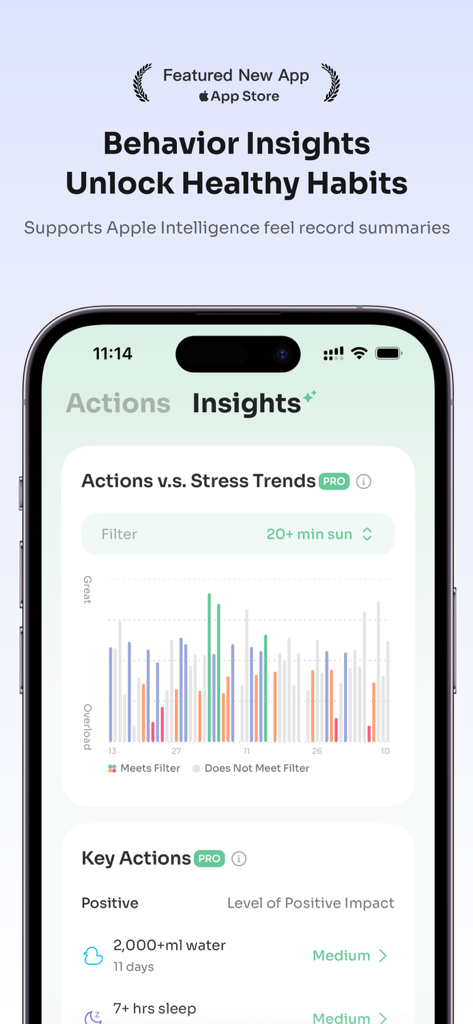
StressWatch app on iPhone showing behavior insights and stress trends graph.

StressWatch app on iPhone showing behavior insights and stress trends graph.

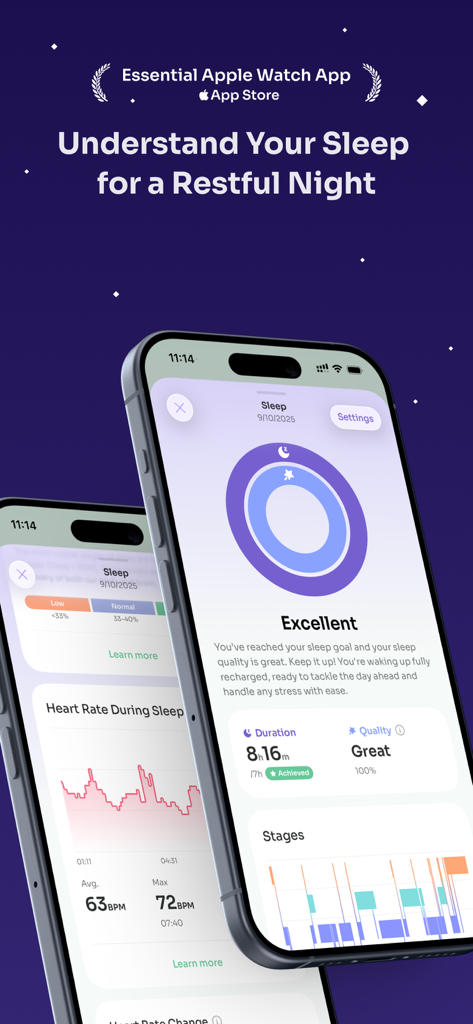
StressWatch app dashboard displaying sleep quality and heart rate data during sleep on an iPhone

StressWatch app dashboard displaying sleep quality and heart rate data during sleep on an iPhone

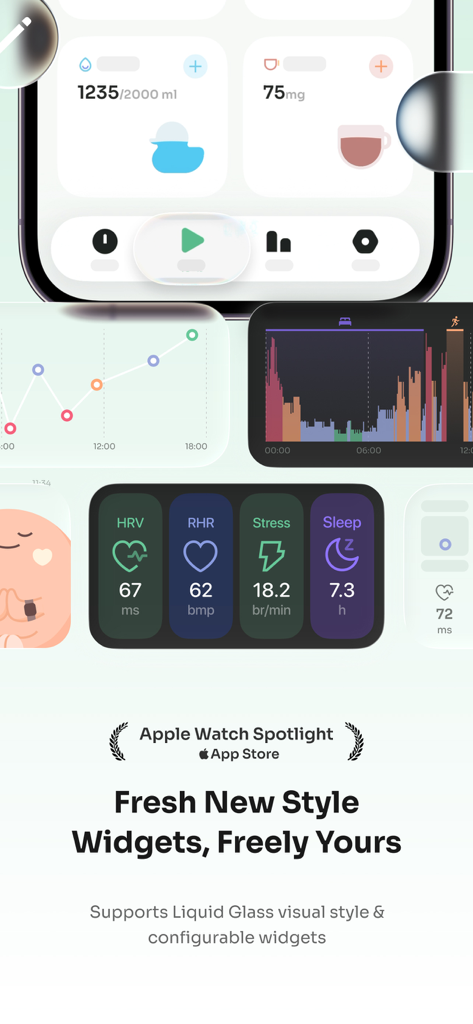
StressWatch app interface displaying health metrics widgets for HRV, RHR, stress levels, and sleep.

StressWatch app interface displaying health metrics widgets for HRV, RHR, stress levels, and sleep.

StressWatch app interface showing interactive widgets for tracking mood, water intake, and caffeine consumption

StressWatch app interface showing interactive widgets for tracking mood, water intake, and caffeine consumption

Turn Your Heart Data Into Peace of Mind

The tools that make this app stand out, trusted by 6M+ users.

🎨

Visual Stress Tracking

Skip the confusing charts. Our friendly character, Mr. Fizz, changes color to reflect your real-time stress levels, making bio-data intuitive for everyone.

🧘

Proactive Burnout Nudges

Get gentle, timely reminders to pause when your HRV drops. StressWatch acts as your objective 'permission slip' to take a break when you need it most.

Passive Watch Integration

Designed for the Apple ecosystem, our complications live on your Watch Face, providing constant monitoring without the need for manual logging.

Loved by users worldwide

Trusted by 6M+ people who love this app.

"

"As a marketing director in a fast-paced agency, I often ignore my own burnout signs. StressWatch is the only app that gives me the objective 'permission' to take a break. Seeing Mr. Fizz change color on my watch face is a gentle, non-intrusive nudge that helps me manage my energy throughout the day. It has truly changed how I approach my work-life balance."

Sarah M., Marketing Director
"

"I've always been into biohacking and tracking my HRV, but most apps just show me confusing graphs. StressWatch translates that complex data into something I can actually use. It accurately detected when I was overtraining and even when I had one too many drinks at a social event. It's a must-have for anyone who wants to understand their body’s stress response."

James L., Software Engineer

About the app

Everything you need to know about StressWatch: AI Stress Monitor.

Description

StressWatch has been featured on the Apple App Store in 171 countries and regions — # Best of August # The Best Apps for iOS 18 # Better Understand Your Wellbeing # Essential Watch Apps # Featured New App # Our Favorite of This Week StressWatch relies on your RHR (Resting Heart Rate) and HRV (Heart Rate Variability) data retrieved from Apple Health. We'll analyze and interpret the data to determine your current stress levels. We constantly monitor your status and remind your immediately if your stress levels get too high so you can take action right away to help reduce your stress levels. #How can StressWatch help you? - When you work late into the night, StressWatch can remind you that your HRV is low and you're stressed - a gentle reminder to help you understand that it's time to get some rest. - When you're at a social event and you have to force yourself to smile, we'll remind you that your HRV is low and you're stressed - a gentle reminder to get some fresh air and recharge. - When you've had just a bit too much to drink, we'll remind you that your HRV is low and you're stressed (because alcohol is a stresssor) - a gentle reminder to let up a bit on the cup, drink some water, and take care of your body. - You can constantly monitor your HRV levels (and stress levels) from your Apple Watch by adding StressWatch to your Watch Face. - Paired with proper exercise and adequate rest, monitor and analyze your weekly and monthly stress levels over prolonged periods of time; you'll realize that you're getting better as time goes on. #Design Concept We created StressWatch with the sole intention to help people to reduce anxiety in this age of stress and pressure. However, data and numbers do not have any meaning if the user is unable to interpret the data. (Not everyone is a rocket scientist!) So it got us thinking: how can we design a app that delivers numbers and data in a friendly manner that will help users to reduce stress and anxiety. Thus, we created the "Mr.Fizz", which is the foundation of our product design. The "Mr.Fizz" will change colors as the user's stress levels rise. #Contact us Email: hi@stresswatch.app Subscription prices and terms StressWatch can be downloaded for free. If you choose to upgrade to the StressWatch Pro version, you can unlock all paid features. We offer two different purchase options: monthly, and annual auto-renewal. For monthly or annual subscriptions: Once confirmed and paid, it will automatically renew through your Apple iTunes account. After successful payment, the subscription period will be extended. To cancel, please manually turn off the auto-renewal feature in iTunes/Apple ID settings management at least 24 hours before the end of the current subscription period. During the trial period, if you do not cancel the subscription, it will automatically activate and charge at the end of the trial period. This service is at your discretion to cancel; if you choose not to cancel, the renewal service for the next billing cycle will be activated for you. Health advice disclaimer All information provided by StressWatch cannot be considered medical advice or diagnosis, and should not replace professional diagnosis and treatment. If you feel excessive stress that cannot be adjusted, and before making any medical decisions, please seek professional medical help in a timely manner. User Agreement: https://docs.ideation.love/stresswatch/en/service/terms-of-use.html Privacy Policy: https://docs.ideation.love/stresswatch/en/service/privacy-policy.html

Latest Version

2.4.17

Size

325.2 MB

First Released

Apr 26, 2023

Ready to Outsmart Burnout?

Join over 6 million users who use Mr. Fizz to visualize their HRV and reclaim their calm. Download StressWatch today and start listening to what your body is telling you.

Download on App Store
FAQ

Frequently Asked Questions

Everything you need to know about StressWatch: AI Stress Monitor

What is StressWatch: AI Stress Monitor?

StressWatch is an AI Stress Monitor application that analyzes your Resting Heart Rate (RHR) and Heart Rate Variability (HRV) data from Apple Health to determine and monitor your current stress levels.

Does StressWatch provide real-time stress level notifications?

Yes, StressWatch continuously monitors your status and provides immediate reminders if your stress levels become too high, prompting you to take action to reduce stress.

What data does StressWatch use to monitor stress?

StressWatch relies on your Resting Heart Rate (RHR) and Heart Rate Variability (HRV) data, which it retrieves from Apple Health to analyze and interpret your stress levels.

Can I add StressWatch to my Apple Watch face?

Yes, you can monitor your HRV and stress levels directly from your Apple Watch by adding StressWatch to your Watch Face for constant visibility.

What is "Mr.Fizz" in StressWatch?

StressWatch features "Mr.Fizz," a visual indicator that changes colors as your stress levels rise, designed to help users easily interpret their data.

Does StressWatch provide medical advice?

No, StressWatch explicitly states that the information it provides cannot be considered medical advice or diagnosis. Users should seek professional medical help for excessive stress.

Does StressWatch offer historical stress trend analysis?

Yes, StressWatch offers detailed charts and trend analysis for hourly, daily, monthly, and yearly stress levels, helping users decode stress patterns over time.

Is StressWatch a free app?

Yes, StressWatch is free to download. Users can upgrade to StressWatch Pro to unlock all paid features through monthly or annual auto-renewing subscriptions.

What are the subscription options for StressWatch Pro?

StressWatch Pro offers monthly and annual auto-renewal subscription options. These subscriptions automatically renew through your Apple iTunes account.

How do I cancel my StressWatch Pro subscription?

To cancel a StressWatch Pro subscription, manually turn off the auto-renewal feature in your iTunes/Apple ID settings management at least 24 hours before the current period ends.

Can StressWatch monitor my sleep patterns?

Yes, StressWatch tracks sleep duration, quality, and average heart rate during sleep, helping users understand their rest for a restful night.

Does StressWatch track water intake and mood?

Yes, StressWatch supports tracking mood, water intake, and caffeine consumption, featuring interactive widgets for the latest iOS and watchOS.

Does StressWatch offer customizable Watch Faces?

Yes, StressWatch provides a growing library of custom Watch Faces, allowing users to personalize their Apple Watch with different styles and data displays.

Where can I find the StressWatch Privacy Policy?

The StressWatch Privacy Policy is available at the provided link: https://docs.ideation.love/stresswatch/en/service/privacy-policy.html.