Sony | Monitor & Control

Sony | Monitor & Control

Download on App StoreDownload on Google Play
Spark by MWM logo
Logo of Sony | Monitor & Control

Sony | Monitor & Control: Professional Field Monitoring for Video Creators

Turn your mobile device into a high-precision cinema monitor. Master every shot with waveform, false color, and remote focus control for your Sony Cinema Line and Alpha cameras.

Publisher

Sony Corporation

Category

Photo & Video

Downloads

343K+

User Rating

4.3/5

Total Ratings

600

Locales

20

Your Mobile Video Village

Discover the interface used by 343K+ users.

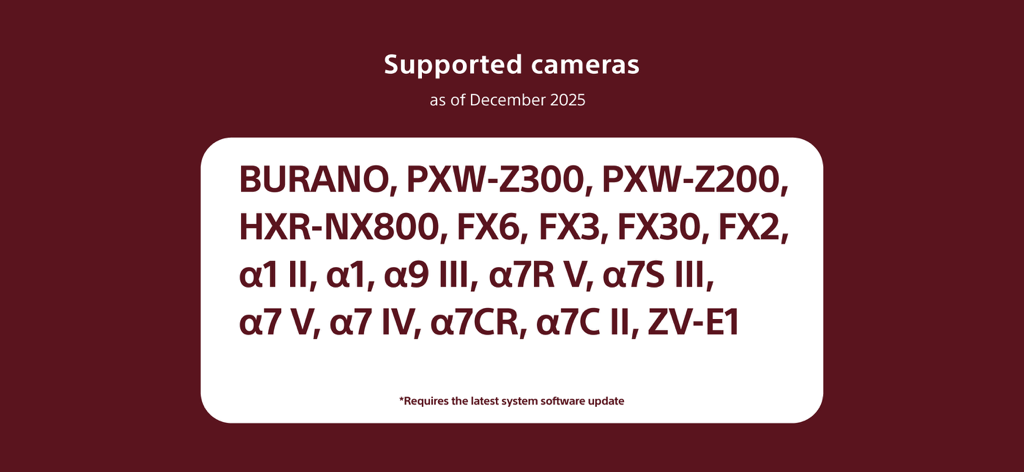
List of supported Sony cameras for the Monitor and Control app including BURANO and Alpha series models.

List of supported Sony cameras for the Monitor and Control app including BURANO and Alpha series models.

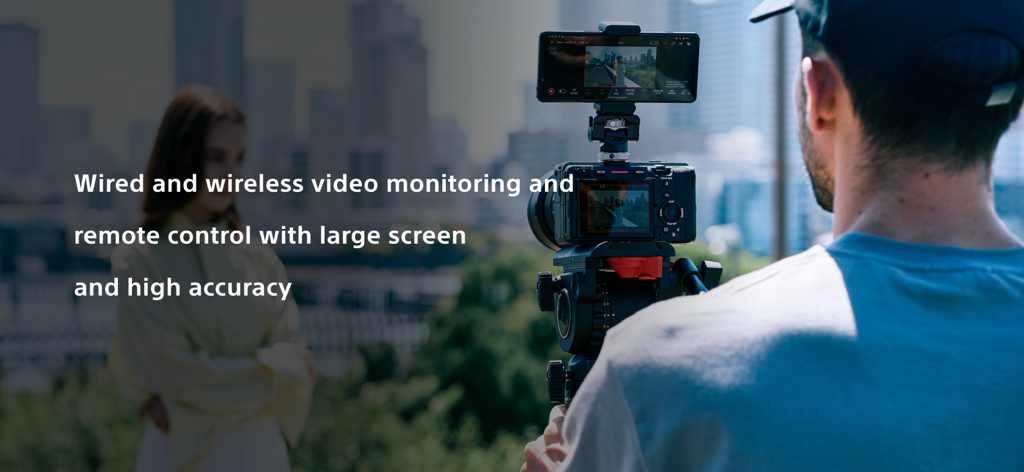
Professional filmmaker using a smartphone as an external monitor with the Sony Monitor and Control app

Professional filmmaker using a smartphone as an external monitor with the Sony Monitor and Control app

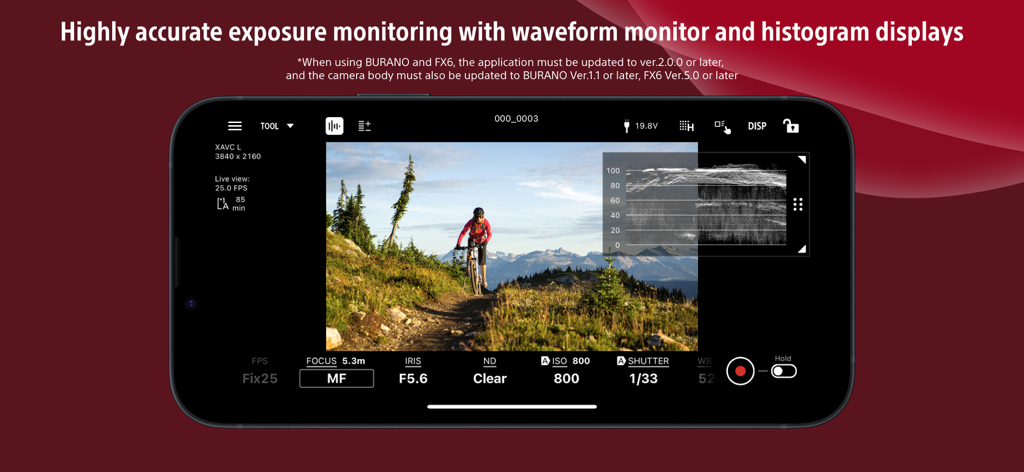
Smartphone interface of Sony Monitor and Control app with waveform display for exposure monitoring

Smartphone interface of Sony Monitor and Control app with waveform display for exposure monitoring

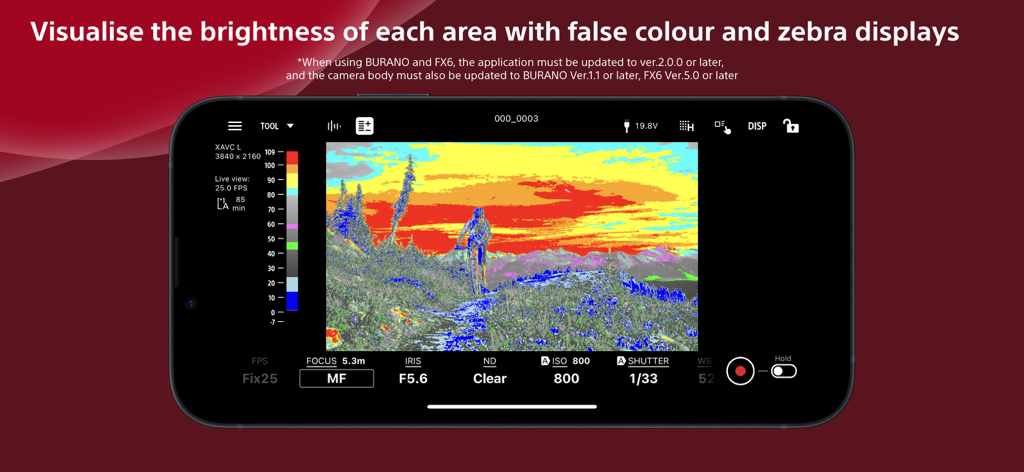
Sony Monitor and Control app interface displaying false color for exposure monitoring

Sony Monitor and Control app interface displaying false color for exposure monitoring

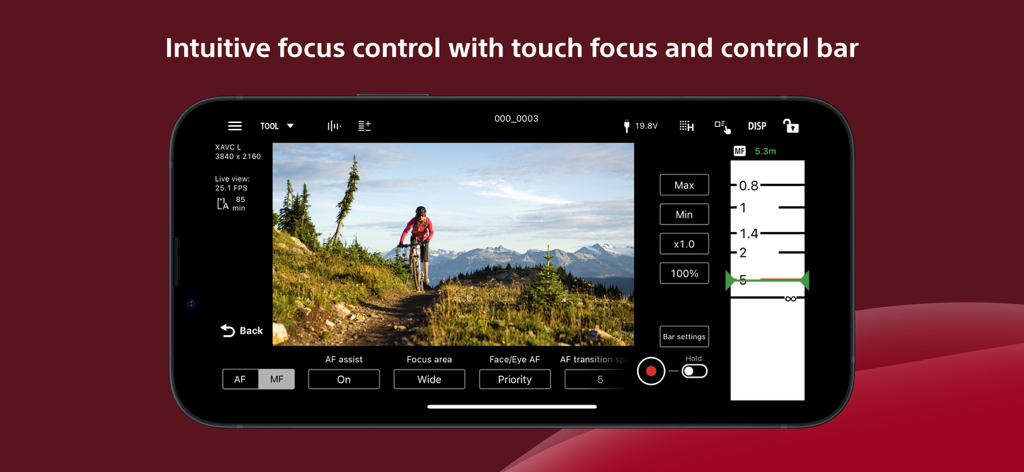
Sony Monitor and Control app interface displaying manual focus slider and touch focus settings for filmmaking

Sony Monitor and Control app interface displaying manual focus slider and touch focus settings for filmmaking

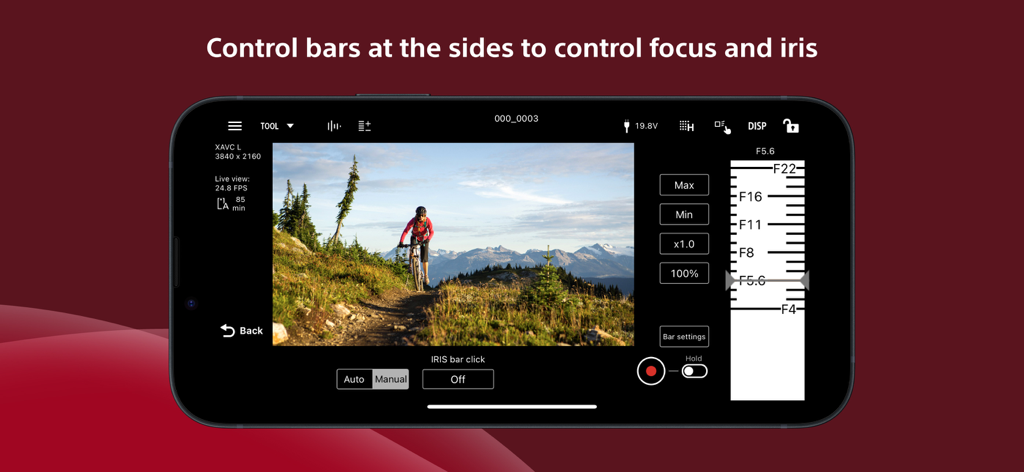
Sony Monitor and Control app interface showing the iris adjustment slider and remote camera controls on a smartphone screen

Sony Monitor and Control app interface showing the iris adjustment slider and remote camera controls on a smartphone screen

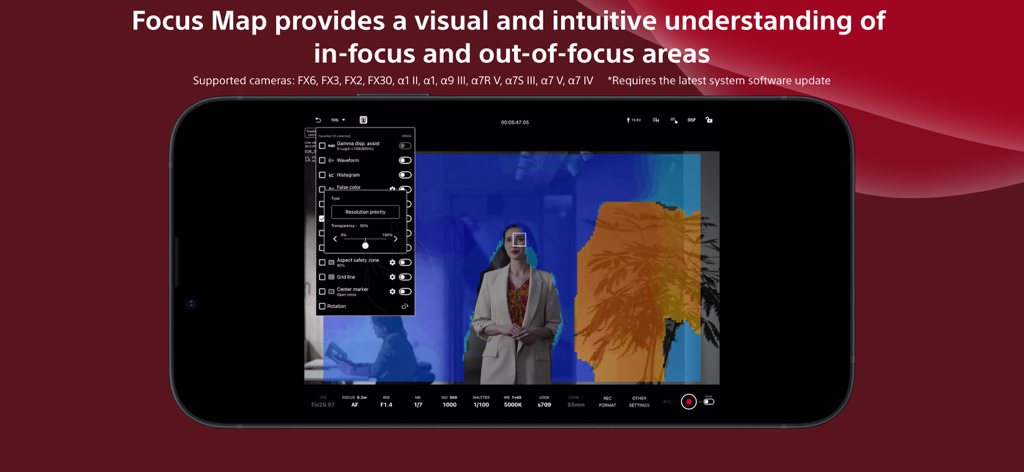
A smartphone screen displaying the Sony Monitor and Control app with its Focus Map feature visualizing in-focus and out-of-focus areas

A smartphone screen displaying the Sony Monitor and Control app with its Focus Map feature visualizing in-focus and out-of-focus areas

A Professional Cinema Monitor in Your Pocket

The tools that make this app stand out, trusted by 343K+ users.

🎨

Precision Exposure & Color

Master every shot with professional Waveform, False Color, and Histogram displays. Apply LUTs in real-time to preview your final grade directly on your mobile screen.

🕹️

Seamless Remote Control

Adjust focus, ND filters, and frame rates wirelessly or via cable. Perfect for solo operators or managing cameras mounted on gimbals and cranes.

🔌

Pro-Grade Reliability

Switch to a wired connection for zero-latency monitoring in high-interference environments. Support for multi-camera setups lets you monitor your entire production at once.

Loved by users worldwide

Trusted by 343K+ people who love this app.

"

"This app has completely transformed how I use my FX3 on set. Having high-precision waveforms and false color on my iPad screen saves me from carrying extra gear. The focus control is incredibly intuitive, making it a must-have for any professional Sony shooter."

Julian R., Director of Photography
"

"Perfect for solo creators! I use it with my A7S III to monitor my shots from a distance. The ability to switch LUTs and adjust ND filters right from my phone is a lifesaver. It is stable, fast, and feels like a native extension of the camera."

Chloe V., Content Creator

Review Analysis

Insights from user reviews.

Sentiment Score

24%
Negative

Summary

This mobile app receives predominantly negative feedback from users, reflected in its low average rating. A major point of contention is the app's limited camera compatibility, with numerous users reporting a lack of support for popular models such as the A6700, A7CII, ZV-E10, and A7C. Frequent complaints highlight connection instability, pairing difficulties, and various bugs, including multicam malfunctions and issues after iOS updates (specifically version 26.0.1 on iPad, affecting camera detection for A7S3 and ZV-E1). Users are also frustrated by missing essential features like LUT support, focus peaking, audio levels, playback functionality, and an orientation lock, alongside dissatisfaction with the app's subscription model for features previously offered for free. The Mac app experience is additionally criticized as a poorly optimized iPadOS port.

Common Themes

Camera Compatibility(22)
Connection Stability(7)
App Instability(6)
Subscription Model(5)
Missing Focus Peaking(3)
Missing LUT Support(2)
Orientation Lock Issue(2)

About the app

Everything you need to know about Sony | Monitor & Control.

Description

Supported cameras (as of December 2025) BURANO, PXW-Z200, HXR-NX800, FX6, FX3, FX2, FX30,α1 II, α1, α9 III, α7R V, α7S III, α7 V, α7 Ⅳ, α7CR, α7C II, ZV-E1 *Requires the latest system software. Please refer to the Support Page for the connection process and list of supported cameras: https://www.sony.net/ccmc/help/ This app for video creators enables wired and wireless video monitoring, as well as high-precision exposure adjustments and focus control to be performed on the large screen of a smartphone, tablet, or Mac. Features of Monitor & Control Highly flexible shooting style It allows a smartphone, tablet, or Mac to be used as a second monitor and camera settings and operations to be performed from a distance through a wired or wireless connection. Wired connections ensure a stable connection in places where wireless connection is unstable. Support for high-precision exposure monitoring The ability to check waveform monitor/false colour/histogram/zebra displays on a large screen enables more accurate exposure settings at the video production site. Intuitive focusing operations Various focus settings/operations such as touch focusing (operations) and AF sensitivity adjustment (settings) are possible, while intuitive focusing is possible through use of an operation bar on the side of the screen. Equipped with a wide range of colour setting functions Operations such as picture profile/scene file settings and LUT switching are possible. You can apply LUTs while shooting in Log and display the image to check the finished image. Easy-to-use operations that meet the needs of creators It allows items that are frequently adjusted during shooting (frame rate, sensitivity, shutter speed, ND filter,* look, white balance) to be adjusted on a mobile device. Functions that facilitate shooting, such as switching between shutter speed and angle displays and the display of markers, are provided, as well as a de-squeeze display function compatible with anamorphic lenses. *If you are using a camera without an ND filter, the ND filter item will be blank. Multi-camera Monitoring Multiple cameras can be connected to a single iPad, Mac or an iPhone for operation, display, and shooting. -Operating environment iOS / iPadOS: 17.0 26.0 macOS: 14.7 26.0 Note This application is not guaranteed to work on all smartphones and tablets.

Latest Version

2.5.1

Size

70.4 MB

First Released

Sep 11, 2023

Ready to Take Total Command of Your Set?

Transform your iPhone, iPad, or Mac into a professional-grade field monitor. Download Sony | Monitor & Control today and experience high-precision exposure, focus, and multi-camera monitoring for your Cinema Line workflow.

Download on App StoreDownload on Google Play
FAQ

Frequently Asked Questions

Everything you need to know about Sony | Monitor & Control

What is Sony | Monitor & Control?

Sony | Monitor & Control is an app for video creators. It enables wired and wireless video monitoring, high-precision exposure adjustments, and focus control using a smartphone, tablet, or Mac.

What cameras are compatible with Sony | Monitor & Control?

Sony | Monitor & Control supports cameras including BURANO, FX6, FX3, FX30, α1 II, α9 III, α7R V, α7S III, α7CR, and ZV-E1. These cameras require the latest system software update for full compatibility.

Can Sony | Monitor & Control use both wired and wireless connections?

Yes, Sony | Monitor & Control supports both wired and wireless connections. Wired connections ensure stability where wireless signals are unreliable, while wireless options provide flexibility for remote camera operation.

Does Sony | Monitor & Control offer advanced exposure monitoring tools?

Yes, Sony | Monitor & Control provides advanced exposure monitoring. It includes waveform monitor, false colour, histogram, and zebra displays for precise exposure settings on the connected large screen device.

How does Sony | Monitor & Control assist with focus operations?

Sony | Monitor & Control assists with focus via touch focusing, AF sensitivity adjustment, and an intuitive operation bar on the screen side. It also features a Focus Map for visualizing in-focus and out-of-focus areas.

What mobile devices and operating systems are supported by Sony | Monitor & Control?

Sony | Monitor & Control supports iOS/iPadOS versions 17.0 to 26.0 and macOS versions 14.7 to 26.0. It functions on smartphones, tablets, and Mac devices that meet these operating environment specifications.

Can users apply LUTs while shooting with Sony | Monitor & Control?

Yes, users can apply LUTs while shooting in Log mode with Sony | Monitor & Control. This feature enables real-time previewing of the finished image directly on the monitoring device during production.

Does Sony | Monitor & Control support multi-camera monitoring?

Yes, Sony | Monitor & Control supports multi-camera monitoring. Multiple cameras can be connected to a single iPad, Mac, or iPhone for simultaneous operation, display, and shooting control from one device.