Filmora HD-Video Editor&Maker

Filmora HD-Video Editor&Maker

ダウンロード: App Storeダウンロード: Google Play
Spark by MWM logo
ロゴ: Filmora HD-Video Editor&Maker

Filmora HD - ビデオエディター&メーカー:どこでもプロのシネマティックコンテンツを作成

デスクトップ編集のパワーをiPadとiPhoneで活用。AI駆動のビート検出から高度なキーフレーム、Appleデバイス間のクラウド同期まで、あなたの想像力をソーシャルメディア向けのインパクトのある4Kストーリーに変えましょう。

開発元

Shenzhen Wondershare Software Co., Ltd

カテゴリ

Photo & Video

ダウンロード

1M+

ユーザー評価

4.6/5

評価数

3K+

対応言語

20

シネマティックパワーを、完璧に可視化

このインターフェースを利用する 1M+ 人のユーザー.

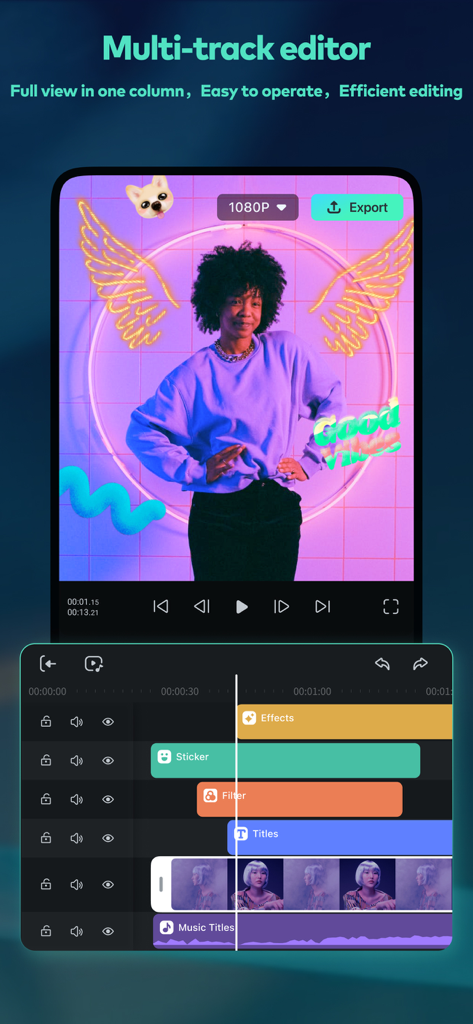
Filmora HDビデオエディターアプリのインターフェース。ビデオエフェクトとステッカーを備えたマルチトラックタイムラインを表示しています

Filmora HDビデオエディターアプリのインターフェース。ビデオエフェクトとステッカーを備えたマルチトラックタイムラインを表示しています

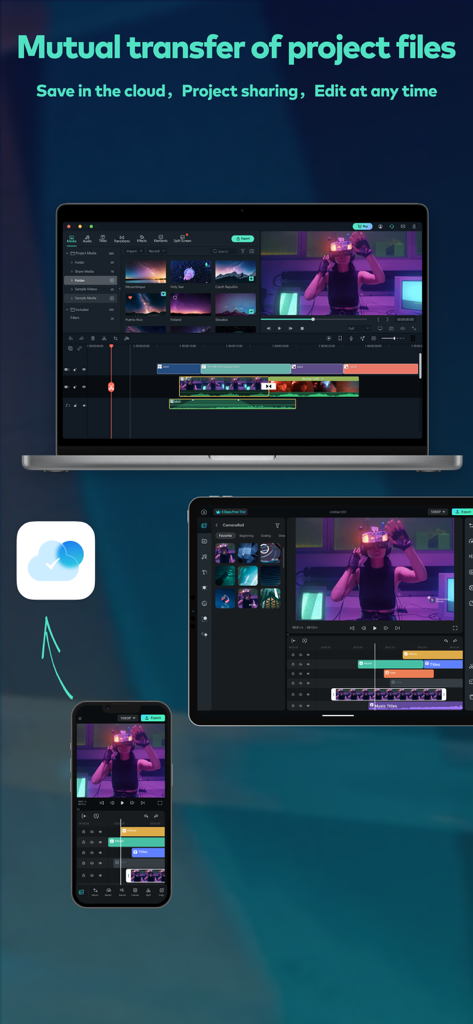
Filmora HDビデオ編集プロジェクトが、クラウド経由でiPhone、iPad、Mac間で同期されています

Filmora HDビデオ編集プロジェクトが、クラウド経由でiPhone、iPad、Mac間で同期されています

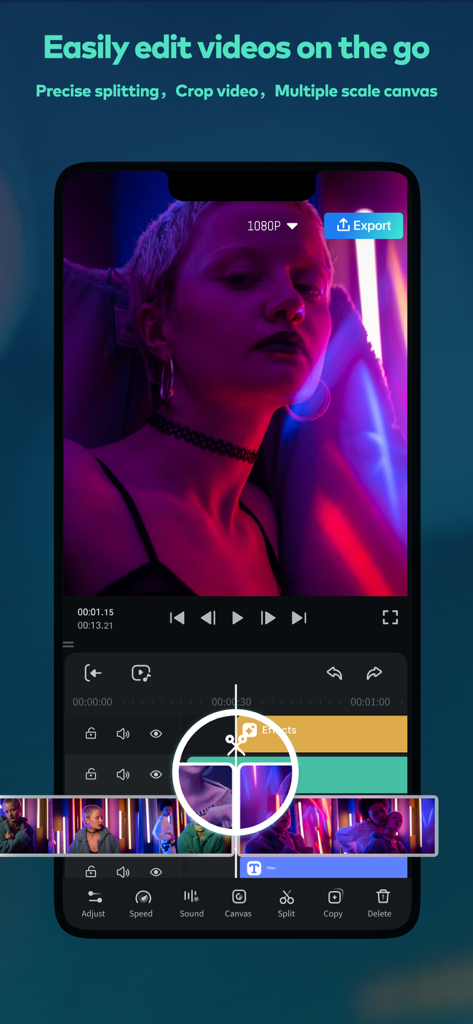
Filmora HDビデオエディターのインターフェース。モバイルでの正確な分割とマルチトラックタイムラインツールが表示されています

Filmora HDビデオエディターのインターフェース。モバイルでの正確な分割とマルチトラックタイムラインツールが表示されています

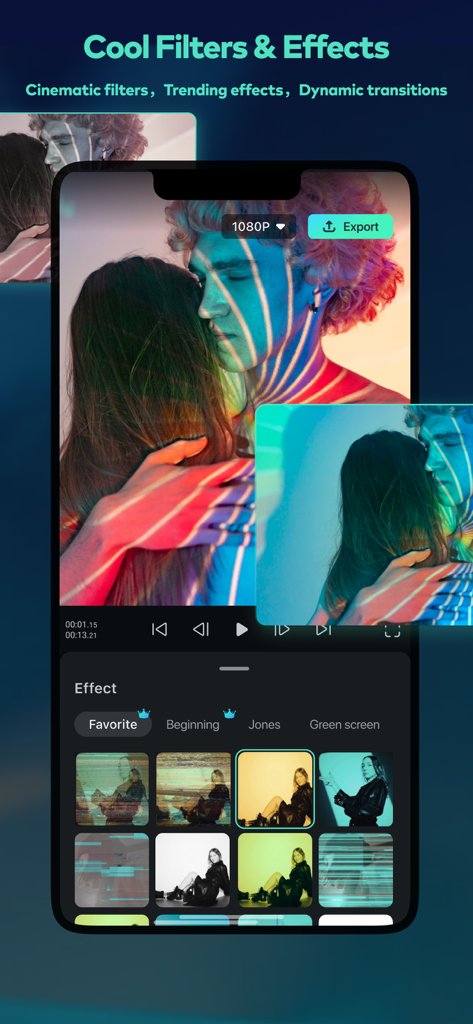
Filmora HDアプリのインターフェース。シネマティックフィルターとビデオエフェクトのセレクションが表示されています

Filmora HDアプリのインターフェース。シネマティックフィルターとビデオエフェクトのセレクションが表示されています

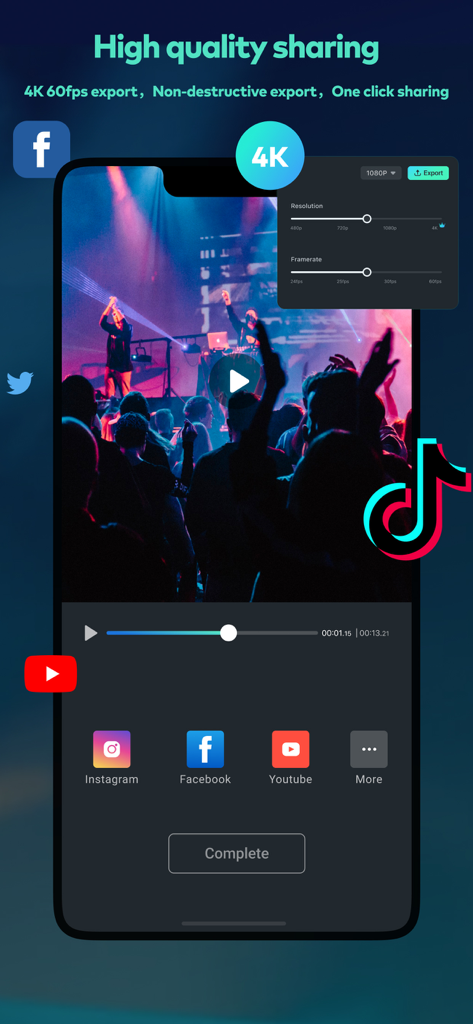
Filmora HDビデオエディターのインターフェース。4Kエクスポートとソーシャルメディア共有用です

Filmora HDビデオエディターのインターフェース。4Kエクスポートとソーシャルメディア共有用です

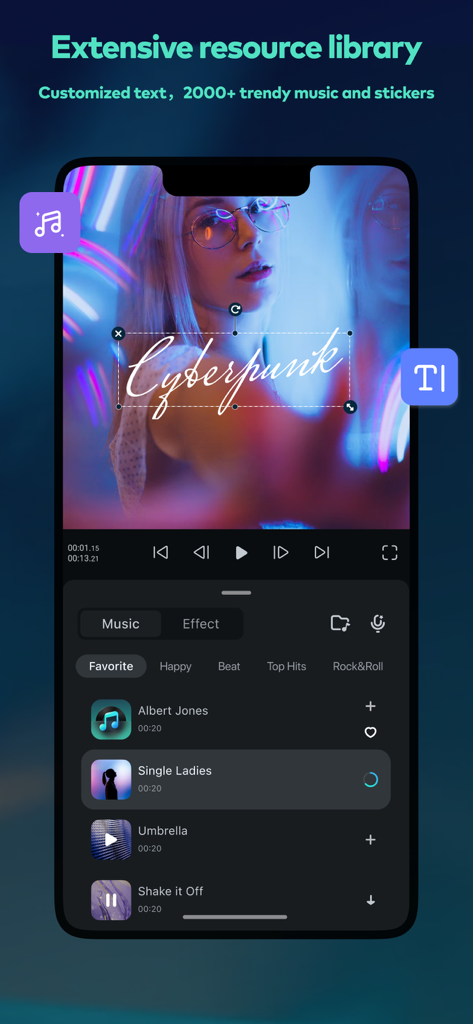
Filmora HDアプリのインターフェース。サイバーパンクテキストオーバーレイを備えたビデオと、プロジェクトに追加できる人気の音楽トラックのリストが表示されています

Filmora HDアプリのインターフェース。サイバーパンクテキストオーバーレイを備えたビデオと、プロジェクトに追加できる人気の音楽トラックのリストが表示されています

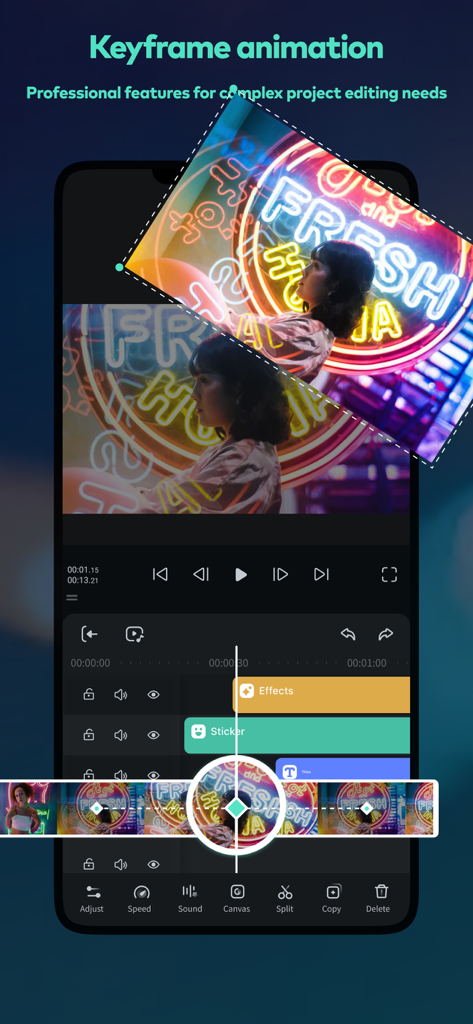
Filmora HDアプリでのキーフレームアニメーション編集を示すスマートフォンの画面

Filmora HDアプリでのキーフレームアニメーション編集を示すスマートフォンの画面

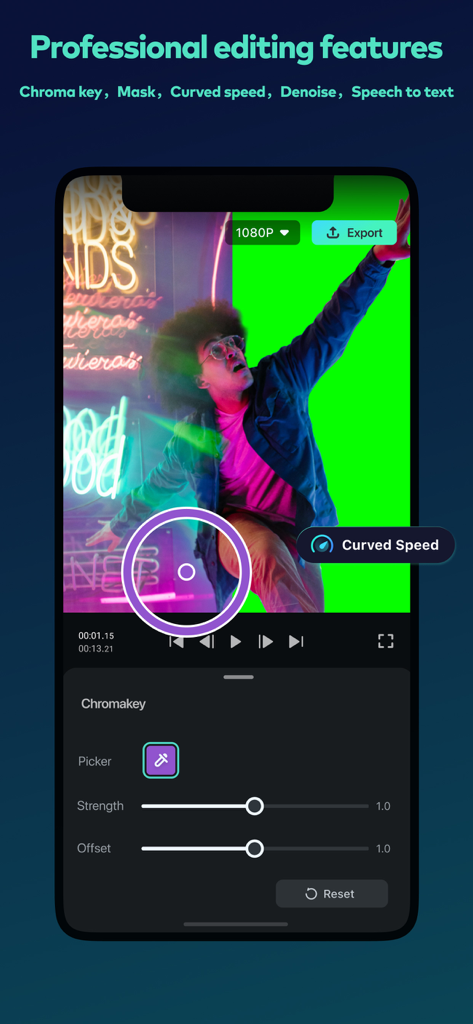
Filmora HDモバイルアプリのインターフェース。グリーンスクリーン背景を使用したプロフェッショナルなクロマキービデオ編集が表示されています

Filmora HDモバイルアプリのインターフェース。グリーンスクリーン背景を使用したプロフェッショナルなクロマキービデオ編集が表示されています

プロフェッショナルなパワーとモバイルのシンプルさ

このアプリを際立たせるツール、 1M+ 人のユーザーが選択.

🤖

AI駆動の自動化

音声からテキストへの変換と、サウンドトラックのリズムに完璧にカットを同期するビート検出で、手作業の時間を節約しましょう。

🎨

シネマティックプロツール

iPadとiPhoneに最適化された直感的なインターフェースで、スピードランプ、マスキング、キーフレームなどのハイエンドテクニックをマスターしましょう。

📲

シームレスなクラウドワークフロー

モバイルデバイスとMacの間のギャップを埋めましょう。移動中にプロジェクトを開始し、自宅で傑作を完成させましょう。クラウド同期が可能です。

世界中のユーザーに愛されています

Trusted by 1M+ 人がこのアプリを愛用しています.

"

"Filmora HDは私の旅行Vlogのワークフローを完全に変えました。iPadのジェスチャーコントロールは非常に直感的で、プロジェクトをクラウドに同期してMacで完成させることができるのは、私のチャンネルにとってまさにゲームチェンジャーです。"

Sarah J., ライフスタイルVlogger
"

"私はあらゆるモバイルエディターを試しましたが、Filmora HDの精度に勝るものはありません。スピードランプやマスキングなどの高度なツールにより、外出先でもiPhoneから直接プログレードのソーシャル広告を作成できます。"

Marcus T., クリエイティブディレクター

レビュー分析

ユーザーレビューの分析.

感情スコア

21%
ネガティブ

概要

This mobile app generally receives overwhelmingly negative feedback, with many users expressing extreme dissatisfaction and labeling it "terrible" or a "scam." A major point of contention revolves around its high cost and pervasive paywalls, forcing users to pay for essential features like watermark removal and high-resolution export, alongside expensive AI credits and unexpected charges. Users frequently report significant performance and stability issues, including frequent freezing, crashing during editing and export, and lag, which often appear or worsen after purchasing a subscription. While some users acknowledge its rich editing functions and potential for a pleasant editing experience, these positives are largely eclipsed by widespread complaints about bugs, costly and ineffective AI features, and unresponsive customer support.

主なテーマ

Overall App Quality(4)
Diverse Editing Functions(3)
Enjoyable Editing Process(2)
Ease of Use(1)
Beginner-Friendly Free Options(1)

アプリについて

について知っておくべきこと Filmora HD-Video Editor&Maker.

説明

Filmora is an easy yet powerful video editor, enables you to quickly and easily create video stories from your video clips, photos, and music. An easy-to-use video editing app with advanced features and tons of music, stickers, filters, effects and transitions to be creative. You’ll save time and have a blast. [What you can do with Filmora Video Editor] - When you are on vacation, you’d like to make a vlog and share on YouTube / TikTok / Facebook / Instagram in short time. - When you are on business, you need to make a creative project presentation video on the road. - You could continue to finish the rest of the iPad/iPhone video project on your Mac. You could edit anywhere anytime. [Why you’ll love Filmora Video Editor] POWERFUL VIDEO EDITING [NEW] - Mask - Speech To Text (STT) - Speed Ramping(Curve Speed) - Keyframe - Tons of Tracks - Intuitive Timeline Zooms - Trim or Split Video - Adjust Video Speed - Rearrange Clips - Copy / Paste / Rotate Clip - PIP (Add Videos on Your Clips) - 4K export - User-friendly gesture for iPad [NEW] - Save in the cloud, edit videos anytime and anywhere AUDIO/MUSIC NEW - Beat detection - Music Library - Sound Effects - Voice Recording - Split Audio Clips - Volume Controls / Mute - Voice-Over TEXT / STICKERS - Add Texts or Stickers on Video or Photo - Fun Stickers - Personalize Text EFFECTS - Brightness, Temperature - Customize Filters and Overlays - Various Cool Transition [Filmora Video Editor Subscription Info] - With Filmora Unlimited subscription, you have access to all features and paid editing materials including stickers, exclusive filter, audio effects, 4K video export, etc. Also, watermark will be removed automatically. - Subscription length: Monthly, Annually or One-time Purchase. - No cancellation of the current subscription is allowed during active subscription period - Subscriptions will automatically be renewed unless auto-renew is turned off at least 24 hours before the time of renewal. - You can turn off auto-renewal at any time through your Account Settings. - Any unused portion of a free trial period, if offered, will be forfeited when the user purchases a subscription. [Terms of Use] https://www.wondershare.net/company/terms_conditions.html [Privacy Policy] https://www.wondershare.net/privacy.html [Contact Us] We value your feedback. Facebook: @filmoravideoeditor Twitter: @Filmora_Editor Instagram: @filmora_editor Web: https://filmora.wondershare.com User Guide: https://filmora.wondershare.com/guide/ [About Developer] Wondershare is a global leader in application software development with 6 offices around the globe and 1000+ talented employees. Our technology is powerful, that's how we provide simple and convenient software to millions of users in over 150 countries. Creativity is in our DNA. We empower digital creators with software solutions tailored to their imagination. Start imagining and jump into creative editing with Wondershare Filmora.

最新バージョン

14.3.27

サイズ

380.8 MB

リリース日

2020年6月30日

あなたのプロフェッショナルスタジオを、どこへでも

クリエイターエコノミーに参加し、AI搭載ツールとシネマティックエフェクトでビデオを生まれ変わらせましょう。今すぐFilmoraで旅を始めましょう。

ダウンロード: App Storeダウンロード: Google Play
FAQ

よくある質問

について知っておくべきこと Filmora HD-Video Editor&Maker

Filmora HD-Video Editor&Makerとは何ですか?

Filmoraは、ユーザーがクリップ、写真、音楽からビデオストーリーを作成できる、簡単でありながら強力なビデオエディターです。高度な機能、音楽、ステッカー、フィルター、エフェクト、トランジションが含まれています。

Filmoraはソーシャルメディアプラットフォーム向けのVlog作成に使用できますか?

はい、Filmoraを使用すると、ユーザーはVlogをすばやく作成し、YouTube、TikTok、Facebook、Instagramなどのプラットフォームで共有できます。プロジェクトプレゼンテーションビデオの作成もサポートしています。

Filmoraはクロスデバイスでのプロジェクト編集をサポートしていますか?

はい、Filmoraはプロジェクトファイルの相互転送をサポートしています。ユーザーはプロジェクトをクラウドに保存して、いつでもどこでもビデオを編集でき、iPad/iPhoneやMacなどのデバイス間でプロジェクトを継続できます。

Filmoraはどのような高度な編集機能を提供していますか?

Filmoraは、マスク、音声テキスト変換(STT)、速度調整(カーブスピード)、キーフレームアニメーション、ピクチャーインピクチャー(PIP)、4Kエクスポートなどの高度な機能を提供しています。

Filmoraはオーディオ編集機能と音楽リソースを提供していますか?

はい、Filmoraには、ビート検出、オーディオクリップの分割、音量コントロールなどのオーディオ編集機能が含まれています。また、音楽ライブラリ、効果音、ボイスオーバーオプションも提供しています。

ユーザーはFilmoraビデオにテキストやステッカーを追加できますか?

はい、Filmoraを使用すると、ユーザーはビデオや写真にテキストを追加してパーソナライズできます。また、創造的な表現のためのさまざまな楽しいステッカーも提供しています。

Filmoraで利用できるビジュアルエフェクトの種類は何ですか?

Filmoraは、明るさと温度の調整、カスタマイズ可能なフィルター、オーバーレイ、クールなトランジションなど、さまざまなビジュアルエフェクトを提供して、ビデオの外観を強化します。

Filmora Unlimitedサブスクリプションはどのようなメリットがありますか?

Filmora Unlimitedサブスクリプションは、すべての機能、限定フィルターやエフェクトなどの有料編集素材、4Kビデオエクスポートへのアクセスを提供します。また、ビデオからウォーターマークが自動的に削除されます。

Filmoraのサブスクリプションオプションは何ですか?

Filmoraは、月次、年次、または買い切り購入を含むサブスクリプションオプションを提供しています。自動更新が少なくとも24時間前にオフにされない限り、サブスクリプションは自動的に更新されます。

Filmoraは4K解像度でビデオをエクスポートできますか?

はい、Filmoraは4Kビデオエクスポートをサポートしています。この機能はFilmora Unlimitedサブスクリプションに含まれており、作成したビデオの高品質な共有を可能にします。

Filmora HD-Video Editor&Makerアプリは誰が開発しましたか?

WondershareがFilmora HD-Video Editor&Makerを開発しました。Wondershareは、150か国以上の数百万人のユーザーにサービスを提供する、アプリケーションソフトウェア開発におけるグローバルリーダーです。

Filmora HD-Video Editor&Makerにはマルチトラックエディターがありますか?

はい、Filmora HD-Video Editor&Makerにはマルチトラックエディターが搭載されています。これにより、インターフェースで示されているように、1つの列での完全な表示で簡単な操作と効率的な編集が可能になります。

Filmoraプロジェクトは複数のデバイス間で共有および編集できますか?

はい、Filmoraはプロジェクトファイルの相互転送をサポートしています。ユーザーはプロジェクトをクラウドに保存できるため、いつでもさまざまなデバイスでプロジェクトを共有および編集できます。

Filmoraで利用できる外出先での編集オプションは何ですか?

Filmoraを使用すると、正確な分割、ビデオクロッピング、複数のスケールキャンバスオプションで外出先でも簡単にビデオを編集でき、柔軟なモバイル編集機能を提供します。

Filmoraはさまざまなフィルターとエフェクトを提供していますか?

はい、Filmoraは、シネマティックフィルター、トレンドエフェクト、ダイナミックトランジションなど、ビデオの美学を強化するためのさまざまなクールなフィルターとエフェクトを提供しています。

Filmoraのビデオ共有とエクスポート機能は何ですか?

Filmoraは、4K 60fpsエクスポートや非破壊エクスポートなど、高品質な共有をサポートしています。また、Instagram、Facebook、YouTube、TikTokなどのプラットフォームへのワンクリック共有も提供しています。

Filmoraには豊富なリソースライブラリが含まれていますか?

はい、Filmoraは豊富なリソースライブラリを提供しています。カスタムテキストのオプションや、創造的なビデオ強化のための2000以上のトレンディな音楽トラックやステッカーが含まれています。

Filmoraはプロフェッショナル編集のためにキーフレームアニメーションをサポートしていますか?

はい、Filmoraはキーフレームアニメーションをサポートしています。このプロフェッショナル機能は、複雑なプロジェクト編集のニーズに対応するように設計されており、ビデオ要素とエフェクトを正確に制御できます。

Filmoraではクロマキーなどのプロフェッショナル編集機能が利用できますか?

はい、Filmoraは、クロマキー、マスク、カーブスピード、ノイズ除去、音声テキスト変換などのプロフェッショナル編集機能を提供しています。クロマキーツールはインターフェースで表示されています。