Microsoft Planner

Microsoft Planner

ダウンロード: App Storeダウンロード: Google Play
Spark by MWM logo
ロゴ: Microsoft Planner

Microsoft Planner: 視覚的なチームワークと簡単なタスク管理

視覚的に作業を整理し、Office 365 内でシームレスに共同作業し、現代のプロフェッショナル向けに設計された直感的なボードでチームの進捗を維持します。

ダウンロード: App Store

開発元

Microsoft Corporation

カテゴリ

Productivity

ダウンロード

6M+

ユーザー評価

4.6/5

評価数

29K+

対応言語

29

チームワークに焦点を当てる

このインターフェースを利用する 6M+ 人のユーザー.

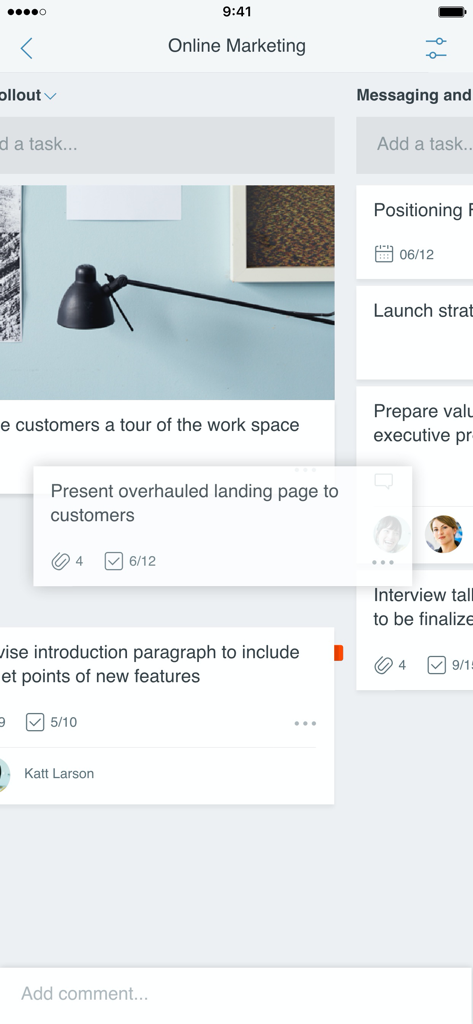
プロジェクトタスク管理のための視覚的なカンバンボードを示す Microsoft Planner モバイルアプリのインターフェース

プロジェクトタスク管理のための視覚的なカンバンボードを示す Microsoft Planner モバイルアプリのインターフェース

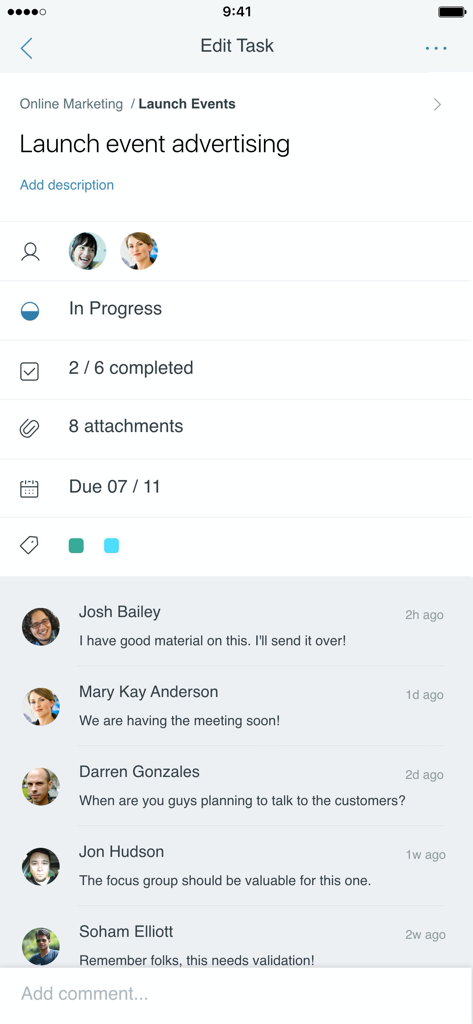
ステータスの進捗状況とチームコメントを含むタスクの詳細を示す Microsoft Planner モバイルアプリのインターフェース

ステータスの進捗状況とチームコメントを含むタスクの詳細を示す Microsoft Planner モバイルアプリのインターフェース

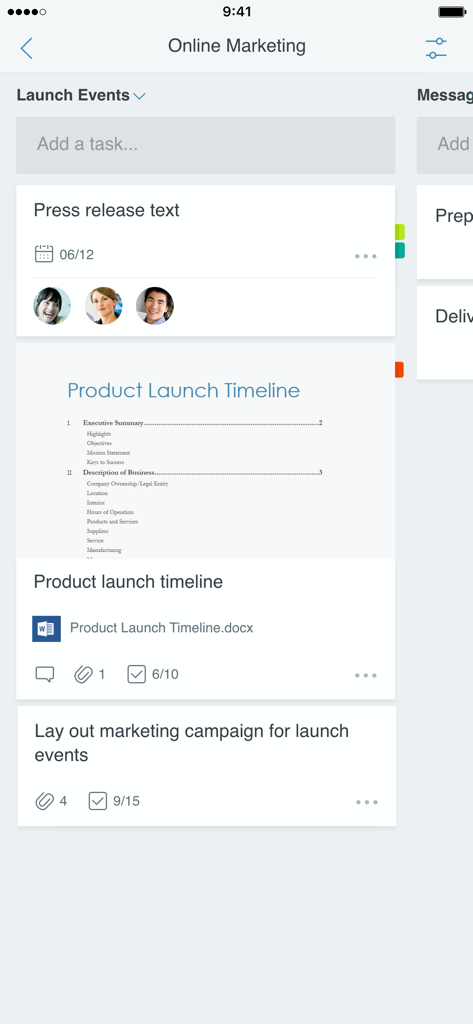
チームの割り当てと添付ファイルを含むオンラインマーケティングプロジェクトのタスクボードを示す Microsoft Planner のモバイルインターフェース

チームの割り当てと添付ファイルを含むオンラインマーケティングプロジェクトのタスクボードを示す Microsoft Planner のモバイルインターフェース

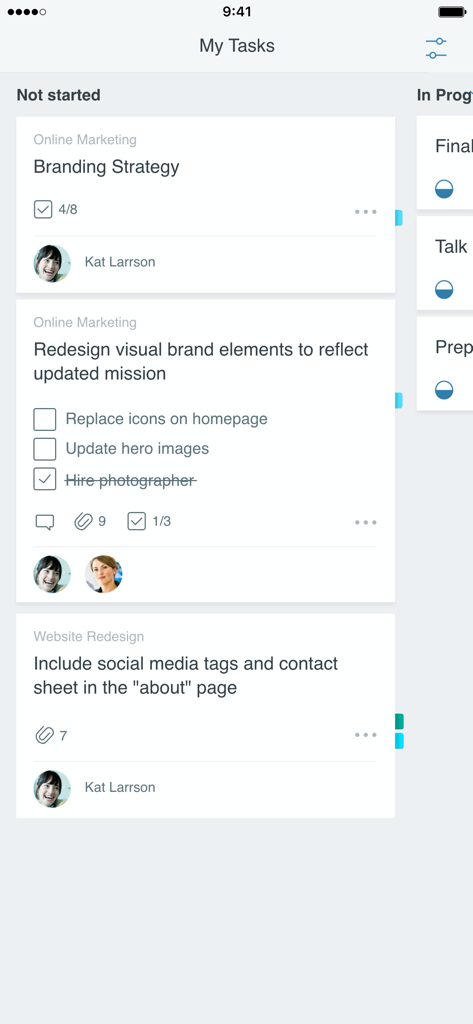
「未開始」列に整理されたタスクカードを含むカンバンボードを示す Microsoft Planner アプリのインターフェース

「未開始」列に整理されたタスクカードを含むカンバンボードを示す Microsoft Planner アプリのインターフェース

視覚的な精度でワークフローをマスター

このアプリを際立たせるツール、 6M+ 人のユーザーが選択.

📊

直感的なカンバンボード

タスクを視覚的なバケットに整理し、シンプルなドラッグ&ドロップ機能でステータスの変更を管理します。

🖇️

シームレスな 365 連携

信頼するセキュアな Microsoft エコシステム内で、ファイル、写真、議論をタスクに直接リンクさせます。

リアルタイムのプロジェクト可視性

すべての計画で誰が何をしているかに関する即時更新を取得し、チームの完全な説明責任を確保します。

世界中のユーザーに愛されています

Trusted by 6M+ 人がこのアプリを愛用しています.

"

"Planner は、私のマーケティングチームが大規模なキャンペーンを処理する方法を完全に変革しました。バケットで進捗状況を視覚化し、タスクを完了にドラッグできるのは信じられないほど満足です。これは、ステータス更新メールの無限ループから最終的に逃れ、実際の作業に集中するために必要だった「唯一の真実の情報源」です。"

サラ・ジェンキンス、マーケティングプロジェクトマネージャー
"

"クライアントサイトとオフィスを行き来する者にとって、モバイル体験は非常に助かります。iPhone でタスクのステータスを更新すると、チームがデスクトップで即座にそれを見ていることがわかります。既存の Office 365 設定と完全に統合されており、共同作業をシームレスかつ安全にします。"

デビッド・リャン、シニアオペレーションコンサルタント

レビュー分析

ユーザーレビューの分析.

感情スコア

16%
ネガティブ

概要

The mobile app receives overwhelmingly negative feedback, primarily due to its significant lack of premium plan compatibility which many users find makes the app "useless". Key criticisms include pervasive performance issues like slow loading times and a critical disparity in features compared to the web version, such as missing task duration, filtering, and reminders. Additionally, users frequently highlight poor integration with other Microsoft services, leading to a disjointed and frustrating user experience. While some appreciate existing functionalities like recurring tasks and the app's potential for quick overviews, the overall sentiment reflects a strong demand for substantial improvements in functionality and performance to match its desktop counterpart.

主なテーマ

Enhanced Mobile Functionality(17)
Premium Plan Functionality Demand(16)
Recurring Task Feature(1)
Multi-Account Support Request(1)
Dark Mode Support Request(1)
Quick Overview Capability(1)
Stability and Clarity(1)

アプリについて

について知っておくべきこと Microsoft Planner.

説明

Microsoft Planner requires an eligible Office 365 work or school subscription. This app does not support Office 365 personal accounts (for example: name@outlook.com or name@hotmail.com). If you are not sure about your company’s subscription or the services you have access to, please contact your IT department. Planner provides a simple, visual way to organize teamwork. Planner makes it easy for your team to create new plans, organize and assign tasks, share files, chat about what you’re working on, and get updates on progress. -- Organize work visually -- Each plan has its own board, where you can organize tasks into buckets. You can categorize tasks based on their status or on whom they’re assigned to. To update the status or change assignments, just drag and drop tasks between columns. -- Visibility -- The My Tasks view provides a comprehensive list of all your tasks and their status across all your plans. When working together on a plan, team members always know who is working on what. -- Collaborate -- Built for Office 365, Planner lets you work together on the same tasks, attach captured photos directly to them, and even have conversations around tasks without switching between apps. With Planner, all your team’s discussions and deliverables stay with the plan and don’t get locked away across disparate applications. -- Works across devices -- Planner works across all your devices. And with Planner, everyone is always on the same page. Continue conversations and updates tasks while on-the-go or at your desk. Terms of service: https://go.microsoft.com/fwlink/?linkid=846830 Privacy policy: https://go.microsoft.com/fwlink/?LinkId=521839 To learn more, please visit https://go.microsoft.com/fwlink/?linkid=849067 The Microsoft Planner app will request permission to access your photos and your camera: When you try to attach a photo to a Planner task, the app requests permission to access your Photos app in order to select images. If you choose to take a photo to attach to a Planner task, the app will request permission to access your Camera app.

最新バージョン

1.17.11

サイズ

150.6 MB

リリース日

2017年5月18日

どこでもチームワークを整理

プロジェクトを効率化する準備はできていますか?職場または学校のアカウントでサインインし、あらゆるデバイスでチームの連携を保つ何百万ものプロフェッショナルに加わりましょう。

ダウンロード: App Storeダウンロード: Google Play
FAQ

よくある質問

について知っておくべきこと Microsoft Planner

Microsoft Plannerとは何ですか?

Microsoft Planner は、チームワークを整理するためのシンプルで視覚的な方法を提供します。チームは、プランを作成し、タスクを整理および割り当て、ファイルを共有し、進捗状況に関する最新情報を取得できます。

Microsoft Planner を利用するには Office 365 サブスクリプションが必要ですか?

はい、Microsoft Planner を利用するには、対象となる Office 365 の職場または学校のサブスクリプションが必要です。Office 365 の個人用アカウントはサポートされていません。会社のサブスクリプションについて不明な場合は、IT 部門にお問い合わせください。

Microsoft Planner はどのようにタスクを整理しますか?

Microsoft Planner はタスクを視覚的に整理します。各プランには独自のボードがあり、タスクはバケットに整理されます。ユーザーは、ステータスまたは担当者別にタスクを分類し、列間でドラッグ アンド ドロップして更新します。

チームは Microsoft Planner 内で共同作業やチャットを行えますか?

はい、Microsoft Planner は Office 365 用に構築されており、チームが直接共同作業できます。ユーザーはタスクを共同で実行し、写真を添付し、異なるアプリケーションを切り替えることなくタスクについて会話できます。

Microsoft Planner は複数のデバイスで利用できますか?

はい、Microsoft Planner はすべてのデバイスで機能します。この機能により、チームメンバーは同期を保ち、モバイルでもデスクにいても会話を続けたりタスクを更新したりできます。

ユーザーは Microsoft Planner で割り当てられたすべてのタスクをどのように表示しますか?

ユーザーは、Microsoft Planner の [マイ タスク] ビューですべての割り当てられたタスクを表示します。これにより、すべてのプランにわたるすべてのタスクとそのステータスの包括的なリストが提供され、個々の貢献の可視性が確保されます。

タスクにファイルや写真を添付できますか?

はい、Microsoft Planner のタスクにファイルや写真を添付できます。アプリは、写真アプリへのアクセス許可を求め、画像を選択するか、カメラアプリを使用して新しい写真を撮り、タスクに直接添付します。