Teleprompter

Teleprompter

다운로드: App Store
Spark by MWM logo
로고: Teleprompter

텔레프롬프터: 완벽한 자신감으로 전문가 수준의 비디오 녹화

완벽한 눈맞춤으로 흠잡을 데 없는 스크립트를 전달하는 4백만 명 이상의 크리에이터 및 전문가와 함께하세요. TikTok, YouTube 또는 Zoom 회의를 위한 것이든, Netflix 및 BBC와 같은 업계 선두 주자들이 신뢰하는 도구를 사용하세요.

개발사

Teleprompter Apps Ltd

카테고리

Productivity

다운로드

4M+

사용자 평점

4.8/5

총 평가 수

96K+

지원 언어

10

전문성을 중심으로

이 인터페이스를 사용하는 4M+ 명의 사용자.

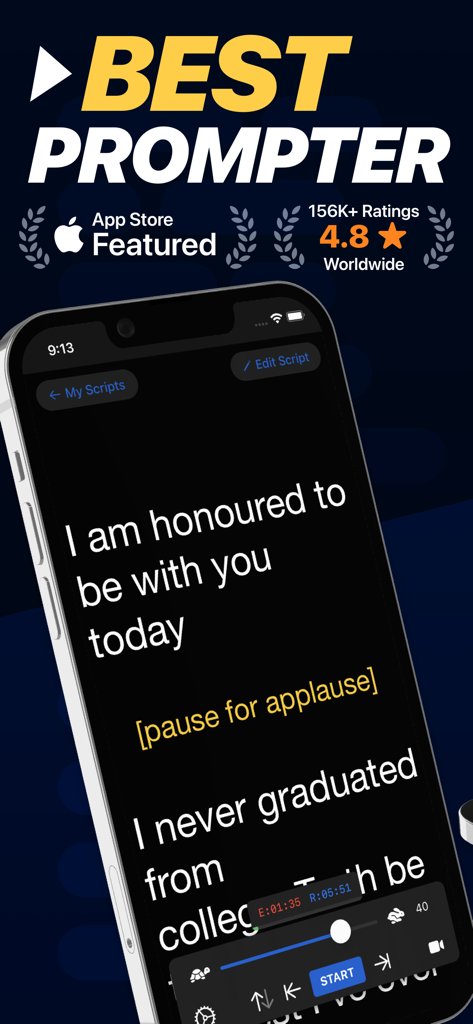
공개 연설을 위한 스크립트와 스크롤 및 속도 제어가 표시된 iPhone의 텔레프롬프터 앱 인터페이스.

공개 연설을 위한 스크립트와 스크롤 및 속도 제어가 표시된 iPhone의 텔레프롬프터 앱 인터페이스.

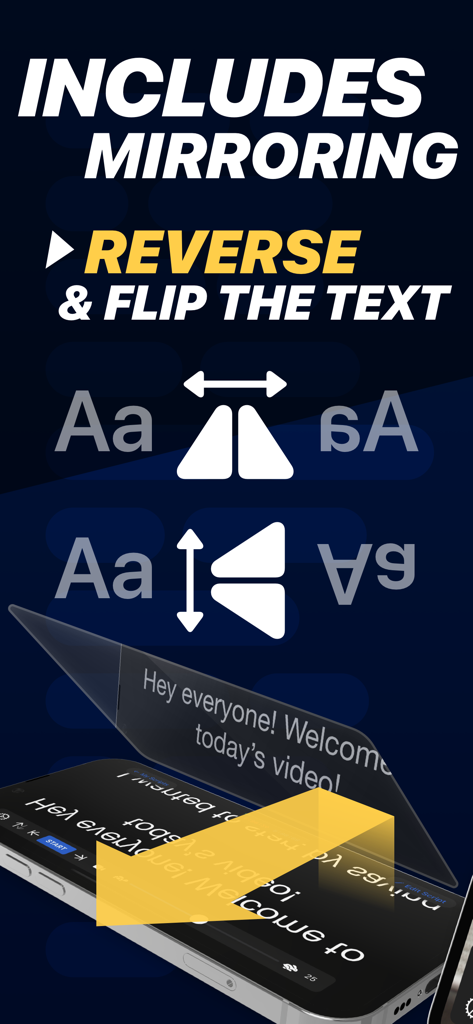
전문 카메라 장비를 위해 텍스트를 미러링하고 반전하는 텔레프롬프터 앱 기능

전문 카메라 장비를 위해 텍스트를 미러링하고 반전하는 텔레프롬프터 앱 기능

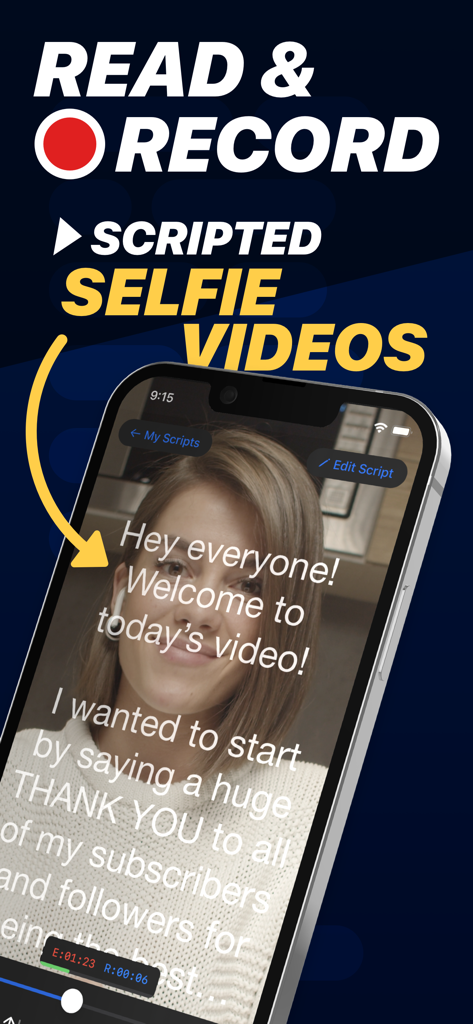
스크롤되는 텍스트와 함께 텔레프롬프터 앱 인터페이스를 사용하여 스크립트가 포함된 셀카 비디오를 녹화하는 여성

스크롤되는 텍스트와 함께 텔레프롬프터 앱 인터페이스를 사용하여 스크립트가 포함된 셀카 비디오를 녹화하는 여성

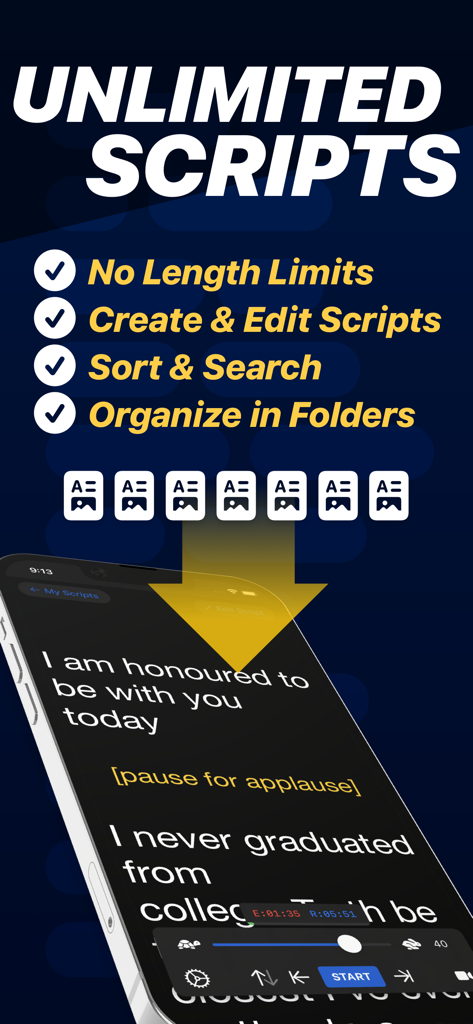
스크롤되는 스크립트와 무제한 스크립트 관리를 위한 기능이 있는 텔레프롬프터 앱을 보여주는 스마트폰.

스크롤되는 스크립트와 무제한 스크립트 관리를 위한 기능이 있는 텔레프롬프터 앱을 보여주는 스마트폰.

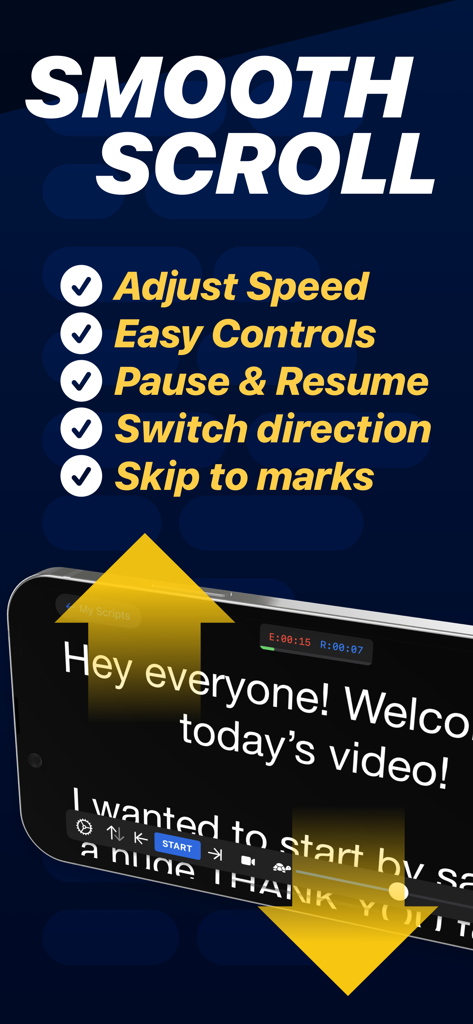
iPhone에서 부드러운 스크롤 기능과 스크립트 제어를 보여주는 텔레프롬프터 앱 인터페이스

iPhone에서 부드러운 스크롤 기능과 스크립트 제어를 보여주는 텔레프롬프터 앱 인터페이스

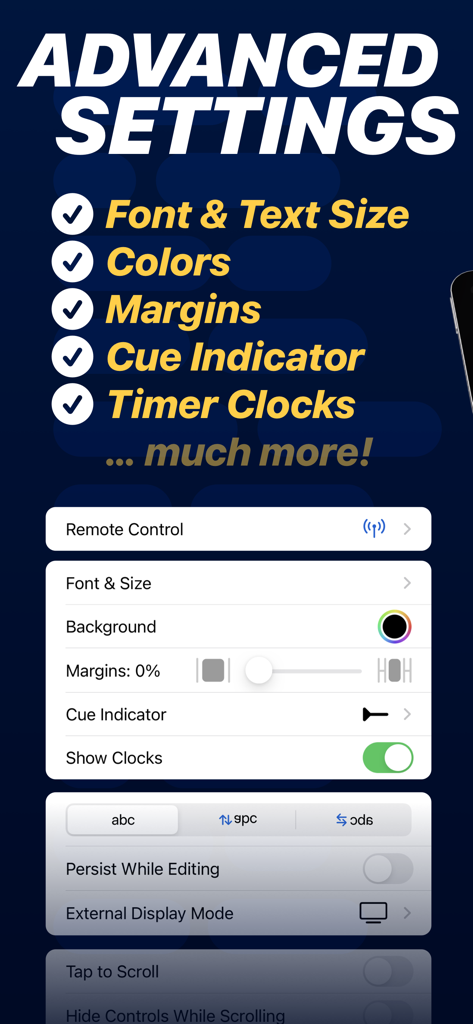
글꼴, 여백 및 큐 표시기 사용자 정의 옵션을 보여주는 텔레프롬프터 앱의 고급 설정 메뉴

글꼴, 여백 및 큐 표시기 사용자 정의 옵션을 보여주는 텔레프롬프터 앱의 고급 설정 메뉴

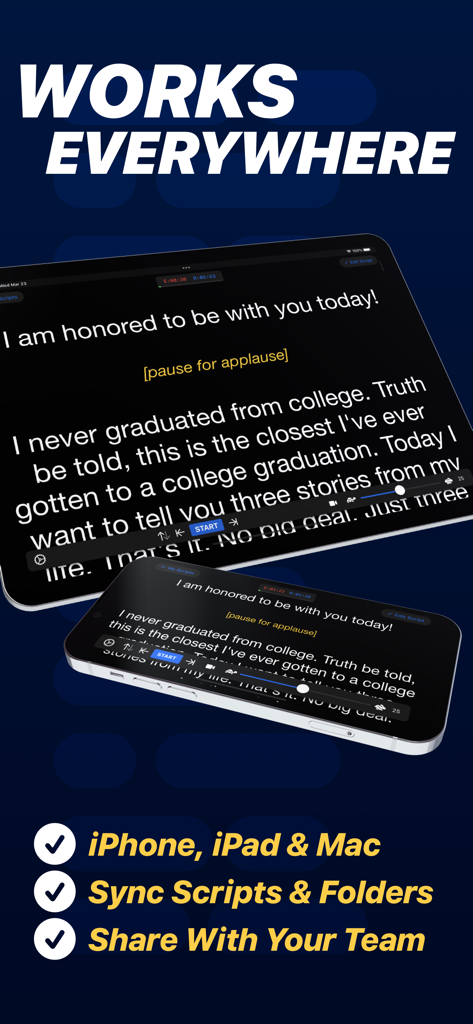
비디오 콘텐츠 제작을 위해 iPhone 및 iPad에서 동기화된 스크립트를 표시하는 텔레프롬프터 앱

비디오 콘텐츠 제작을 위해 iPhone 및 iPad에서 동기화된 스크립트를 표시하는 텔레프롬프터 앱

화면 발표 능력 향상

이 앱을 돋보이게 하는 도구, 4M+ 명의 사용자가 선택.

🤳

몇 초 만에 녹화 및 공유

스크립트를 읽으면서 고품질 비디오를 캡처하고 TikTok, Instagram 또는 YouTube에 직접 게시하여 콘텐츠 흐름을 유지하세요.

👁️

완벽한 눈맞춤

스크립트를 읽는 동안 카메라 렌즈를 주시하여 Zoom 통화 또는 전문 녹화 중에 자신감 있고 몰입감 있게 보이도록 합니다.

🎮

원활한 원격 제어

Apple Watch, 키보드 또는 게임 컨트롤러를 사용하여 속도와 스크립트를 원격으로 조정하여 핸즈프리 및 자연스러운 전달이 가능합니다.

전 세계 사용자들에게 사랑받는 앱

Trusted by 4M+ 명이 이 앱을 사랑합니다.

"

"TikTok 및 YouTube 콘텐츠에 이 앱을 사용하기 시작한 이후로 제작 시간이 절반으로 줄었습니다. 자연스러운 눈맞춤을 유지하면서 길고 상세한 스크립트를 한 번에 녹화할 수 있습니다. 부드러운 스크롤과 쉬운 속도 제어 덕분에 모든 녹화가 전문적으로 느껴집니다."

Marcus Rivera, 소셜 미디어 크리에이터
"

"이것은 원격 프레젠테이션에 필수적인 도구입니다. iPad의 분할 보기 기능을 사용하여 Zoom 회의 바로 옆에 스크립트를 표시하여 고객을 직접 바라보면서도 핵심 내용을 놓치지 않도록 합니다. Word에서 스크립트를 가져오는 것이 빠르고 완벽합니다."

Elena Rodriguez, 선임 마케팅 이사

앱 소개

에 대해 알아야 할 모든 것 Teleprompter.

설명

Turn your device into a Teleprompter for free... Teleprompter is the best free teleprompter app used by creators and studios including Netflix, ABC, CBS, BBC, Fox, ITV, Channel 4, UKTV and many more. Engineered for real-world reliability, Teleprompter is packed with everything you'll need for your content, production or presentation. Available for Free: • Compose, create, and manage unlimited scripts with NO character or length limits • Adjust text size, font, and colour to suit your setup • Import (up to 5) documents in Word, PDF, .txt, and .rtf formats from any app • Record videos using your device camera while reading from the Teleprompter • Save recorded videos directly to Photos or share to apps like Instagram, YouTube, and TikTok • Apply real-time video effects (Virtual Backgrounds, portrait mode) • Scripts scroll smoothly with easy speed control • Scroll up to 120Hz on ProMotion devices • Use any font installed on your device for your teleprompter scripts • Basic control options from connected keyboards and controllers • Export and share scripts easily, or save as backup files • Add cue points to jump to specific parts of your script • Add a countdown timer before scrolling begins • Re-arrange scripts by title, date, or custom order • AirDrop scripts to nearby devices • (Optional) Synchronise your scripts across all your devices automatically via cloud sync • Use Timed Scrolling to scroll your script over a set duration • Display elapsed and remaining time based on scroll speed • Display a reading guide arrow or line with customisable style and position • Set custom default settings (font, colour, layout) for new and imported scripts • Display your scripts full screen by hiding the controls while scrolling • Set a custom background colour behind your script • Adjust side margins to reduce eye movement or fit beam splitter glass • Select between "Continuous" or "Paging" scroll modes • Use the Teleprompter while participating in video meetings (e.g., Zoom or Google Meet) • Use Slide Over or Split View on iPad to multitask with other apps Extra features available with the optional Pro upgrade: • Import unlimited documents in Word, PDF, .txt, and .rtf formats from any app • Mirror or reverse the text for use in professional on-camera Teleprompter rigs • Control the Teleprompter from any web browser on the same WiFi network • Use other nearby iOS devices to monitor and control scrolling and speed via Bluetooth • Control the Teleprompter remotely using keyboard, handheld remote, foot pedal, or gaming controller (including PlayStation and Xbox) • Customisable button/key assignments for remote controls and keyboards • Use Apple Watch to control the scrolling of your script on iPhone • Use the IKAN Elite Remote for scrolling control • Display your script full screen on a connected display or AirPlay TV, with optional independent mirroring • Use the built-in script editor to format text with rich text features like bold, italic, underline, and text colour • Export scripts as Rich Text (.rtf) files for editing on other devices • Connect via HDMI or AirPlay to external displays with "clean feed" • Automatically generate '.srt' captions and subtitles for your videos • Retrieve backups of your recordings from the cloud Designed to be the best free Teleprompter app with mirroring. Teleprompter is designed for presentations, lectures, broadcasters, filmmakers, musicians & singers, business professionals, or any public speaking! Pro Upgrade Purchase: The Teleprompter Pro upgrade is available as a one-time in-app purchase forever, or as a subscription. If you chose to subscribe (optional), you can cancel anytime within the app, or from your Apple ID account settings. Terms: https://teleprompterpro.com/terms Privacy: https://teleprompterpro.com/privacy

최신 버전

3.57.0

크기

59.2 MB

출시일

2015년 2월 17일

한 번의 촬영으로 메시지 마스터하기

자신감과 권위로 말하는 4백만 명 이상의 크리에이터 및 전문가와 함께하세요. 오늘 iPhone 또는 iPad에서 세계에서 가장 신뢰받는 텔레프롬프터를 무료로 다운로드하세요.

다운로드: App Store
FAQ

자주 묻는 질문

에 대해 알아야 할 모든 것 Teleprompter

Teleprompter 앱이란 무엇인가요?

Teleprompter 앱은 사용자의 기기를 무료 텔레프롬터로 변환합니다. Netflix, ABC, BBC와 같은 제작사 및 스튜디오에서 콘텐츠 제작, 프로덕션 및 프레젠테이션에 필수적인 도구로 사용합니다.

Teleprompter 앱은 무료로 사용할 수 있나요?

네, Teleprompter 앱은 무료로 다운로드하여 사용할 수 있습니다. 무제한 스크립트 관리, 텍스트 조정, 비디오 녹화와 같은 핵심 기능이 포함되어 있으며, 추가 Pro 기능은 선택적 업그레이드를 통해 사용할 수 있습니다.

Teleprompter 앱 내에서 직접 동영상을 녹화할 수 있나요?

네, Teleprompter 앱을 사용하면 텔레프롬터에서 읽으면서 기기 카메라를 사용하여 동영상을 녹화할 수 있습니다. 실시간 비디오 효과를 적용하고 녹화를 Photos로 직접 저장할 수도 있습니다.

Teleprompter는 전문 설정을 위해 텍스트 미러링을 지원하나요?

네, Teleprompter 앱은 텍스트를 미러링하거나 반전하는 기능을 지원합니다. 이 기능은 Pro 업그레이드를 통해 사용할 수 있으며, 전문 카메라용 텔레프롬터 장비와 함께 사용하도록 설계되었습니다.

Teleprompter 앱에서 어떤 파일 형식을 가져올 수 있나요?

Teleprompter 앱의 무료 버전은 Word, PDF, .txt 및 .rtf 형식의 문서를 최대 5개까지 가져올 수 있습니다. Pro 업그레이드를 통해 이러한 형식의 문서를 무제한으로 가져올 수 있습니다.

Teleprompter 앱을 원격으로 제어할 수 있나요?

네, Teleprompter 앱은 Pro 업그레이드를 통해 다양한 원격 제어 옵션을 제공합니다. 여기에는 웹 브라우저, Bluetooth를 통한 다른 iOS 기기, 키보드, 풋 페달, 게임 컨트롤러 및 Apple Watch에서의 제어가 포함됩니다.

Teleprompter는 스크립트를 어떻게 처리하나요? 길이 제한이 있나요?

Teleprompter 앱을 사용하면 문자나 길이 제한 없이 무제한 스크립트를 작성, 생성 및 관리할 수 있습니다. 또한 스크립트 설정을 조정하고, 큐 포인트를 추가하고, 재정렬할 수 있습니다.

Teleprompter Pro 업그레이드는 구독인가요, 아니면 일회성 구매인가요?

Teleprompter Pro 업그레이드는 평생 액세스를 위한 일회성 인앱 구매 또는 선택적 구독으로 제공됩니다. 구독은 언제든지 취소할 수 있습니다.

Zoom 또는 Google Meet과 같은 화상 통화 중에 Teleprompter를 사용할 수 있나요?

네, Teleprompter 앱은 화상 회의와 통합됩니다. 사용자는 Zoom 또는 Google Meet과 같은 화상 회의에 참여하면서 Teleprompter를 사용할 수 있습니다.

Teleprompter는 여러 기기에서 스크립트를 동기화하나요?

네, Teleprompter 앱은 선택적 클라우드 동기화를 제공하여 모든 기기에서 스크립트를 자동으로 동기화합니다. 이 기능은 iPhone, iPad 및 Mac 전반에 걸쳐 스크립트를 원활하게 관리하는 데 도움이 됩니다.