
CAD快速看图-CAD手机看图软件



Access DWG files instantly, take precision measurements on-site, and manage your blueprints with 100GB of secure cloud storage right from your iPhone.
Publisher
Category
Graphics & DesignDownloads
258K+User Rating
Total Ratings
2K+Locales
1Discover the interface used by 258K+ users.

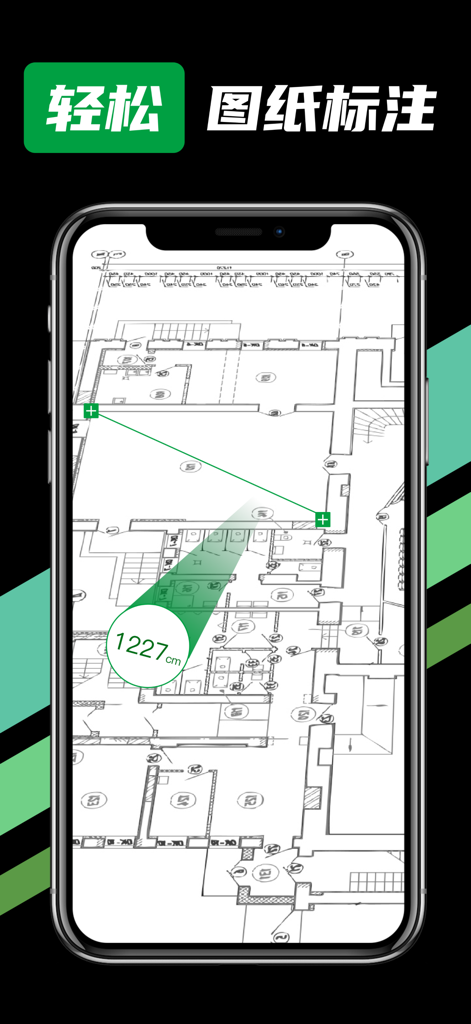

The tools that make this app stand out, trusted by 258K+ users.
Instantly open and view 2D or 3D drawings with smooth panning and zooming, designed for high-pressure site environments.
Calculate heights, lengths, and widths with surgical accuracy directly on your iPhone, eliminating the need for bulky paper blueprints.
Keep all your heavy DWG and DXF files in one place with encrypted storage, ensuring your critical data is safe and accessible offline.
Trusted by 258K+ people who love this app.
"This app has completely changed how I manage my construction sites. I no longer have to carry massive rolls of paper blueprints. The 100GB cloud storage is a lifesaver for my large DWG files, and I can quickly measure any detail right from my iPhone. It's incredibly fast and reliable."
"As an interior designer, I need to be able to show 3D previews to my clients on the spot. Importing drawings from my email is seamless, and the measurement tools are spot-on for verifying dimensions in real-time. It’s the perfect mobile companion to my desktop CAD software."
Insights from user reviews.
Sentiment Score
Summary
The app receives overwhelmingly negative feedback, primarily due to widespread complaints of unauthorized and automatic weekly charges, often 68 RMB, that occur even after app uninstallation or minimal use. Users frequently report significant difficulty canceling subscriptions and securing refunds, exacerbated by a perceived lack of responsive customer support. Additionally, some negative reviews mention critical app malfunctions, such as an inability to open CAD files. Conversely, a small number of positive reviews praise the app for its convenient CAD viewing capabilities, including high-definition display, quick file import, and practical measuring tools.
Common Themes
Everything you need to know about CAD快速看图-CAD手机看图软件.
Description
Latest Version
1.0.4
Size
27.7 MB
First Released
Apr 21, 2023
Join over 250,000 AEC professionals who rely on CAD Fast View. Access 100GB of secure cloud storage and precise measurement tools right on your iPhone today.
Everything you need to know about CAD快速看图-CAD手机看图软件
CAD快速看图 is a mobile application for quickly viewing CAD drawings. It supports various formats like DWG and DXT, allowing users to preview 2D and 3D designs with features for pan, rotate, zoom, and accurate measurement.
CAD快速看图 supports multiple drawing formats, including DWG, DXT, 2D, and 3D files. Additionally, it enables importing and viewing of PDF, JPG, and PNG files from other applications.
Yes, CAD快速看图 includes a drawing measurement function. Users can precisely measure project specifics like height, length, and width directly within the CAD drawings displayed in the app.
CAD快速看图 supports importing CAD drawing files from various third-party applications. Users can easily transfer DWG, PDF, JPG, and PNG files into the app for viewing and management.
Yes, CAD快速看图 offers a dedicated personal cloud disk with a substantial 100GB storage capacity. This cloud service provides encrypted storage for all user drawing files.
CAD快速看图 subscriptions automatically renew at the original package price and duration. To prevent renewal, users must cancel the subscription at least 24 hours before the current VIP period concludes.
The official Privacy Policy for CAD快速看图 is accessible through the provided link: https://docs.qq.com/doc/p/78f492fc3f1a137cd87395f056109be7bbbe2913.
Apps with similar features and user experience

Shapr 3D Zartkoruen Mukodo Reszvenytarsasag

Shanghai Tantian Network Technology Co.,Ltd.

Gstarsoft Co., Ltd

ZWCAD Software Co.,Ltd.

嘉欣 朱

Giles Goddard

镇源 余

Autodesk

Beijing Honghu Yuntu Technology Co., Ltd.