CAD FastView King: DWG Viewer

CAD FastView King: DWG Viewer

Download on App Store
Spark by MWM logo
Logo of CAD FastView King: DWG Viewer
CAD FastView King: DWG Viewer – Professional High-Speed CAD Performance

The ultimate mobile solution for architects and engineers. Access, sync, and convert DWG files instantly with high-definition rendering and seamless iCloud integration. Stay productive from the office to the job site.

Publisher

镇源 余

Category

Productivity

Downloads

62K+

User Rating

4.6/5

Total Ratings

0

Locales

8

Precision in Every Pixel

Discover the interface used by 62K+ users.
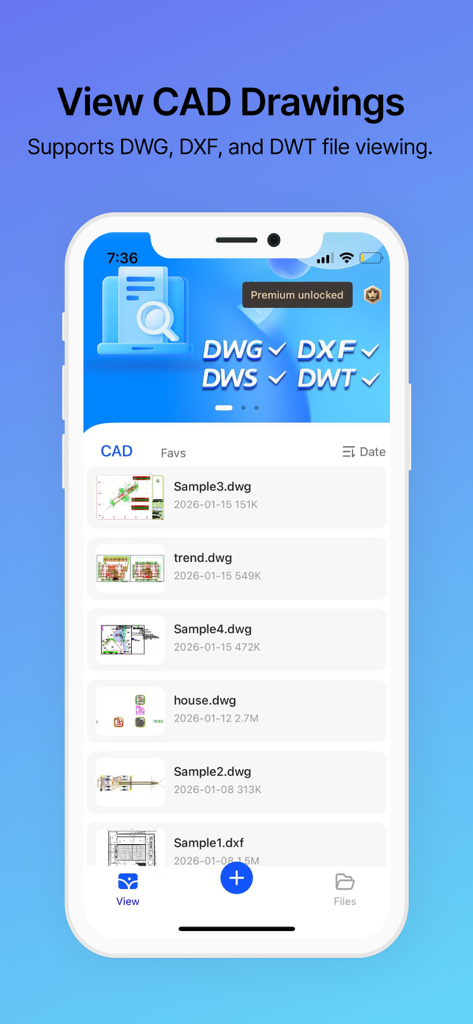
Interface of the CAD FastView King app displaying a list of DWG and DXF drawing files on a smartphone screen

Interface of the CAD FastView King app displaying a list of DWG and DXF drawing files on a smartphone screen

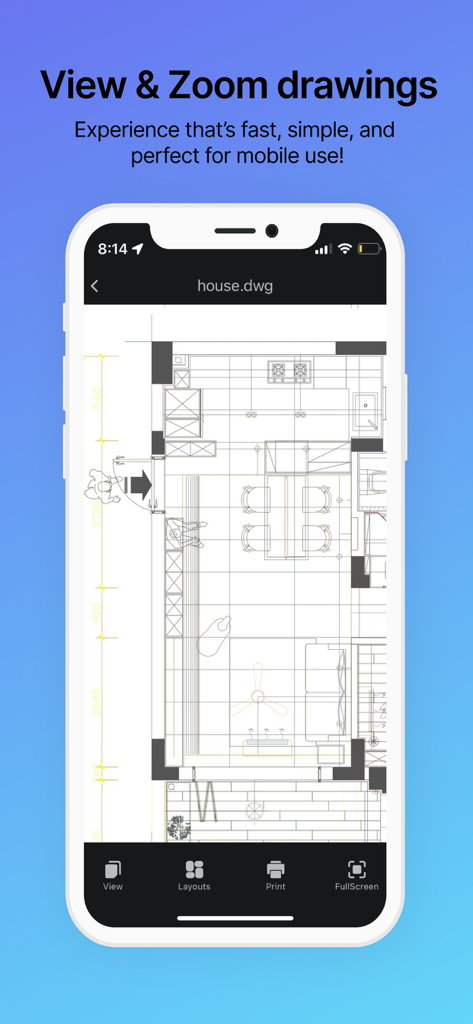
A smartphone screen displaying a detailed architectural floor plan in the CAD FastView King app.

A smartphone screen displaying a detailed architectural floor plan in the CAD FastView King app.

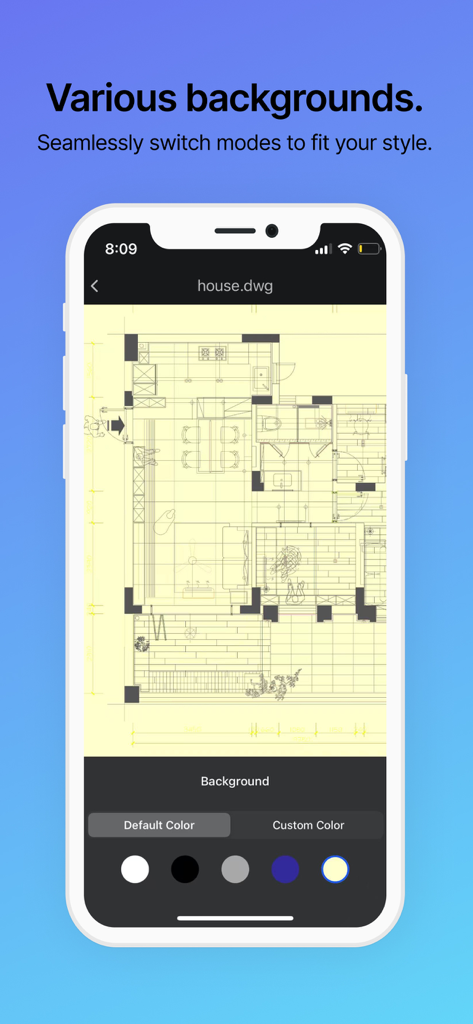
CAD FastView King app interface showing an architectural floor plan with customizable background colors on an iPhone.

CAD FastView King app interface showing an architectural floor plan with customizable background colors on an iPhone.

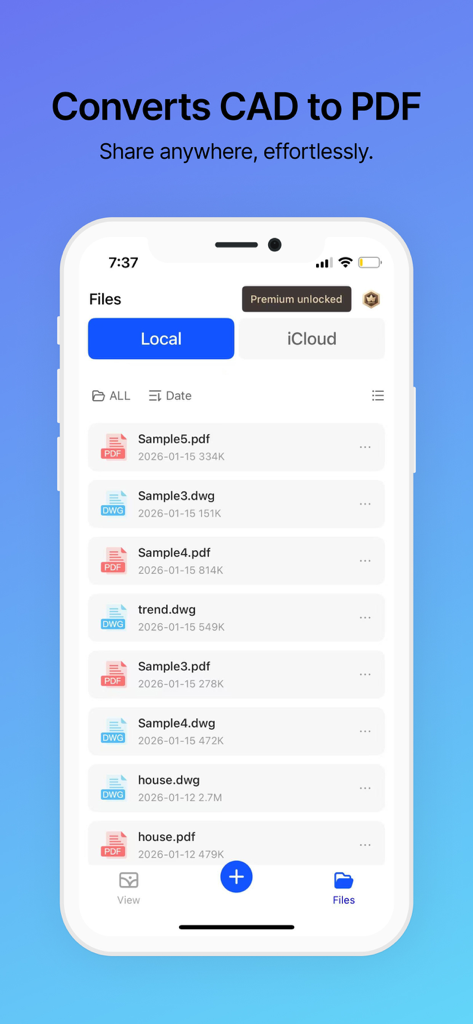
Smartphone screen showing CAD FastView King app with a list of DWG and PDF files and a CAD to PDF conversion header

Smartphone screen showing CAD FastView King app with a list of DWG and PDF files and a CAD to PDF conversion header

Built for the Speed of the Field

The tools that make this app stand out, trusted by 62K+ users.

Instant Rendering Speed

Open complex DWG, DXF, and DWT files in seconds without the bloat. Experience high-definition zooming and smooth layer navigation optimized for mobile hardware.

☁️

Office-to-Site Sync

Leverage native iCloud integration to access your drawings across iPhone, iPad, and Mac. Your latest project revisions are always waiting for you at the job site.

📄

Professional PDF Export

Bridge the gap with clients and contractors by converting technical CAD drawings into high-quality PDFs for instant sharing via email or messaging apps.

Loved by users worldwide

Trusted by 62K+ people who love this app.

"

"As a project manager constantly moving between job sites, this app is a lifesaver. It opens heavy DWG files instantly on my iPad, and the iCloud sync means I always have the latest revisions from the office team without thinking about it. No more carrying rolls of paper blueprints!"

David Martinez, Construction Lead
"

"The CAD to PDF conversion is a game-changer for my client meetings. I can pull up a floor plan, toggle specific layers to show design details, and instantly email a PDF copy to the client right then and there. It has streamlined my entire workflow and looks incredibly professional."

Sarah Chen, Interior Architect

About the app

Everything you need to know about CAD FastView King: DWG Viewer.

Description

"CAD FastView King" is a multifunctional CAD drawing viewing and sharing application that supports a wide range of features, including fast viewing of DWG drawings, PDF conversion and generation, drawing printing, iCloud cloud synchronization, Wi-Fi printing, and more. It can view various formats of drawings such as DWG/DXF/DWT/PDF, and offers features like layer layout, multiple viewing options, and cloud drawing management. Used by millions of professionals worldwide, including architects, engineers, construction specialists, field technicians, and contractors from various industries. Whether it's mechanical drafting, electrical design, civil engineering, or interior decoration, CAD QuickView King can handle it all effortlessly! Committed to creating a mobile product that satisfies CAD users globally, CAD QuickView King provides users with high-quality products and services and continually improves product quality while developing more practical features. Here are the main features of the CAD FastView King application: 1.Fast and efficient: Rapidly browse mainstream CAD drawings, compatible with various formats such as DWG/DXF/DWS/DWT. 2.Perfect display: High-definition and multiple zoom levels for viewing CAD drawing information, eliminating issues with Chinese character encoding. Provides layer layouts and multiple viewing backgrounds. 3.One-click iCloud sync: Easily sync your CAD drawings on iPhone, iPad, and Mac computers. 4.Convert to PDF: Convert CAD drawings to PDF for easier communication and seamless sharing on social media, making CAD drawing exchange hassle-free. 5.Wi-Fi file printing: One-click printing for convenient and hassle-free operation. 6.Instant feedback: Professional customer service is available for online inquiries and quick feedback. ---------------------------------- Premium members will enjoy CAD viewing packages, as follows: 1、Import drawings unlimited times; 2、Unlimited high-definition viewing; 3、Unlimited CAD to PDF conversion; 4、Enjoy permanent pop-up ads; And other functional benefits: wifi printing, cloud synchronization, etc.; Subscription period: one week, one month, one year; Payment: Payment will be made directly through the iTunes account after the user confirms the purchase. Cancel renewal: If you need to cancel the renewal, please manually turn off the automatic renewal function in iTunes/Apple ID settings management 24 hours before the current subscription period expires. Renewal: Apple's iTunes account will be deducted within 24 hours before expiration. After the deduction is successful, the subscription period will be extended by one subscription period. Free Trial: For paid subscriptions during the free trial period, the current trial will automatically end. Privacy Policy: https://www.cadview.cn/privacy_policy.html User Agreement: https://www.cadview.cn/user_agreement.html Subscription Terms: https://www.cadview.cn/SubscriptionTerms.html

Latest Version

1.3.1

Size

28.6 MB

First Released

Aug 30, 2023

Take Your Blueprints From the Desk to the Field

Join thousands of architects and engineers who rely on CAD FastView King for instant DWG access. Experience seamless iCloud sync and effortless PDF sharing on all your iOS devices today.

Download on App Store