Filmmaker Pro - Video Editor

Filmmaker Pro - Video Editor

Download on App Store
Spark by MWM logo
Logo of Filmmaker Pro - Video Editor

Filmmaker Pro: Professional Cinema Editing Power in Your Pocket

Transform your iPhone or iPad into a high-end creative studio. Master 4K video with desktop-grade tools like keyframe animation, motion tracking, and chroma key—all processed locally on your device for total privacy.

Publisher

Tinkerworks Apps

Category

Photo & Video

Downloads

19M+

User Rating

4.6/5

Total Ratings

364K+

Locales

13

Your Mobile Edit Suite

Discover the interface used by 19M+ users.
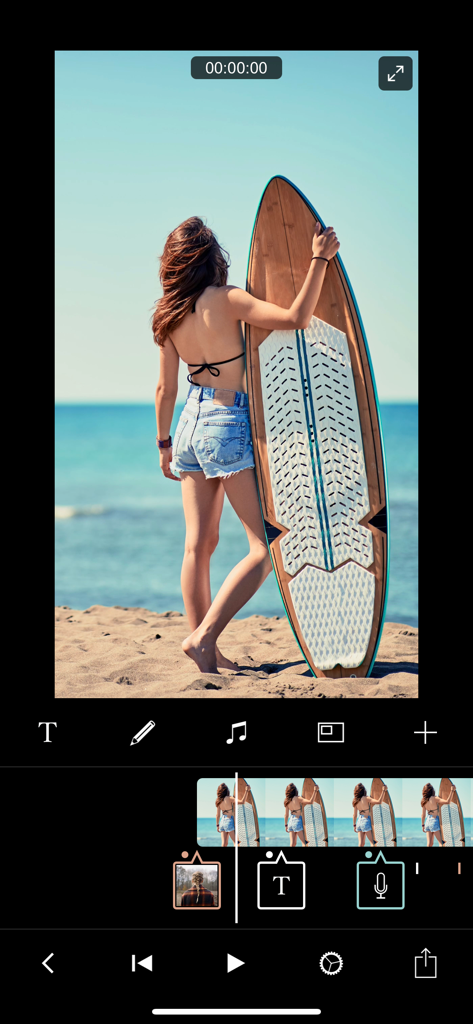
Filmmaker Pro app interface showing a video of a surfer being edited on a multi track timeline with audio and text layers

Filmmaker Pro app interface showing a video of a surfer being edited on a multi track timeline with audio and text layers

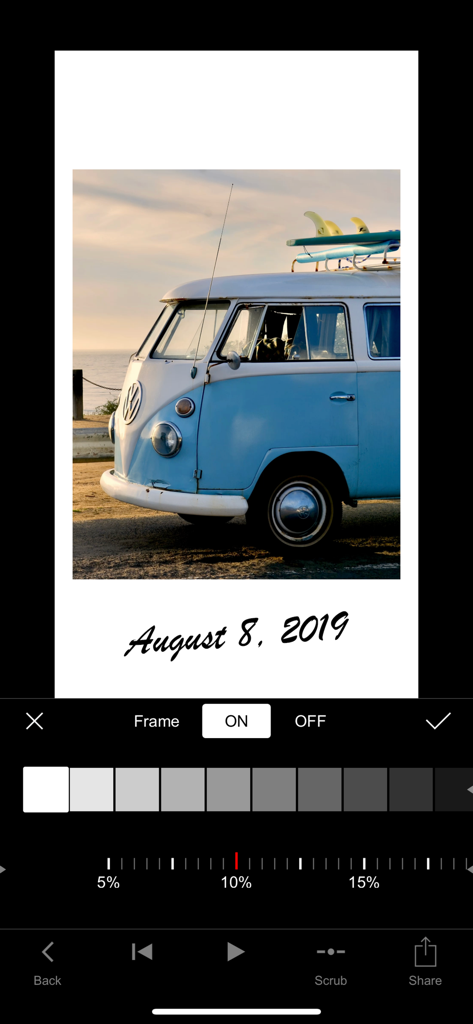
A video editing interface showing a vintage blue van with a white frame and a date text overlay in a script font

A video editing interface showing a vintage blue van with a white frame and a date text overlay in a script font

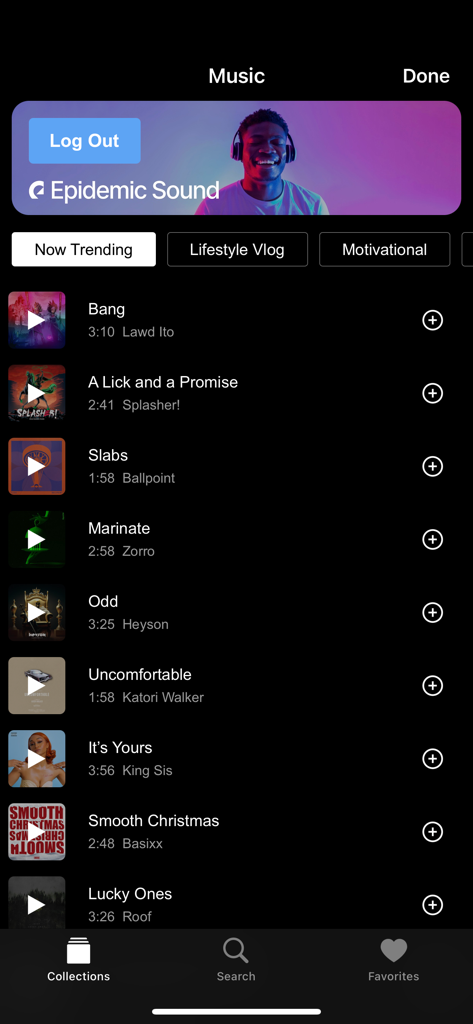
A royalty free music library interface within the Filmmaker Pro app showing Epidemic Sound tracks for video editing

A royalty free music library interface within the Filmmaker Pro app showing Epidemic Sound tracks for video editing

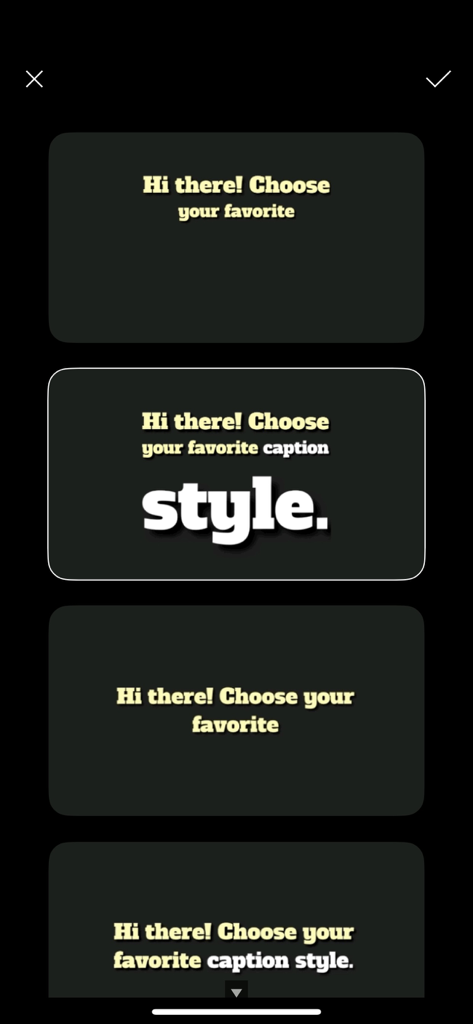
A menu in the Filmmaker Pro app displaying various font and caption style options for video editing.

A menu in the Filmmaker Pro app displaying various font and caption style options for video editing.

Filmmaker Pro app interface showing custom font selection for video text overlays

Filmmaker Pro app interface showing custom font selection for video text overlays

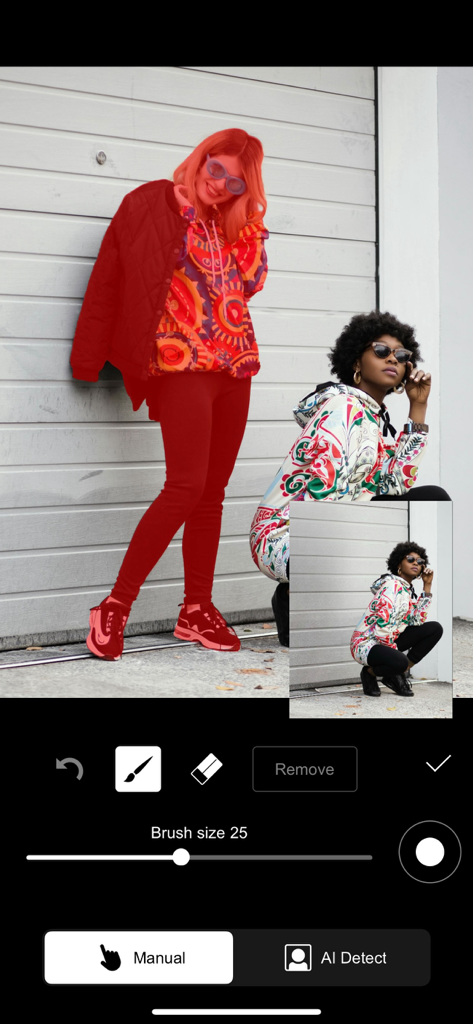
Video editor interface with manual and AI detection masking tools

Video editor interface with manual and AI detection masking tools

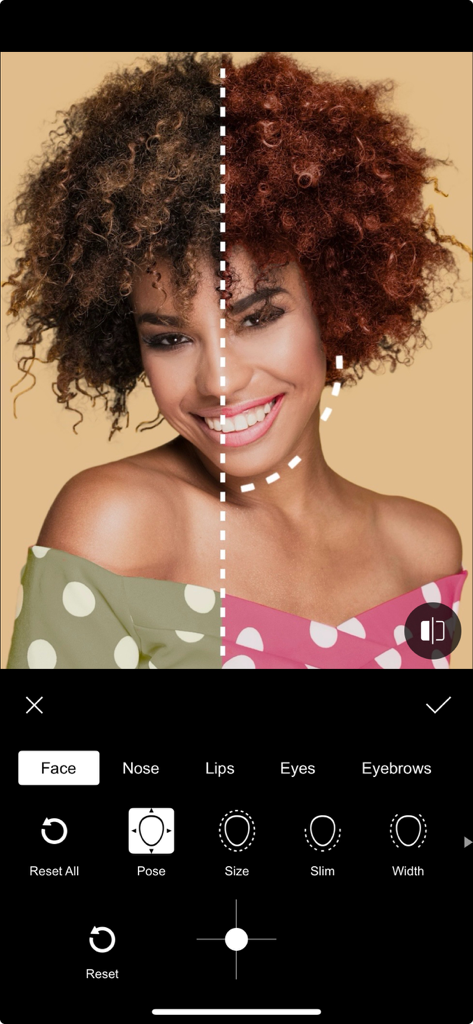
A before and after comparison of facial retouching and reshaping tools within the Filmmaker Pro app interface.

A before and after comparison of facial retouching and reshaping tools within the Filmmaker Pro app interface.

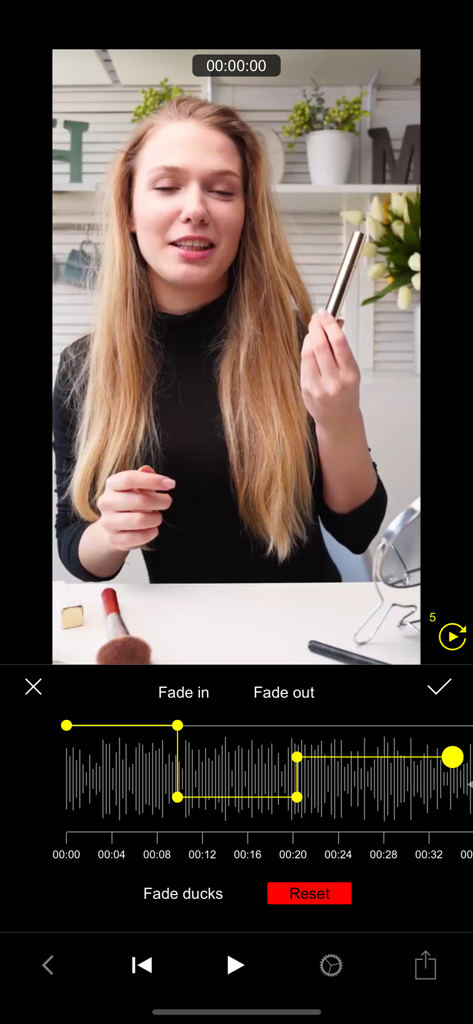
Audio waveform editing interface with fade and ducking controls in Filmmaker Pro

Audio waveform editing interface with fade and ducking controls in Filmmaker Pro

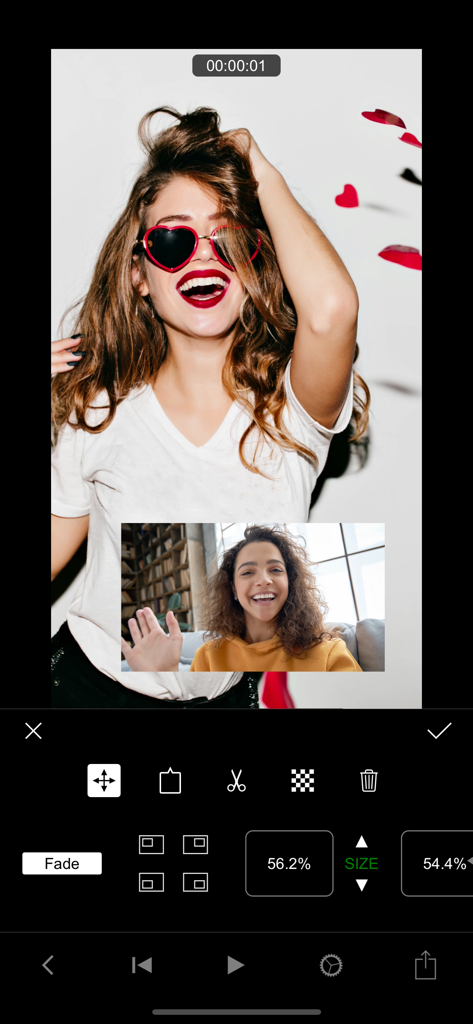
Filmmaker Pro video editor interface showing picture in picture feature with a video overlay

Filmmaker Pro video editor interface showing picture in picture feature with a video overlay

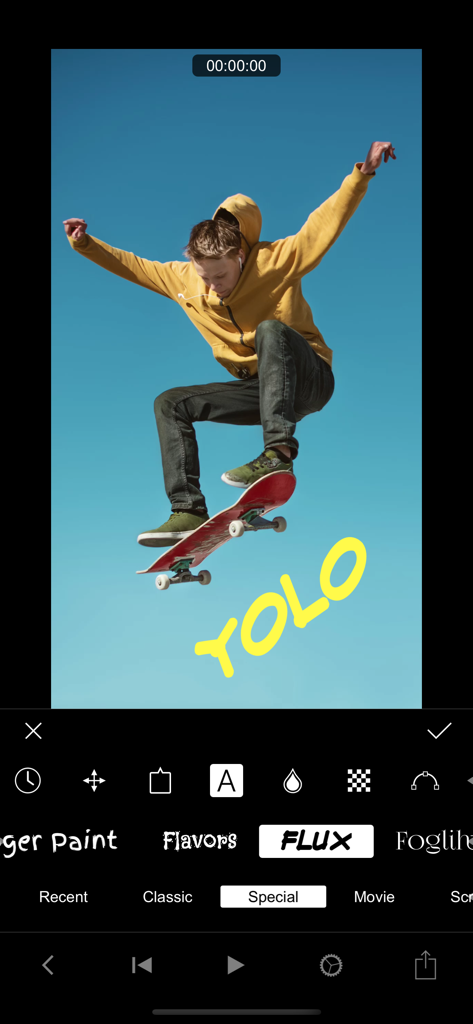
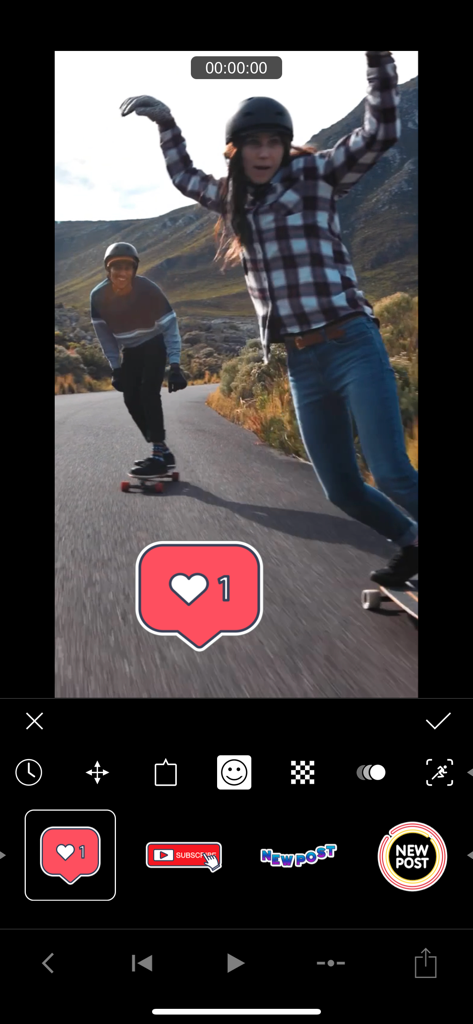
Filmmaker Pro app interface showing social media stickers and editing tools over a skateboarding video

Filmmaker Pro app interface showing social media stickers and editing tools over a skateboarding video

Professional Power in the Palm of Your Hand

The tools that make this app stand out, trusted by 19M+ users.

🎬

Desktop-Grade Editing Control

Master your projects with advanced tools like keyframe animation, motion tracking, and chroma key for high-production results on the go.

🛡️

Privacy-First Local Processing

Your footage stays yours. All AI tasks and video rendering happen entirely on your device with zero data collection, ensuring total digital sovereignty.

🎵

Endless Creative Assets

Scale your brand with 250+ royalty-free music tracks and 200+ unique fonts, allowing you to monetize your content without copyright headaches.

Loved by users worldwide

Trusted by 19M+ people who love this app.

"

"As a creator who values privacy, the local processing feature is what sold me. Filmmaker Pro gives me professional tools like keyframe animation and motion tracking right on my iPhone without compromising my data. It is my go-to for high-quality social content."

Jordan Miller
"

"The iPad Pro integration is flawless. I use the Apple Pencil to add custom drawings and animations to my marketing videos using the Stroke Path tool. The color-coded timeline makes managing complex projects easy, and the output quality is always stunning."

Elena Rodriguez

About the app

Everything you need to know about Filmmaker Pro - Video Editor.

Description

***All processing is done locally on device. We do not collect or store any user data. All AI model are included in the app bundle.*** FEATURES - Create and manage unlimited projects - Manage, share/export projects' underlaying assets through the File Manager view - 4K video support on iPhone SE and later, and iPad Pro - Support for unlimited video clips, audio tracks, voiceovers, and text overlays - Color coded timeline view makes it easy to distinguish assets and manage the timeline - Assets can be easily repositioned using a long press gesture - Ability to select the composition’s export frame rate - Ability to choose the composition’s aspect ratio - Ability to change the composition’s background color - Composition fade in / out options - Auto save ensures that edits are never lost VIDEO EDITOR - 46 professional grade transition options - Trim, split, or duplicate video clips - Adjust video playback speed for a super slow motion or fast motion effect - Volume control - Reverse video tool - 30 expertly crafted filters - Video grading (brightness, contrast, saturation, exposure, and white balance) - Realtime filters and effects playback - Picture-in-Picture Video - Picture-in-Picture Photo - Picture-in-Picture GIF - Photo motion (Ken Burns) - Ken Burns effect for videos - Chroma Key (Green Screen) - Voice-to-text captions - Keyframe animation - Motion tracking - Audio ducking AUDIO TRACKS - 256 royalty-free music tracks - Sound Effects Collection - Trim audio tracks with a fade in / out option - Adjust auto track playback speed - Volume control - Audiometer assisted voiceovers TEXT OVERLAYS - 79 classic fonts - Special Fonts Collection - 92 beautiful custom fonts - Movie Fonts Collection - 15 fonts inspired by popular Hollywood blockbusters - Script Fonts Collection - 16 beautiful script style fonts - Retro Fonts Collection - 26 beautiful retro style fonts - Graffiti Fonts Collection - 21 beautiful graffiti style fonts - Premium Text Animations - 17 advanced text animation options - 9 standard text animation options - "Stroke Path" animation draws text on videos - Pan, pinch and rotate gestures to reposition, resize, and rotate text - The ability to curve text up to 360 ° / -360 ° - Adjustable text duration - Text stroke option (white / black) - Recent font category persistent across projects - Foreground and background color adjustment - Recent color category persistent across projects GRAPHICS & STICKERS - 220 gorgeous graphics and labels - 80 custom animated stickers - in-app purchase - 9 illustration animation options - "Stroke Path" animation draws illustrations on videos - Pan, pinch and rotate gestures to reposition, resize, and rotate text - Adjustable duration - Illustrations outline option - Foreground and background color adjustment - Recent color category persistent across projects DRAWING TOOL - Select brush color, size, and opacity - Works great with Apple Pencil on iPad ALL ACCESS SUBSCRIPTION - You can subscribe for unlimited access to all features and content offered for purchase within Filmmaker Pro. - Subscriptions are billed monthly or annually at the rate selected depending on the subscription plan. - Subscriptions auto-renew at the cost of the chosen package, unless cancelled 24-hours prior to the end of the current period. The subscription fee is charged to the iTunes account at confirmation of purchase. You may manage your subscription and turn off auto-renewal by going to your Account Settings after purchase. - Once purchased, refunds will not be provided for any unused portion of the term. Privacy Policy: http://www.filmmakerproapp.com/privacy-policy Terms of Use: http://www.filmmakerproapp.com/terms--conditions

Latest Version

12.5.3

Size

1.2 GB

First Released

Apr 7, 2016

Start Creating Your Masterpiece Today

Join over 19 million creators who trust Filmmaker Pro for desktop-grade editing with total privacy. No data collection, just pure creative power on your iPhone and iPad.

Download on App Store
FAQ

Frequently Asked Questions

Everything you need to know about Filmmaker Pro - Video Editor

Does Filmmaker Pro collect or store user data?

No, Filmmaker Pro does not collect or store any user data. All processing occurs locally on the device, and all AI models are included within the app bundle.

Does Filmmaker Pro support 4K video editing?

Yes, Filmmaker Pro supports 4K video editing. This feature is available on iPhone SE and later models, as well as all iPad Pro devices.

What video editing features are available in Filmmaker Pro?

Filmmaker Pro offers a wide range of video editing capabilities, including trimming, splitting, duplicating clips, adjusting playback speed, volume control, reverse video, 46 transitions, 30 filters, video grading, and real-time effects playback.

Does Filmmaker Pro - Video Editor have a green screen feature?

Yes, Filmmaker Pro includes Chroma Key (Green Screen) functionality. This feature allows users to perform green screen effects directly within the app.

How many royalty-free music tracks are included with Filmmaker Pro?

Filmmaker Pro offers 256 royalty-free music tracks and a Sound Effects Collection for use in your projects. Users can trim audio tracks and adjust playback speed.

Does Filmmaker Pro offer Picture-in-Picture effects?

Yes, Filmmaker Pro provides Picture-in-Picture (PiP) functionality. This includes support for Picture-in-Picture Video, Picture-in-Picture Photo, and Picture-in-Picture GIF effects.

Are there text animation options in Filmmaker Pro?

Filmmaker Pro provides 17 premium text animation options, 9 standard text animation options, and a "Stroke Path" animation for drawing text on videos. Users can curve text and adjust its duration.

Does Filmmaker Pro - Video Editor have an auto-save feature?

Yes, Filmmaker Pro includes an auto-save feature. This ensures that all edits made within the app are continuously saved and not lost during usage.

Is motion tracking available in Filmmaker Pro?

Yes, Filmmaker Pro offers motion tracking. This advanced video editing feature is included to allow users to track movement within their videos.

Does Filmmaker Pro support audio ducking?

Yes, Filmmaker Pro includes audio ducking. This feature allows users to automatically reduce the volume of background audio when a voiceover or other primary audio track is present.

Does Filmmaker Pro include face editing tools?

Yes, Filmmaker Pro offers various face editing tools, including options to adjust nose, lips, eyes, and eyebrows for pose, size, slimness, and width.

How does the Filmmaker Pro All Access Subscription work?

The All Access Subscription in Filmmaker Pro is billed monthly or annually, based on the selected plan. Subscriptions auto-renew unless cancelled 24 hours before the current period ends.

How do I cancel my Filmmaker Pro subscription?

You can manage your Filmmaker Pro subscription and turn off auto-renewal by accessing your Account Settings after purchase through iTunes.