Media Converter - video to mp3

Media Converter - video to mp3

Download on App Store
Spark by MWM logo
Logo of Media Converter - video to mp3
Media Converter - video to mp3: Your All-in-One Power Tool for Every File

Join over 6 million users who effortlessly convert, compress, and edit media on the go. Extract high-quality MP3s, create custom ringtones, and reclaim your storage with the most versatile Swiss Army Knife for your mobile device.

Publisher

俊杰 阮

Category

Utilities

Downloads

6M+

User Rating

4.7/5

Total Ratings

118K+

Locales

49

The Ultimate Media Toolkit

Discover the interface used by 6M+ users.
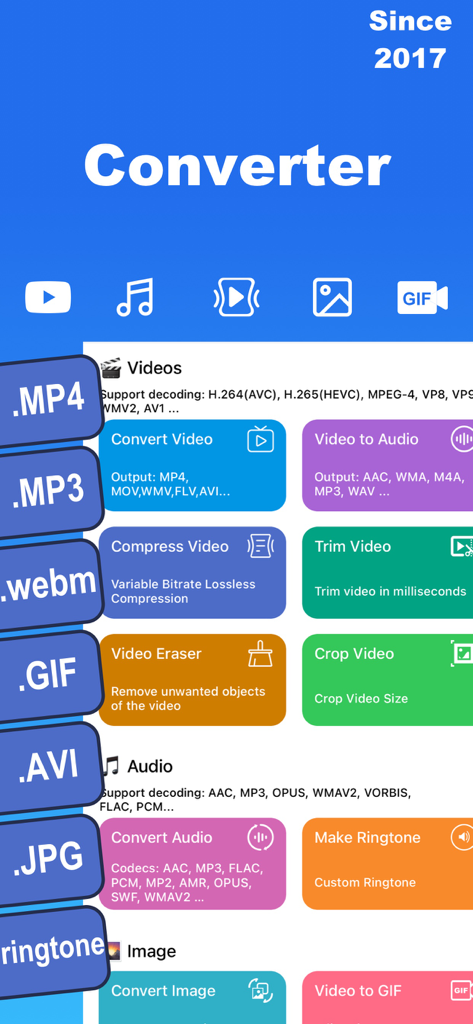
Interface of Media Converter app showing video and audio conversion compression and ringtone maker tools

Interface of Media Converter app showing video and audio conversion compression and ringtone maker tools

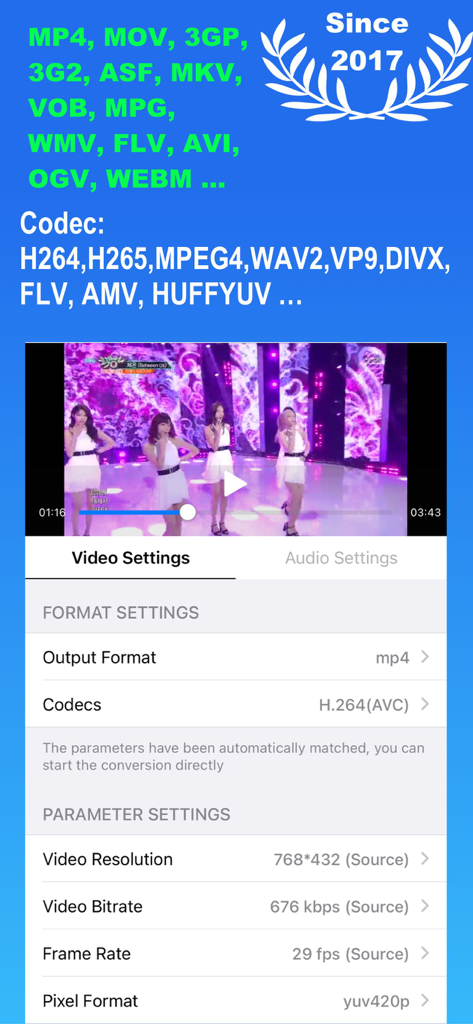
Mobile app interface of Media Converter showing video format settings and codec adjustment options.

Mobile app interface of Media Converter showing video format settings and codec adjustment options.

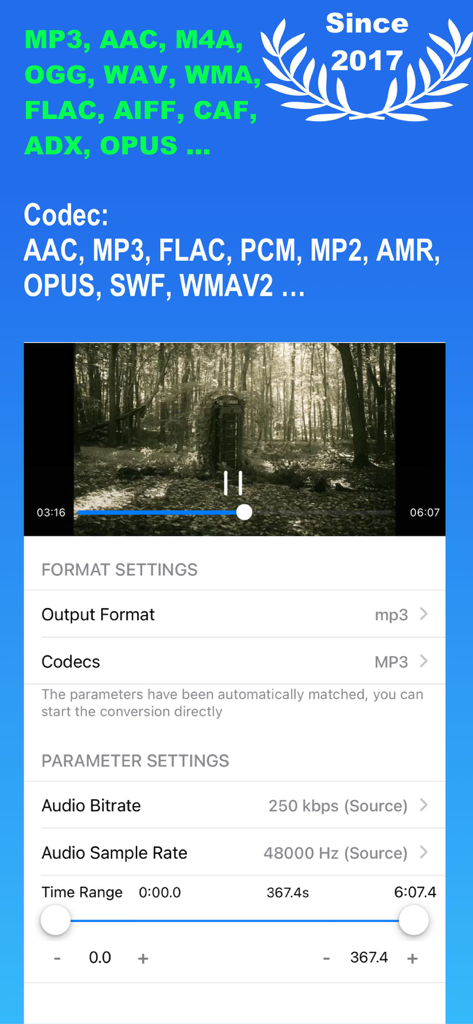
Audio conversion and parameter settings interface in Media Converter app showing bitrate and trimming options.

Audio conversion and parameter settings interface in Media Converter app showing bitrate and trimming options.

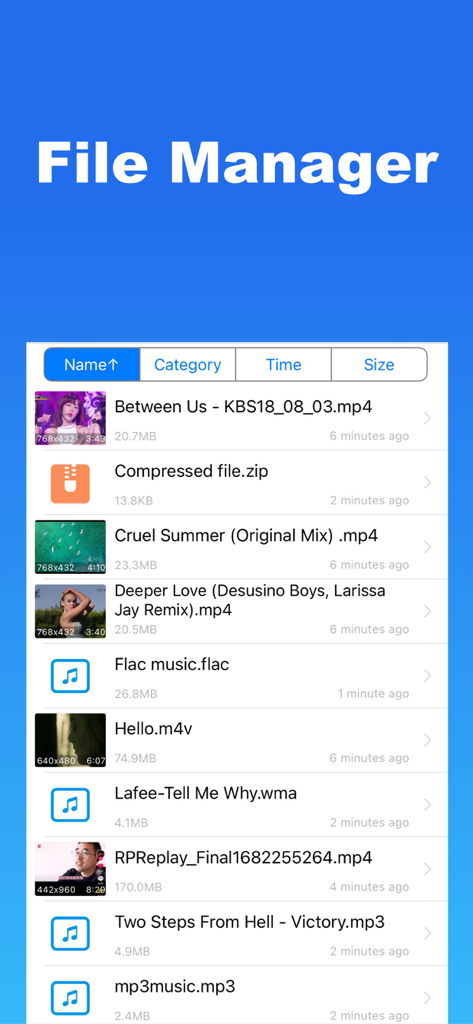
Media Converter app file manager screen displaying a list of video audio and compressed files

Media Converter app file manager screen displaying a list of video audio and compressed files

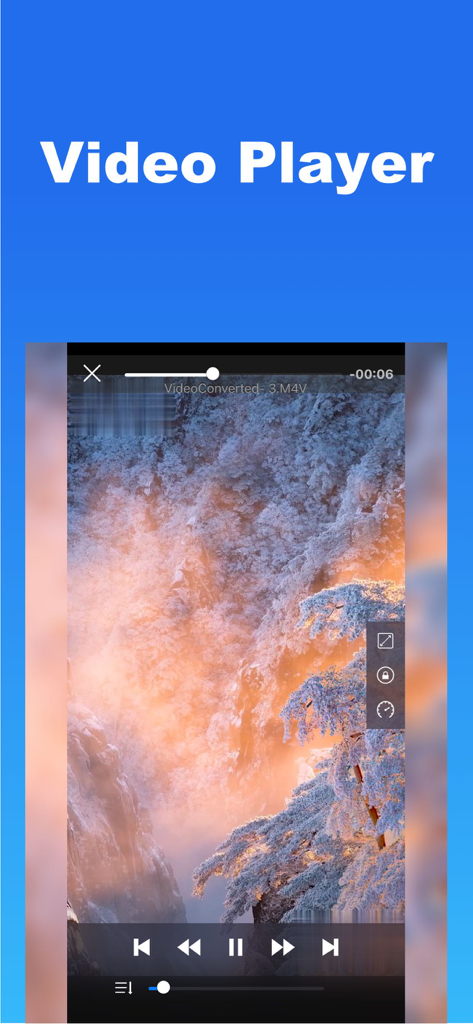
Built in video player interface with playback controls showing a scenic mountain landscape

Built in video player interface with playback controls showing a scenic mountain landscape

Master Your Media Without Limits

The tools that make this app stand out, trusted by 6M+ users.

🔄

Convert Any Format Instantly

Bridge the gap between your devices. Seamlessly switch between MP4, MOV, MKV, and MP3 to ensure your files work everywhere, every time.

📦

Reclaim Your Storage Space

Shrink massive 4K videos and heavy media files without losing a pixel of quality. Perfect for keeping your iPhone fast and your iCloud empty.

✂️

Extract, Trim & Personalize

Turn any video into a custom ringtone, a viral GIF, or a standalone audio track. Professional editing tools simplified for your mobile workflow.

Loved by users worldwide

Trusted by 6M+ people who love this app.

"

"As a social media manager, I'm constantly needing to pull audio from clips or turn videos into GIFs for my stories. This app is a total game-changer! It handles every format I throw at it, and the Wi-Fi transfer makes moving files to my laptop effortless. It's the Swiss Army Knife of media apps."

Chloe Rodriguez
"

"I originally downloaded this just to make a custom ringtone, but it has quickly become my most-used utility. The video compressor saved me gigabytes of iCloud space, and being able to open ZIP files and convert PDFs in the same app is incredibly convenient for my work. Worth every penny."

Mark Stevens

About the app

Everything you need to know about Media Converter - video to mp3.

Description

Media Converter – Video Converter, Convert all your videos, audios, images, GIFs, and PDFs. Convert video & audio & picture encoding, compress video, extract audio and create custom ringtones with music. All-in-one solution combining file format converter, audio extractor, media editor, ringtone maker and Video Player. ◆ Video Converter & Video transcoder - Convert videos between all popular formats: MP4, MOV, 3GP, 3G2, ASF, MKV, VOB, MPEG, WMV, FLV, AVI, OGV, WEBM, MPG.. - Video Encoders: H.264(AVC), H.265(HEVC), MPEG-2,MPEG-4, H.263+, AV1, WMV2, VP8, VP9,THEORA, XVID, DIVX and others. ◆ Audio Converter & Ringtone Maker - Extract audio from recorded videos, output format: MP3, M4A, OGG, WAV, FLAC, WMA, AIFF, CAF, ADX, AC3, AAC, M4R, M4A, OPUS. - Audio Encoders : AAC, MP3, MP2, AMR, Opus, SWF, WMAV2, WMAV1, Vorbis, SPEEX, DCA, EAC3, FLAC, PCM_S16LE, PCM_S16BE. - Edit metadata (title, artist, album, cover artwork). - Make ringtone: Extract audio from videos and trim to create personalized ringtones. ◆ Image & PDF Converter - Convert images to/from JPG(JPEG), PNG, HEIC, WEBP, and more. - Turn images into PDFs or extract pages from PDF to images. - Video to GIF: Convert any video clip into a high-quality animated GIF for sharing or messaging. ◆ Video Player - Play any video or music file smoothly with built-in player. - Supports playlists, offline playback, and all major formats. ◆ Compressor & More Tools - Compress video files without losing quality. - Adjust resolution, frame rate, and bitrate to save storage. - Trim Modes: Trim Both Ends, Trim the Middle. - Video Eraser: Remove unwanted objects from the video. - Change Video aspect ratio: Resize video with blur, crop, or padding. - Change Speed: Speed up or slow down the video or audio. - Merge or cut videos and audios. - More Tools: Crop video size, flip or rotate video. - Archive Extractor: Open and manage ZIP, RAR, 7Z, and other archive file formats. ◆ File Management & Transfer - Batch import, Wi-Fi transfer, and file sharing between phone and computer. - Import recorded videos from your device gallery. - Backup to iCloud Drive for safe storage. == Upgrade to Pro == Lifetime Pro: One-time purchase with permanent access. Subscription: - Annual auto-renewable subscription, automatic renewal upon expiration. - After the purchase of the subscription item is confirmed, the subscription fee will be credited to your iTunes account. The subscription will automatically renew unless the automatic renewal feature is turned off at least 24 hours before the end of the current time period. The account will be charged for renewal within 24 hours before the end of the current period.Subscriptions may be managed by the user and auto-renewal may be turned off by going to the user's Account Settings after purchase. Privacy Policy:https://mediaconvertserver.web.app/privacypolicy.html Terms of Use:https://mediaconvertserver.web.app/terms.html Contact us: junjie_ruan@163.com

Latest Version

4.12

Size

124.3 MB

First Released

Oct 10, 2017

One App. Every Format. No Limits.

Stop struggling with 'file not supported' errors. Join over 6 million users who convert, compress, and master their media with the ultimate mobile toolkit.

Download on App Store
FAQ

Frequently Asked Questions

Everything you need to know about Media Converter - video to mp3

What is Media Converter - video to mp3?

Media Converter - video to mp3 is an all-in-one app that converts videos, audios, images, GIFs, and PDFs. It also features a media editor, ringtone maker, and video player.

Can Media Converter convert video formats?

Yes, Media Converter converts videos between popular formats like MP4, MOV, 3GP, MKV, and AVI. It supports encoders such as H.264, H.265, MPEG-4, and AV1.

Does Media Converter allow audio extraction from videos?

Yes, Media Converter extracts audio from recorded videos. Output formats include MP3, M4A, OGG, WAV, and FLAC. It supports various audio encoders.

Can I create custom ringtones with Media Converter?

Yes, Media Converter allows users to create personalized ringtones. It extracts audio from videos and provides trimming tools to customize the ringtone length.

What image formats does Media Converter support?

Media Converter supports converting images to and from JPG, PNG, HEIC, and WEBP formats. It also converts images into PDFs or extracts pages from PDFs to images.

Does Media Converter include a video compressor?

Yes, Media Converter includes a video compressor. It compresses video files without losing quality and allows adjustment of resolution, frame rate, and bitrate to save storage.

What subscription options are available for Media Converter?

Media Converter offers a Lifetime Pro one-time purchase for permanent access. An annual auto-renewable subscription is also available, charging the iTunes account upon confirmation.

Can I manage my files within the Media Converter app?

Yes, Media Converter features file management tools. It supports batch import, Wi-Fi transfer, file sharing, and iCloud Drive backup for safe storage.

Does Media Converter have a built-in video player?

Yes, Media Converter includes a built-in video player. It plays any video or music file smoothly and supports playlists and offline playback.

How can I remove unwanted objects from videos using Media Converter?

Media Converter provides a "Video Eraser" tool for this purpose. Users can utilize this feature to remove unwanted objects directly from their videos.