Video Compress - Shrink Vids

Video Compress - Shrink Vids

Download on App Store
Spark by MWM logo
Logo of Video Compress - Shrink Vids

Video Compress - Shrink Vids: Reclaim Your Storage and Keep Every Memory

Stop paying for extra iCloud space and ending up with 'Storage Full' warnings. Easily shrink large 4K videos to save gigabytes of space while keeping high quality for sharing on WhatsApp, iMessage, and Instagram.

Publisher

Brachmann Online Marketing GmbH & Co. KG

Category

Photo & Video

Downloads

1M+

User Rating

4.6/5

Total Ratings

32K+

Locales

8

Clear the Clutter

Discover the interface used by 1M+ users.

Main interface of Video Compress app showing a plus button to select videos for compression

Main interface of Video Compress app showing a plus button to select videos for compression

A video selection screen showing recent clips in the Video Compress app

A video selection screen showing recent clips in the Video Compress app

A screen showing a video gallery with a selected video ready for compression.

A screen showing a video gallery with a selected video ready for compression.

Video compression app interface showing bitrate adjustment and estimated file size reduction

Video compression app interface showing bitrate adjustment and estimated file size reduction

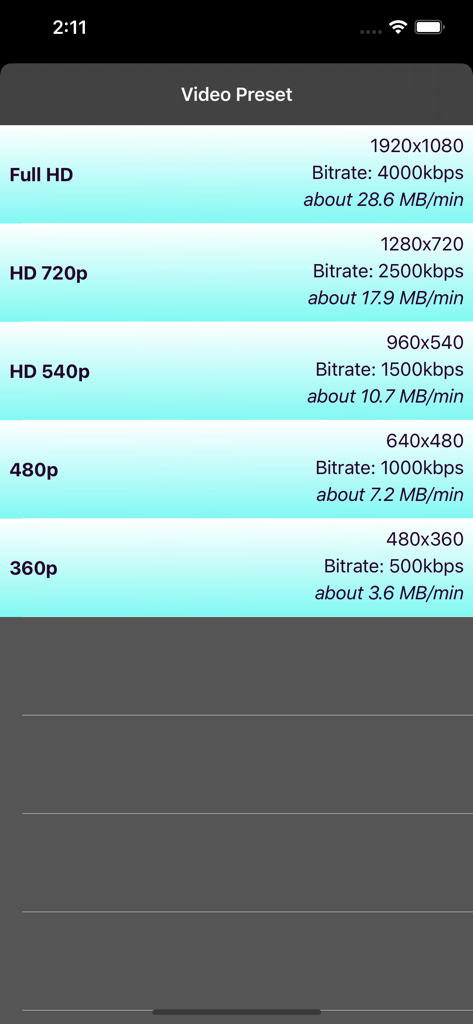
A list of video compression preset options showing resolution, bitrate and estimated file size per minute.

A list of video compression preset options showing resolution, bitrate and estimated file size per minute.

Interface showing options to preview original and compressed video quality

Interface showing options to preview original and compressed video quality

Interface of the Video Compress app showing a video being compressed with a progress bar and cancel button

Interface of the Video Compress app showing a video being compressed with a progress bar and cancel button

App screen showing a successful video compression message with options to delete the original video and finish the process.

App screen showing a successful video compression message with options to delete the original video and finish the process.

Take Back Control of Your Storage

The tools that make this app stand out, trusted by 1M+ users.

📦

Instant Storage Recovery

Batch compress entire albums and automatically remove bulky originals to reclaim gigabytes of space instantly.

💬

Seamless Social Sharing

Stop fighting with file limits. Shrink videos to the perfect size for WhatsApp, iMessage, and Instagram in one tap.

Pro Quality, Small Size

Maintain stunning HD visuals while reducing file weight. Choose your resolution and preview the space you save before you hit go.

Loved by users worldwide

Trusted by 1M+ people who love this app.

"

"I was constantly getting the 'Storage Full' notification because of all the videos of my kids. This app is a lifesaver! I managed to shrink my entire library without losing the quality I care about. Now I don't have to keep paying for extra iCloud space every month."

Sarah M.
"

"Finally, an easy way to send long clips to my friends on Discord and WhatsApp! The batch compression feature is super fast, and I love that it can automatically delete the huge original files for me. Definitely a must-have utility for my iPhone."

Jason K.

About the app

Everything you need to know about Video Compress - Shrink Vids.

Description

Simply shrink videos to save disk space. Download now for free! Your storage is almost full or you want to reduce the size of a video to send it with Whatsapp, iMessage, or post it on Facebook or Instagram? This app will solve your problem. Also use this app as an alternative if your cloud storage on iCloud, Google Photos, Dropbox, OneDrive, etc. is full. With this app, you can fit many more videos there by compressing them before uploading, without significant loss of quality. Overview: - Compress a single video, multiple videos or entire albums to save storage on your device - Customize strength of compression (resolution and bitrate) - Preview to check image quality of the compressed video - Preview of disk space before and after compression - Simple & intuitiv - If you like, the app can also delete the original video for you so that only the compressed ones will be kept. Please note that deleted videos may still appear in the album "Recently Deleted". Delete them as well to save disk space. - Compatible with iPhone, iPad, iPod - Also works with 4K videos that have been recorded with iPhone/iPad The following presets are available to compress your videos: - Full HD 1080p (1920x1080 Pixel) - HD 720p (1280x720 Pixel) - HD 540p (960x540 Pixel) - 480p (640x480 Pixel) - 360p (480x360 Pixel) In addition to that you can also specify the bitrate to compress your videos. The app shows you the new memory space of the compressed video. Also you have a video preview to check the image quality. Download now for free and save storage on your device! PLEASE NOTE: The app was made to compress original videos that had been recorded with the original camera app of your iPhone/iPad and may not always be able to compress videos from other sources or videos that had previously been edited. Please don't select too many videos at once. Please always try to compress a short video from the same source and see if it works before you make a purchase within the app. Standard Apple Terms of Use (EULA): https://www.apple.com/legal/internet-services/itunes/dev/stdeula/

Latest Version

2.4

Size

4.7 MB

First Released

Jun 13, 2015

Say Goodbye to "Storage Almost Full" Notifications

Reclaim your iPhone storage and share your favorite videos instantly. Join over 1 million users who save space without losing quality. Download for free today!

Download on App Store
FAQ

Frequently Asked Questions

Everything you need to know about Video Compress - Shrink Vids

How to use Video Compress - Shrink Vids?

Users tap the "+" icon to select videos from their gallery. They then choose a compression preset and adjust the bitrate. After previewing, they continue to compress, and the app saves the compressed videos.

Does Video Compress - Shrink Vids cost money?

No, Video Compress - Shrink Vids is free to download and use. The app description explicitly states, "Download now for free!"

Can Video Compress - Shrink Vids reduce video size for social media?

Yes, Video Compress - Shrink Vids reduces video size for sharing on platforms such as WhatsApp, iMessage, Facebook, and Instagram. It also optimizes videos for cloud storage.

Does Video Compress - Shrink Vids support 4K videos?

Yes, Video Compress - Shrink Vids supports 4K videos. It specifically works with 4K videos that have been recorded using the original camera app on iPhone or iPad.

What compression presets are available in Video Compress - Shrink Vids?

Video Compress - Shrink Vids provides presets including Full HD 1080p, HD 720p, HD 540p, 480p, and 360p. Users can also manually specify the bitrate for custom compression.

Can I preview the compressed video quality before saving in Video Compress - Shrink Vids?

Yes, Video Compress - Shrink Vids features a preview function to check the compressed video's image quality. The app limits this preview to 10 seconds.

Can Video Compress - Shrink Vids delete original videos after compression?

Yes, Video Compress - Shrink Vids offers an option to delete the original video once compression is successful. This feature helps save device storage space.

What devices are compatible with Video Compress - Shrink Vids?

Video Compress - Shrink Vids is compatible with iPhone, iPad, and iPod devices. It functions optimally with original videos recorded using the native camera app on these devices.

Does Video Compress - Shrink Vids compress photos?

Yes, Video Compress - Shrink Vids provides an option to compress photos in addition to videos. This feature is accessible from the app's main screen.