Panda - Video Compressor

Panda - Video Compressor

Download on App Store
Spark by MWM logo
Logo of Panda - Video Compressor

Panda - Video Compressor: Shrink Your Videos, Keep the HD Quality

The fastest way to resize videos for TikTok, Instagram, and Gmail. Free up phone storage and skip the "File too large" errors without losing a single pixel.

Publisher

Farluner Apps Grzegorz Balcerzak

Category

Photo & Video

Downloads

107K+

User Rating

4.7/5

Total Ratings

1K+

Locales

17

Small Size, Big Quality

Discover the interface used by 107K+ users.

Panda mascot illustrating high quality video compression and resizing features

Panda mascot illustrating high quality video compression and resizing features

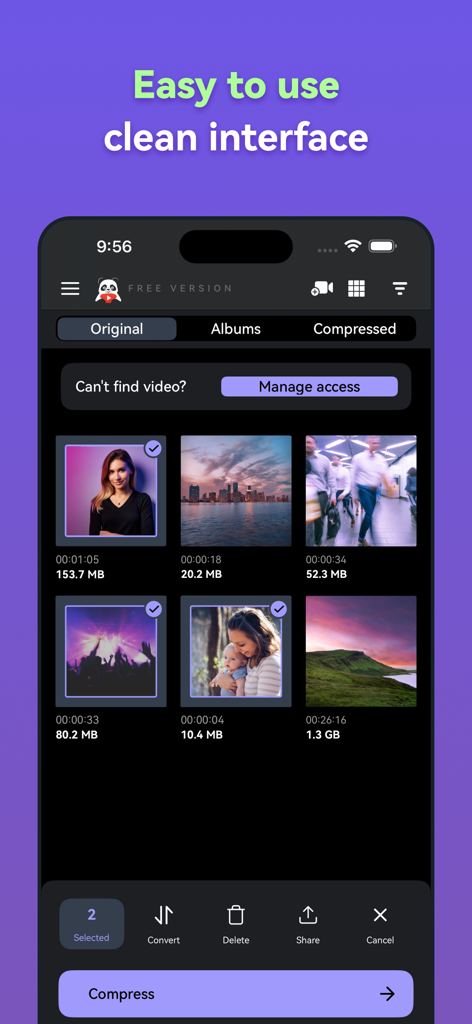
Panda Video Compressor mobile app showing a clean and easy to use video gallery interface

Panda Video Compressor mobile app showing a clean and easy to use video gallery interface

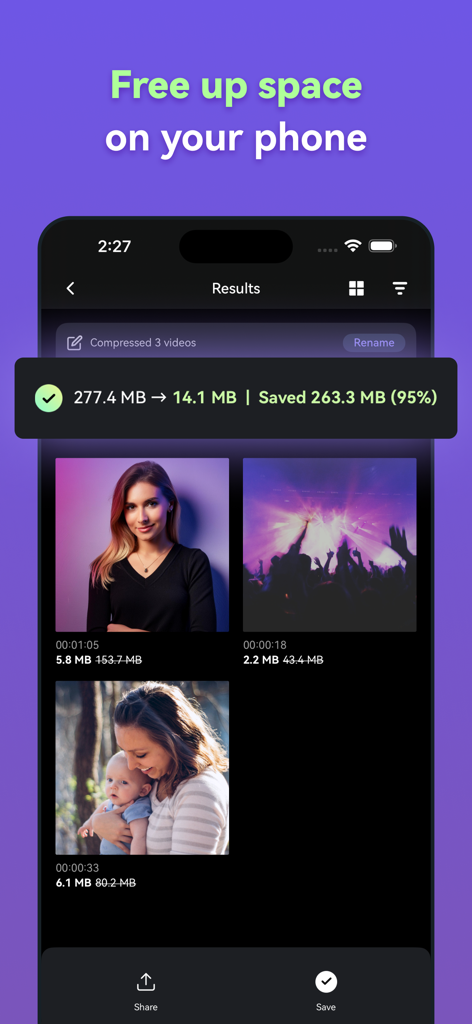
Panda Video Compressor app screen showing 95 percent file size reduction to free up phone storage

Panda Video Compressor app screen showing 95 percent file size reduction to free up phone storage

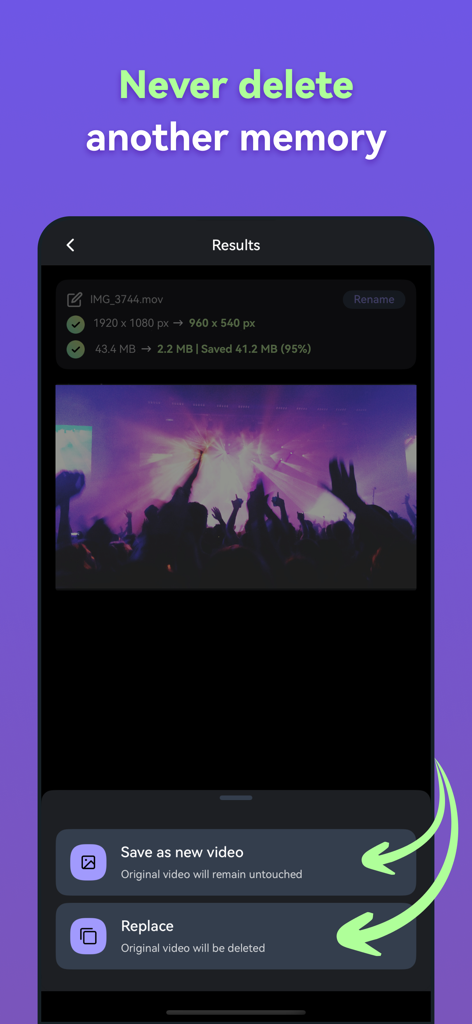
Screenshot of Panda Video Compressor app showing a 95 percent reduction in video file size with options to save as a new video or replace the original.

Screenshot of Panda Video Compressor app showing a 95 percent reduction in video file size with options to save as a new video or replace the original.

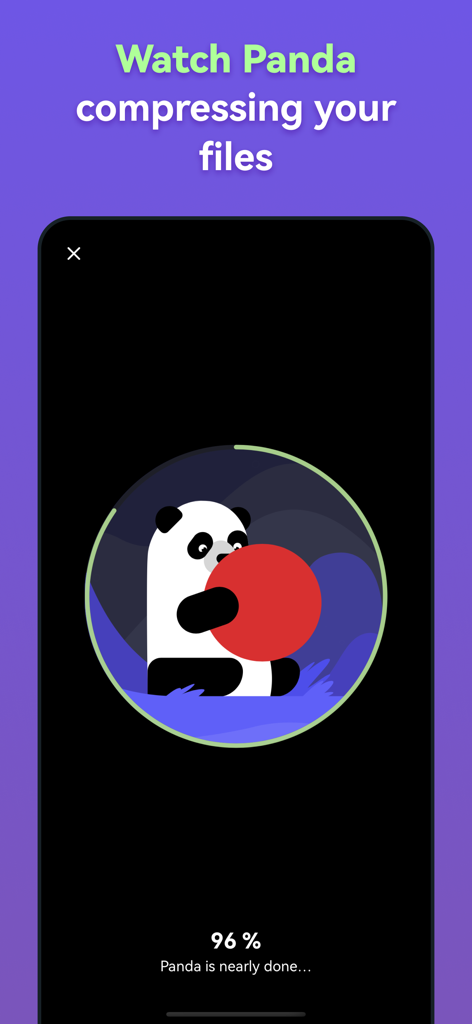
Panda mascot compressing a video file with a progress bar at ninety six percent

Panda mascot compressing a video file with a progress bar at ninety six percent

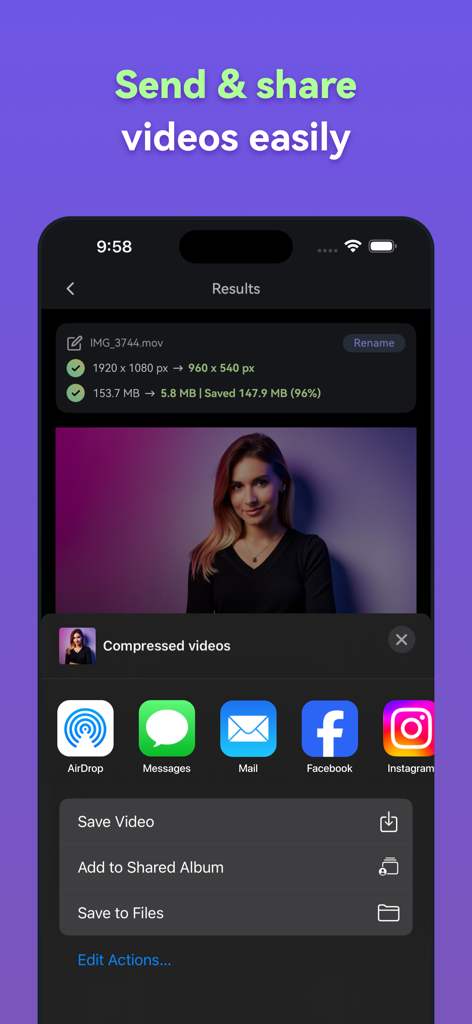
Interface of Panda Video Compressor showing a 96 percent size reduction and sharing buttons

Interface of Panda Video Compressor showing a 96 percent size reduction and sharing buttons

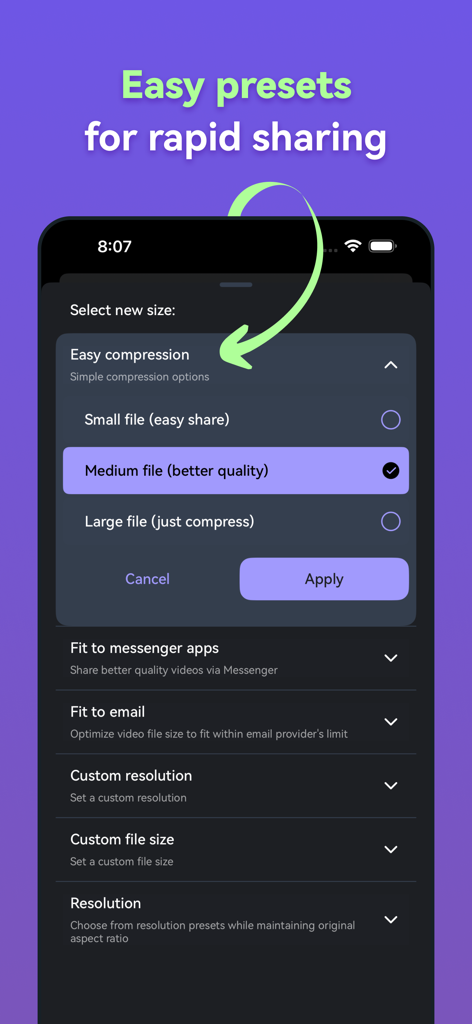
Panda Video Compressor app interface showing various video size compression presets for quick sharing

Panda Video Compressor app interface showing various video size compression presets for quick sharing

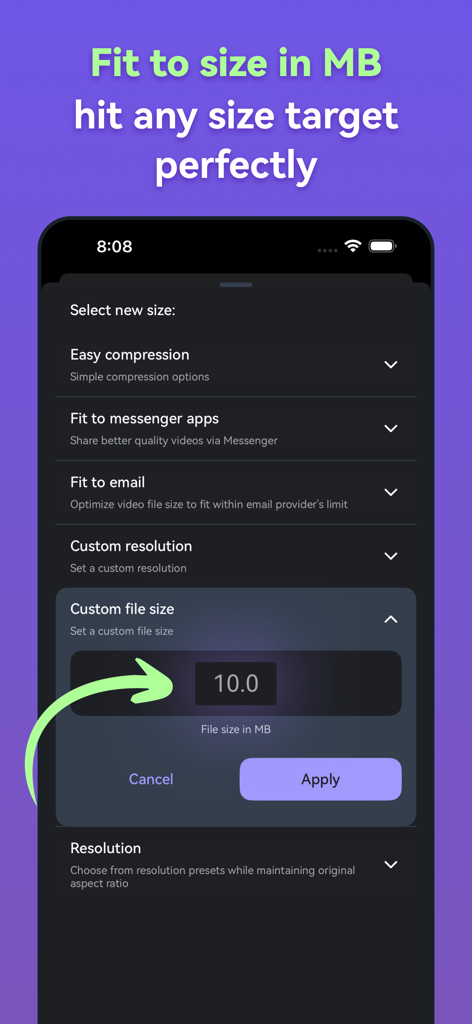
Interface of Panda Video Compressor app showing the custom file size setting to reach a specific MB target.

Interface of Panda Video Compressor app showing the custom file size setting to reach a specific MB target.

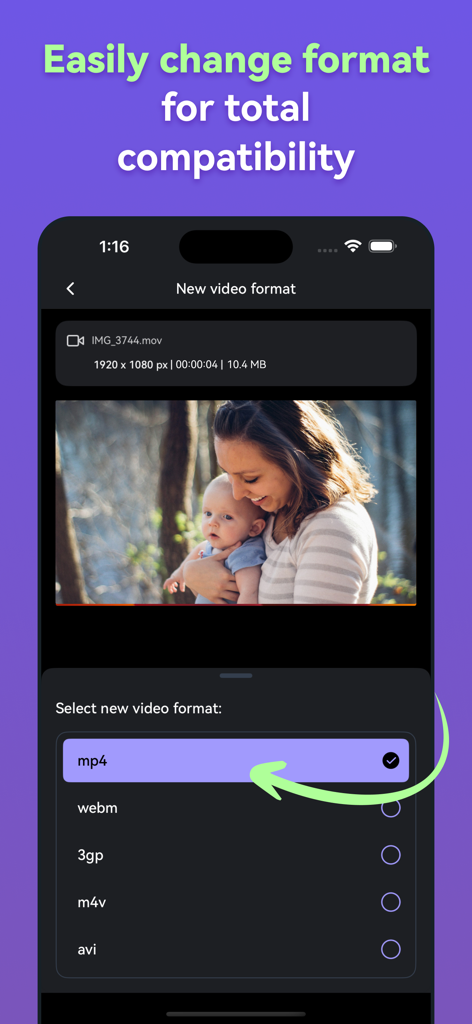
Panda Video Compressor app screen showing options to change video formats such as mp4 and webm

Panda Video Compressor app screen showing options to change video formats such as mp4 and webm

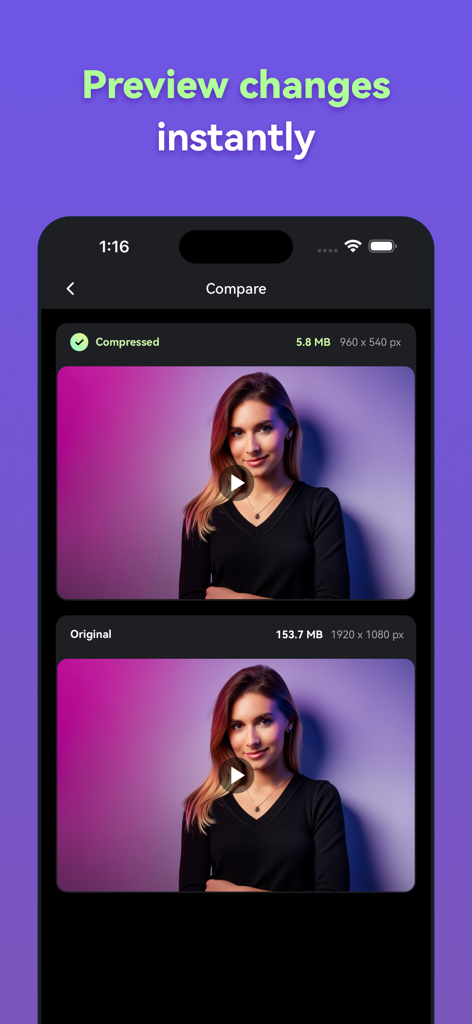
A side by side comparison showing a video file reduced from 153MB to 5MB while maintaining visual quality in the Panda Video Compressor app.

A side by side comparison showing a video file reduced from 153MB to 5MB while maintaining visual quality in the Panda Video Compressor app.

Shrink Your Videos, Keep Your Quality

The tools that make this app stand out, trusted by 107K+ users.

📱

Built for Social Creators

Instantly resize and compress 4K clips to perfectly fit TikTok, Instagram Reels, and YouTube Shorts for faster uploads even on weak signals.

✉️

Bypass Email File Limits

Stop getting 'file too large' errors. Use the 'Fit to Email' preset to shrink videos under 25MB for Gmail, Slack, and Discord attachments.

💾

Reclaim Your iPhone Space

Running out of storage? Save gigabytes of space by compressing bulky video files while maintaining HD clarity—no more deleting memories.

Loved by users worldwide

Trusted by 107K+ people who love this app.

"

"I am always filming in 4K for my TikTok, but the files are huge. Panda is a lifesaver for when I need to send drafts to my friends on Discord or upload over my dorm's spotty Wi-Fi. It stays HD but at a fraction of the original size!"

Chloe M.
"

"I was struggling to send a video demo to a client via Gmail because of that 25MB limit. The Fit to Email feature worked perfectly on the first try. It saved me from having to upload to a Drive link and wait for access permissions. Highly recommended for work!"

Marcus J.

About the app

Everything you need to know about Panda - Video Compressor.

Description

Panda - Video Compressor is your go-to solution for making videos smaller quickly, easily, and without compromising on quality. Whether you're trying to share a video via email, upload it to social media, or simply save space on your device, Panda has got you covered. You'll be amazed at how great your videos look, even after compression! This video compression app allows you to send videos via email, which is often challenging due to size limits. Panda - Video Compressor compresses videos to sizes that are compatible with most email providers and resizes videos perfectly for Instagram, TikTok, and other social media platforms. Have You Experienced Problems Like These? ● Struggling to send large video files via email or text? ● Difficulty sharing videos on social media platforms? ● Issues uploading videos that don't fit on Instagram, Facebook, YouTube, WhatsApp, Discord, WeChat, Viber, Line, Telegram, VKontakte, or KakaoTalk? ● Running out of storage space on your device? ● High mobile data costs for video uploads? ● Wondering how to compress videos while maintaining HD quality? ● Need to reduce video file size or compress 4K videos? ● Want to resize videos to fit Instagram or TikTok? We have the solution. Download Panda - Video Compressor and get rid of these issues once and for all! Panda - Video Compressor Can Help You: ● Compress videos for easy sending via email or text. ● Upload and share videos on Instagram, Facebook, YouTube, WhatsApp, Discord, WeChat, Viber, Line, Telegram, VKontakte, and KakaoTalk. ● Save valuable storage space on your phone, tablet, or in the cloud. ● Reduce mobile data usage for video sharing. ● Resize videos to perfectly fit Instagram or TikTok. ● Compress video file sizes without losing quality. ● And much more! Supported Video Formats: ● Panda - Video Compressor supports all major video formats, including MP4, AVI, MKV, FLV, RMVB, 3GP, MPEG, WMV, MOV, and videos optimized for Instagram. This means you can compress almost any video you have, regardless of the format. Why Compress Videos with Panda? ● Send Videos via Email: Need to share a video via email, but it's too large? Use the "Fit to Email" option to resize videos to the perfect size for email attachments. This feature is essential for anyone who needs to send videos via email regularly. ● Free Up Device Space: Videos can take up a lot of space on your device. Instead of deleting your favorite videos to free up space, use Panda - Video Compressor to compress them. This way, you can keep all your important videos without sacrificing storage. ● Reduce Data Usage: Sharing videos can consume a lot of data, especially if you're on a limited plan or traveling without Wi-Fi. Panda - Video Compressor reduces video sizes, helping you save on mobile data while still sharing high-quality videos. ● Share Videos with Weak Signals: Ever tried to upload a video but couldn't because of a weak signal? Panda - Video Compressor helps you compress videos so that even with a weak signal, you can still upload and share your content. This is especially useful for social media sharing on platforms like Instagram or TikTok. Panda - Video Compressor is more than just a video compression tool. It's designed to help you overcome the challenges of sharing and storing large video files without compromising on quality. Start compressing your videos today with Panda - Video Compressor and experience the convenience of easily shareable, high-quality videos. Privacy Policy: https://www.simpleimageresizer.com/panda-video-compressor-privacy Terms of Service: https://www.simpleimageresizer.com/panda-video-compressor-terms-of-service

Latest Version

1.2.2

Size

82.7 MB

First Released

Nov 18, 2024

Stop Struggling with 'File Too Large' Errors

Join 100,000+ creators and professionals who use Panda to shrink 4K videos for Instagram, TikTok, and Email—without losing a single pixel of quality.

Download on App Store
FAQ

Frequently Asked Questions

Everything you need to know about Panda - Video Compressor

How to compress videos for email using Panda Video Compressor?

Panda Video Compressor features a "Fit to Email" option. This resizes videos to fit within email provider attachment limits, making large video files easy to send via email or text.

Does Panda Video Compressor maintain video quality after compression?

Yes, Panda Video Compressor compresses videos without compromising quality. The app description states it achieves compression with "no visible loss of quality," ensuring great-looking videos post-compression.

What video formats does Panda Video Compressor support?

Panda Video Compressor supports all major video formats. These include MP4, AVI, MKV, FLV, RMVB, 3GP, MPEG, WMV, MOV, and videos optimized for Instagram.

Can Panda Video Compressor help free up storage space on my device?

Yes, Panda Video Compressor helps free up device space by compressing videos. Instead of deleting favorite videos, users can compress them to save significant storage on their phone or tablet.

How does Panda Video Compressor assist with sharing videos on social media?

Panda Video Compressor resizes videos perfectly for platforms like Instagram, TikTok, Facebook, YouTube, and more. It helps users overcome size restrictions and share content efficiently, even with weak signals.

Is Panda Video Compressor a free application?

Yes, Panda Video Compressor offers a free version. This allows users to compress, resize, and convert videos to save space and share easily, as indicated by the "FREE VERSION" label.

How can I change the video format using Panda Video Compressor?

Panda Video Compressor allows users to easily change video formats. The app presents an option to "Select new video format" with choices like mp4, webm, 3gp, m4v, and avi, ensuring total compatibility.

Does Panda Video Compressor allow custom file sizes for compression?

Yes, Panda Video Compressor allows users to set a custom file size for compression. The app provides a "Custom file size" option where users can input a target size in MB to achieve specific compression goals.