
全能办公文档-在线word文档手机版、在线文档编辑



Edit Word and Excel files, sign contracts on the fly, and manage your workflow without a laptop. Get 500GB of cloud storage and all the tools you need to stay productive from anywhere.
Publisher
Category
LifestyleDownloads
32K+User Rating
Total Ratings
700Locales
1Discover the interface used by 32K+ users.
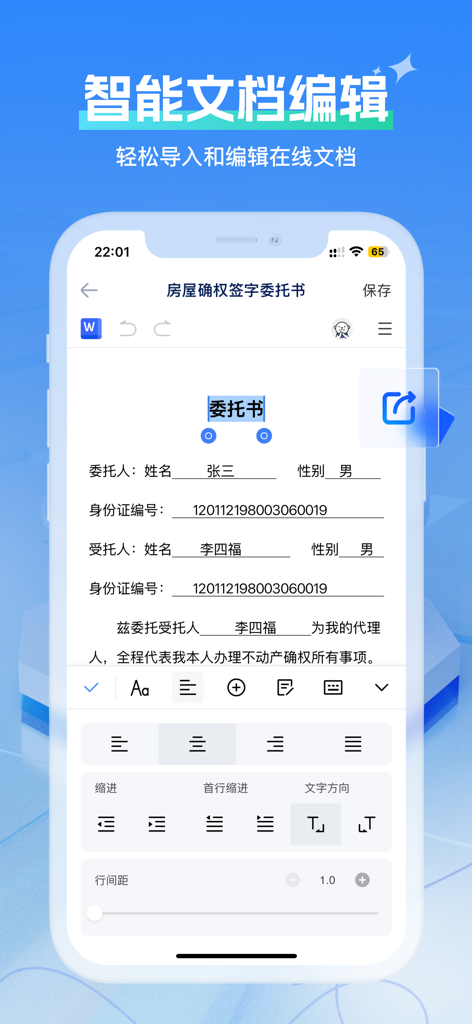
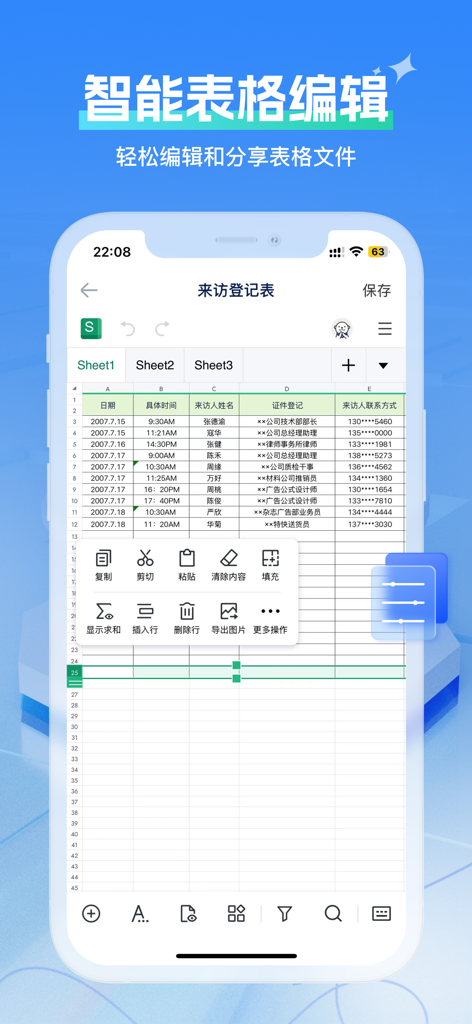

The tools that make this app stand out, trusted by 32K+ users.
Full support for Word, Excel, and PowerPoint. Edit documents with desktop-grade precision while you're on the move.
Forget storage limits. Securely store and sync your entire professional library in our high-capacity cloud environment.
Sign contracts, unzip folders, and extract text with built-in OCR tools—everything you need to solve office emergencies.
Trusted by 32K+ people who love this app.
"As a consultant always between meetings, this app has completely changed my workflow. Being able to sign contracts and edit complex spreadsheets directly on my phone means I never have to rush back to my desk for quick fixes. The 500GB cloud storage is a massive bonus that keeps all my client files accessible anywhere."
"I've tried every office app out there, but this is the first one that actually replaces my laptop for document management. The built-in file decompression and OCR tools are incredibly handy for my grad school research. It’s essentially a professional workstation that fits right in my pocket."
Everything you need to know about 全能办公文档-在线word文档手机版、在线文档编辑.
Description
Latest Version
1.0.7
Size
59.8 MB
First Released
Dec 11, 2024
Join thousands of professionals who have replaced multiple apps with one powerful mobile office. Edit documents, sign contracts, and unzip files anywhere with 500GB of cloud storage included. Start your 3-day free trial today.
Everything you need to know about 全能办公文档-在线word文档手机版、在线文档编辑
全能办公文档 is a mobile office app designed for editing Word documents, XLSX spreadsheets, and presentations. It enables users to quickly edit files on mobile devices, enhancing work efficiency without needing a PC.
Yes, 全能办公文档 offers comprehensive editing features for Word documents, Excel spreadsheets, and presentation files. Users can edit text, insert charts, use table formulas, and manage rows and columns, similar to PC functions.
Yes, 全能办公文档 provides a large 500G cloud storage space. This feature supports online office efficiency by allowing users to store and access their documents remotely from the cloud.
Users can import files into 全能办公文档 directly from local storage on their device or from third-party software. This functionality allows for seamless access and editing of existing documents.
Yes, 全能办公文档 provides a free 3-day trial period. Users can utilize the app's features during this time to ensure satisfaction before committing to a purchase.
To cancel your subscription for 全能办公文档, you must manually go to your AppleID settings and select "Cancel Subscription" at least 24 hours before the current subscription cycle concludes.
全能办公文档 includes specialized small tools such as "Go Identify" for file extraction, "Go Sign" for secure handwritten signatures, and "Go Unzip" for quick folder decompression, enhancing document management.
The Privacy Policy for 全能办公文档-在线word文档手机版、在线文档编辑 is accessible via the following URL: https://docs.qq.com/doc/p/3f7661d550501004e197ad971f00b59176e91ead. This link provides detailed information on user data handling.
Yes, 全能办公文档 enables users to create new Word documents, Excel spreadsheets, and PowerPoint presentations directly within the app. It also provides various ready-to-use templates for efficient document creation.
Apps with similar features and user experience

ChuXin Tec Co., Ltd.

Normal Vector Limited

晶晶 姜

根根 黄

Stefl und Taschauer OG

华 杨

卓臻 李

Akikazu Yoshikawa

孟达 李