
xlsx表格手机版 -移动端表格编辑


Master your spreadsheets, documents, and presentations on the go. Seamlessly edit Excel, Word, and PPT files directly from your iPhone with cloud-ready storage and instant sharing.
Publisher
Category
ReferenceDownloads
101K+User Rating
Total Ratings
200Locales
1Discover the interface used by 101K+ users.
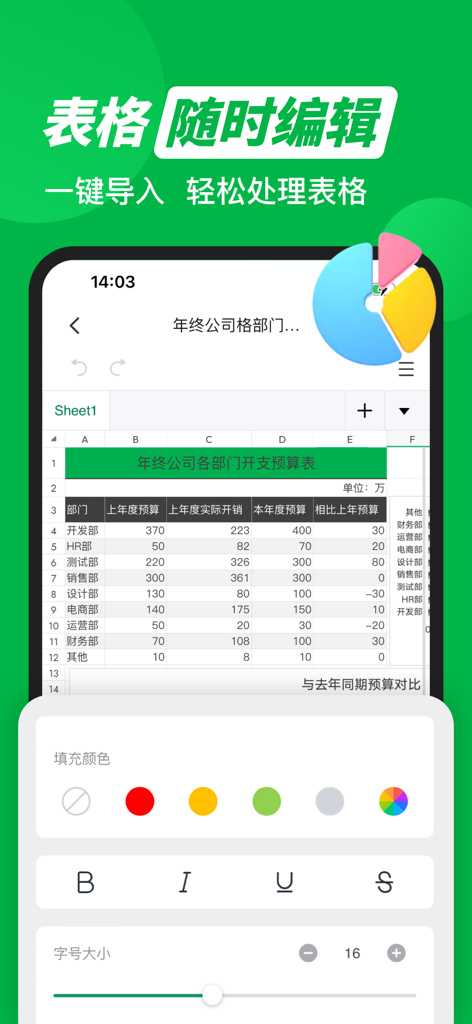


The tools that make this app stand out, trusted by 101K+ users.
Stop switching between apps. Effortlessly view and edit Word, Excel, and PPT files with professional-grade tools designed specifically for your iPhone.
Maximize your phone's storage with integrated cloud backup. Share updated documents instantly via WeChat, WhatsApp, or email with a single tap.
Whether you are commuting or between meetings, handle complex data entry, text formatting, and presentation tweaks with a fast, responsive interface.
Trusted by 101K+ people who love this app.
"As a project manager handling international supply chains, I often receive urgent spreadsheet updates late at night. This app allows me to make precise edits directly on my iPhone without needing to boot up my laptop. The interface is intuitive, and the cloud synchronization ensures I never lose a change while on the move."
"I love having Word, Excel, and PPT tools all in one place. It saves so much storage space on my phone compared to downloading separate apps. It is perfect for reviewing my lecture notes and managing my small business inventory during my daily commute. A must-have for anyone who needs to stay productive outside the office."
Everything you need to know about xlsx表格手机版 -移动端表格编辑.
Description
Latest Version
1.3
Size
18.2 MB
First Released
Oct 25, 2024
Join over 100,000 professionals managing Excel, Word, and PPT with ease. No laptop required—just your phone and your drive to succeed.
Everything you need to know about xlsx表格手机版 -移动端表格编辑
xlsx表格手机版 is a mobile application that allows users to perform various office document tasks, including editing spreadsheets, Word, and PPT files, directly on their phone without a computer.
xlsx表格手机版 supports editing multiple document formats, including Word, Excel, and PPT. Users can perform text formatting, insert images, and create tables.
Yes, xlsx表格手机版 supports one-click import and sharing of files. This feature facilitates fast file transfer and enhances user efficiency.
Yes, xlsx表格手机版 offers file storage, enabling users to upload and download documents anytime, anywhere. This feature helps in saving local device space.
xlsx表格手机版 offers VIP auto-renewal services through weekly, monthly, or quarterly subscriptions. Subscribers receive unlimited member services during their VIP validity period.
Users can manage or cancel their xlsx表格手机版 subscription by accessing the 'Subscriptions' section within their phone's settings.
xlsx表格手机版 provides spreadsheet editing tools such as color filling, font size adjustment, and text styles including bold, italic, underline, and strikethrough.
The Privacy Policy for xlsx表格手机版 is located at the following URL: https://docs.qq.com/doc/p/5e831641157903fef1c3084a864203b827f37ddc.
Apps with similar features and user experience

ChuXin Tec Co., Ltd.

Normal Vector Limited

亚敏 陈

晶晶 姜

根根 黄

Stefl und Taschauer OG

卓臻 李

Akikazu Yoshikawa

孟达 李