TIM Modem

TIM Modem

Download on App Store
Spark by MWM logo
Logo of TIM Modem

TIM Modem: Total Control of Your Italian Connection from Anywhere in the World

Empowering transatlantic property owners and businesses to remotely manage, optimize, and troubleshoot their Italian network with professional-grade diagnostics and instant Wi-Fi management.

Download on App Store

Publisher

Telecom Italia spa

Category

Utilities

Downloads

1M+

User Rating

4.3/5

Total Ratings

66K+

Locales

2

Your Network at a Glance

Discover the interface used by 1M+ users.
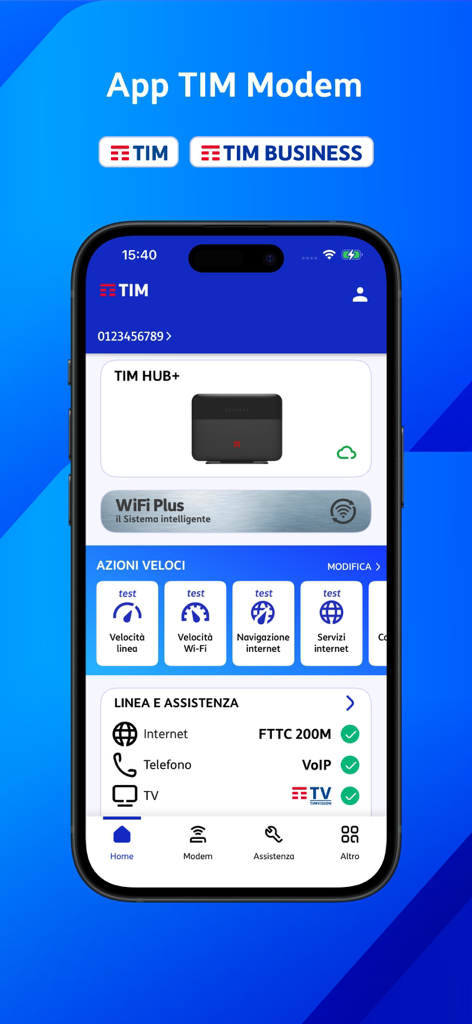
TIM Modem app dashboard showing modem status speed tests and network diagnostics

TIM Modem app dashboard showing modem status speed tests and network diagnostics

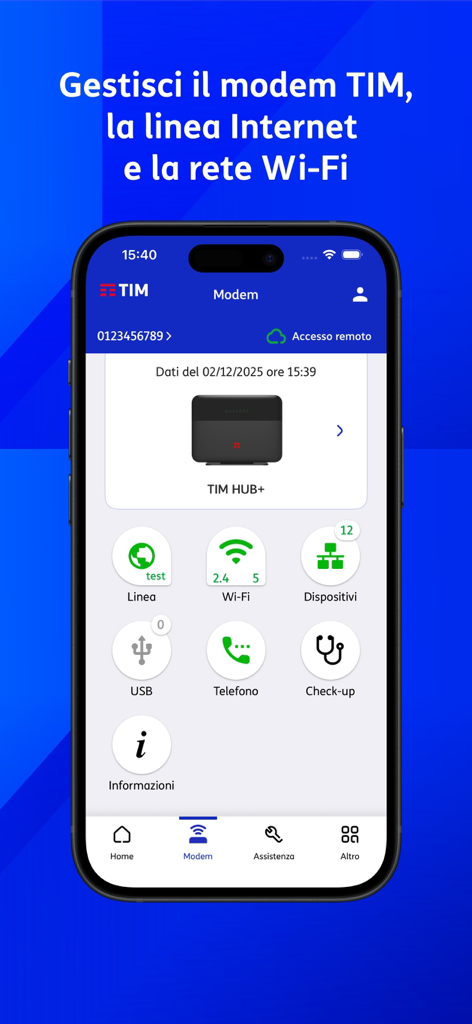
TIM Modem app dashboard on a smartphone showing remote network management options for TIM HUB plus modem

TIM Modem app dashboard on a smartphone showing remote network management options for TIM HUB plus modem

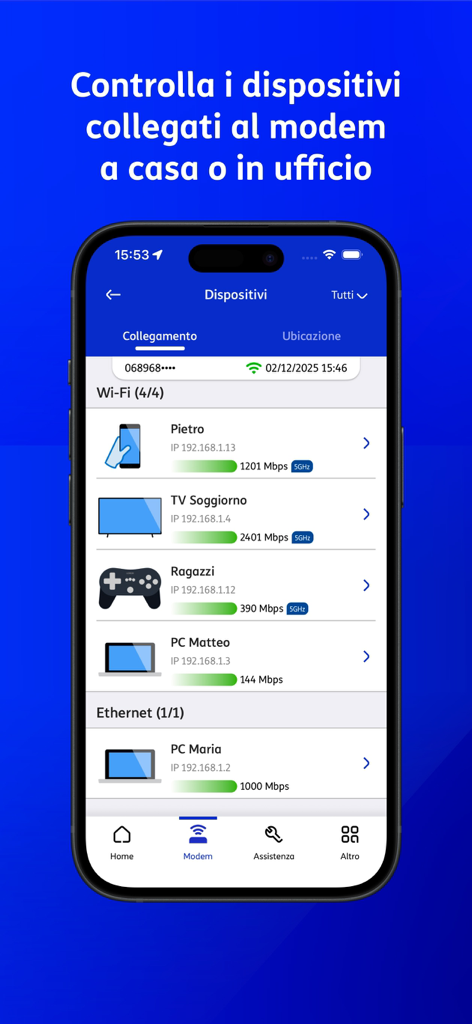
Interface of the TIM Modem app showing a list of devices connected via Wi-Fi and Ethernet with connection speeds

Interface of the TIM Modem app showing a list of devices connected via Wi-Fi and Ethernet with connection speeds

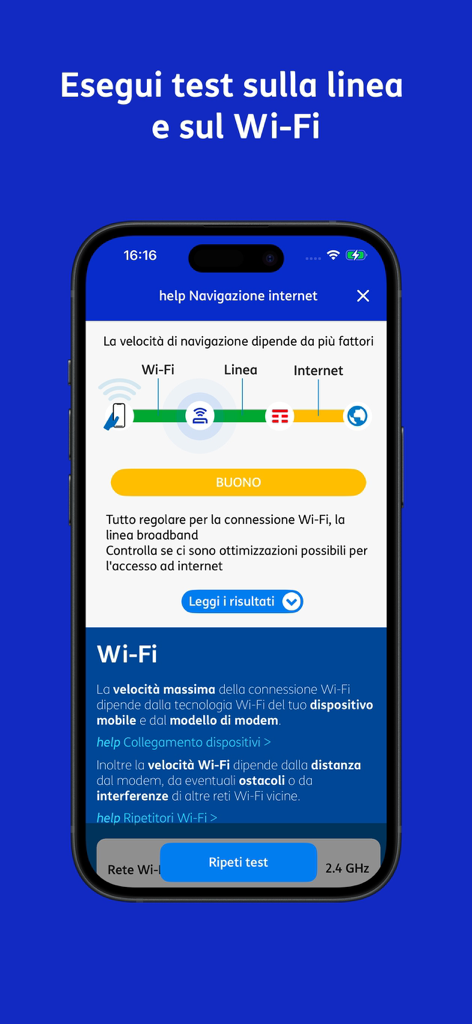
Mobile interface of TIM Modem app performing a network and wifi connection speed test.

Mobile interface of TIM Modem app performing a network and wifi connection speed test.

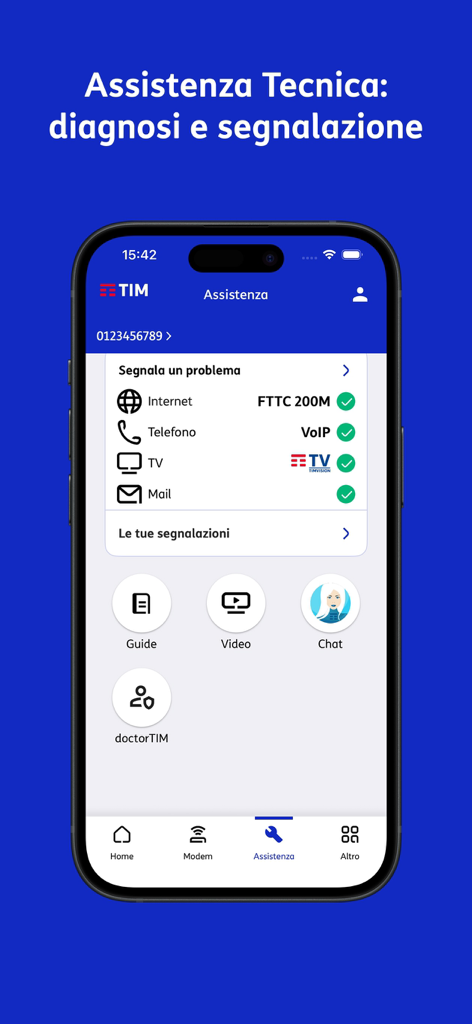
Technical support screen of the TIM Modem app showing service status and diagnostic tools for remote management.

Technical support screen of the TIM Modem app showing service status and diagnostic tools for remote management.

Complete Network Control, Anywhere in the World

The tools that make this app stand out, trusted by 1M+ users.

🌍

Remote Diagnostics & Reboots

Troubleshoot and restart your Italian modem from thousands of miles away to ensure your home or office stays online.

🏠

Smart Home Mapping

Visualize your Italian property's Wi-Fi coverage and monitor connected devices room-by-room with intuitive floor plan mapping.

📲

Seamless Guest Sharing

Manage guest networks and instantly share access via QR codes, making it the perfect tool for vacation home owners and hosts.

Loved by users worldwide

Trusted by 1M+ people who love this app.

"

"Managing my home in Rome from Chicago used to be stressful, but this app is a game-changer. I can reboot the modem and check the signal strength in every room remotely. It gives me total peace of mind knowing my security system is always connected."

Marco S.
"

"As a business owner with offices in Milan, the ability to manage our Wi-Fi networks from the US is invaluable. The guest network QR code sharing and the instant diagnostic tools save me hours of international support calls. Essential for any transatlantic professional."

Elena G.

About the app

Everything you need to know about TIM Modem.

Description

Gestisci il tuo Modem TIM, quando sei collegato in Wi-Fi o da remoto, controlla la tua linea fissa e apri segnalazioni all’assistenza tecnica. Per accedere all’app TIM Modem utilizza le credenziali MyTIM, se sei cliente residenziale, oppure le credenziali TIM BUSINESS. Ecco cosa puoi fare con l’app TIM Modem. Nel tab "Modem" 1. Visualizzare, gestire, aggiornare e riavviare il modem TIM di casa o della sede di lavoro 2. Verificare lo stato della linea Internet; eseguire il test di velocità della linea, il test di raggiungibilità dei servizi internet, il test di navigazione; su linee FWA eseguire il test del segnale 4G/5G per l’installazione guidata del modem Indoor o la verifica dell’antenna esterna 3. Verificare e modificare la configurazione Wi-Fi del modem, accendere, spegnere e ottimizzare le reti Wi-Fi, gestire e condividere la rete Wi-Fi Ospiti, controllare il traffico e la qualità Wi-Fi dei dispositivi collegati, verificare la velocità della rete Wi-Fi, eseguire il backup/restore Wi-Fi (utile se sostituisci il modem TIM), visualizzare e condividere il QR Code Wi-Fi della tua rete 4. Visualizzare i ripetitori Wi-Fi TIM collegati e la rete EasyMesh 5. Verificare e simulare la copertura Wi-Fi del modem e di eventuali repeater; misurare il reale segnale Wi-Fi ricevuto nelle diverse stanze con il Test copertura Wi-Fi 6. Servizio WiFi Plus: controllare il funzionamento della tua rete Wi-Fi e verificare le ottimizzazioni eseguite automaticamente da TIM 7. Controllare e amministrare i dispositivi collegati al modem. Disegna la planimetria della tua abitazione e visualizza i dispositivi per stanza dopo aver assegnato ad ognuno la corretta ubicazione 8. Controllare lo stato dei servizi di condivisione USB sul tuo modem TIM (solo quando sei collegato in Wi-Fi) 9. Verificare lo stato del servizio voce (VoIP) sul modem 10. Eseguire il Check-up periodico della tua rete domestica Nel tab "Assistenza" (attualmente completo solo con login MyTIM) 1. Eseguire la diagnosi della linea di casa, segnalare un problema ai tecnici o risolvere on-line i problemi più comuni su Internet, Mail e Telefono 2. Eseguire la diagnosi sui servizi TV attivi (TIMvision), risolvere on-line o segnalare un problema ai tecnici 3. Essere avvisato di eventuali disservizi sulla rete fissa TIM nella tua zona, e richiedere l’invio di SMS alla risoluzione del guasto 4. Gestire le tue Segnalazioni e monitorarne lo stato di lavorazione 5. Chiedere a Angie: l’assistente digitale di TIM ti aiuta a risolvere problemi tecnici sulla tua linea Nel tab “Altro” 1. Consultare informazioni utili, guide e video di assistenza tecnica 2. Accedere velocemente ad altri servizi TIM (app MyTIM, app TIM BUSINESS, app EZVIZ per TIM Cam, Community We TIM, TIM Party, TIM Mail) 3. Cercare i negozi TIM 4. Semplificare la configurazione Wi-Fi del tuo dispositivo tramite scansione del QR Code del modem TIM Per usare l'app serve una linea fissa residenziale o business di TIM e uno smartphone/tablet Android, con qualsiasi operatore mobile (TIM o altri gestori). Informativa privacy e Condizioni di licenza sono accessibili nel menu Impostazioni. Per aiutarci a migliorare l’applicazione scrivi a: appmodem@telecomitalia.it

Latest Version

9.0.2

Size

43.1 MB

First Released

Jun 19, 2010

Remote Control for Your Italian Network

Download the TIM Modem app today to manage, troubleshoot, and optimize your home or business connection from anywhere in the world.

Download on App Store
FAQ

Frequently Asked Questions

Everything you need to know about TIM Modem

What is the TIM Modem app for?

The TIM Modem app allows users to manage their TIM Modem, control their fixed line, and open technical assistance requests both via Wi-Fi and remotely.

How do I log in to the TIM Modem app?

To log in to the TIM Modem app, residential customers use MyTIM credentials, while business customers use TIM BUSINESS credentials.

Can I restart my TIM modem using the app?

Yes, the TIM Modem app allows users to view, manage, update, and restart their TIM modem for home or business locations.

Does the TIM Modem app perform internet speed tests?

Yes, the TIM Modem app verifies the internet line status and performs line speed tests, internet service reachability tests, and navigation tests. It also tests 4G/5G signals for FWA lines.

Can I manage my Wi-Fi settings with the TIM Modem app?

Yes, the TIM Modem app allows users to check, modify, turn on/off, and optimize Wi-Fi configurations. It also manages guest Wi-Fi, monitors device traffic, and shows Wi-Fi speed.

Does the TIM Modem app show connected Wi-Fi repeaters?

Yes, the TIM Modem app displays connected TIM Wi-Fi repeaters and the EasyMesh network, providing a comprehensive overview of the home network.

Can I check my Wi-Fi coverage with the TIM Modem app?

Yes, the TIM Modem app verifies and simulates Wi-Fi coverage for the modem and repeaters. It measures the actual Wi-Fi signal received in different rooms using the Wi-Fi coverage test.

What is the WiFi Plus service in the TIM Modem app?

The WiFi Plus service in the TIM Modem app allows users to control their Wi-Fi network's operation and check optimizations automatically performed by TIM.

Can I see devices connected to my TIM modem?

Yes, the TIM Modem app allows users to control and administer devices connected to the modem. Users can draw a home floor plan and view devices by room.

Can I manage USB sharing services on my TIM modem?

Yes, the TIM Modem app controls the status of USB sharing services on the TIM modem. This functionality is available only when the user is connected via Wi-Fi.

Can I check my VoIP service status with the TIM Modem app?

Yes, the TIM Modem app allows users to verify the status of the Voice over IP (VoIP) service on their TIM modem.

Does the TIM Modem app offer network check-ups?

Yes, the TIM Modem app performs periodic check-ups of the user's home network to ensure optimal performance and identify potential issues.

Can I report internet problems using the TIM Modem app?

Yes, the TIM Modem app allows users to diagnose their home line, report problems to technicians, or resolve common issues online for Internet, Mail, and Telephone services.

Does the TIM Modem app diagnose TIMvision services?

Yes, the TIM Modem app diagnoses active TV services like TIMvision, offering online troubleshooting or the option to report issues directly to technicians.

Does the TIM Modem app notify me about network outages?

Yes, the TIM Modem app notifies users of any fixed network outages in their TIM area. Users can also request SMS notifications upon fault resolution.

Can I track my support requests in the TIM Modem app?

Yes, the TIM Modem app allows users to manage their support requests and monitor their processing status directly within the application.

Who is Angie in the TIM Modem app?

Angie is TIM's digital assistant within the TIM Modem app. She helps users resolve technical issues related to their fixed line.

Does the TIM Modem app provide technical assistance guides?

Yes, the TIM Modem app offers useful information, technical assistance guides, and video tutorials to help users manage their services.

Can I access other TIM apps from the TIM Modem app?

Yes, the TIM Modem app provides quick access to other TIM services, including MyTIM, TIM BUSINESS, EZVIZ for TIM Cam, Community We TIM, TIM Party, and TIM Mail apps.

Can I find TIM stores using the TIM Modem app?

Yes, the TIM Modem app includes a feature to locate and search for nearby TIM stores, providing convenience for users.

Does the TIM Modem app simplify Wi-Fi configuration with a QR Code?

Yes, the TIM Modem app simplifies device Wi-Fi configuration by allowing users to scan the TIM modem's QR Code.

What are the requirements to use the TIM Modem app?

To use the TIM Modem app, users need a residential or business TIM fixed line and an Android smartphone/tablet. It works with any mobile operator.

Where can I find the privacy policy for the TIM Modem app?

The privacy policy and license conditions for the TIM Modem app are accessible within the Settings menu of the application.