WEILO - My Last Video Editor

WEILO - My Last Video Editor

Download on App Store
Spark by MWM logo
Logo of WEILO - My Last Video Editor

WEILO - The Desktop-Class Video Editor Your iPad Was Built For

Unlock professional-grade masking, keyframes, and 4K export for free. No watermarks, no lag—just pure creative power optimized for M1/M2 chips and Apple Pencil.

Publisher

vimosoft

Category

Photo & Video

Downloads

368K+

User Rating

4.7/5

Total Ratings

7K+

Locales

14

Desktop Power on Your iPad

Discover the interface used by 368K+ users.
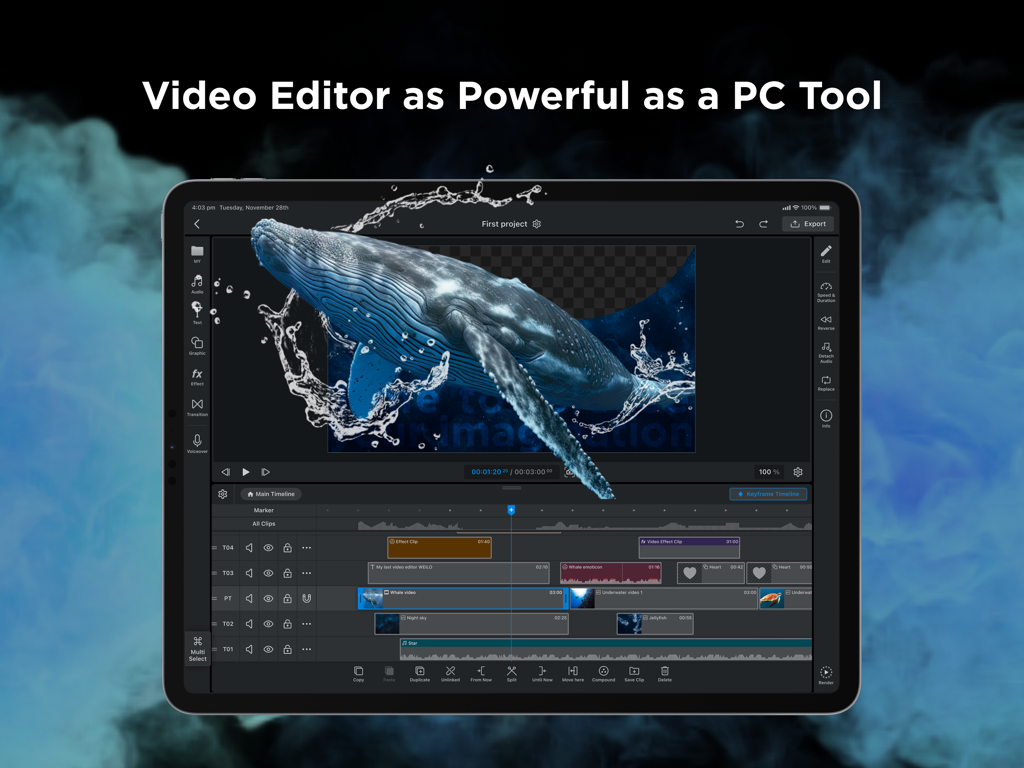
WEILO professional video editing interface on an iPad displaying a multi track timeline and advanced masking features

WEILO professional video editing interface on an iPad displaying a multi track timeline and advanced masking features

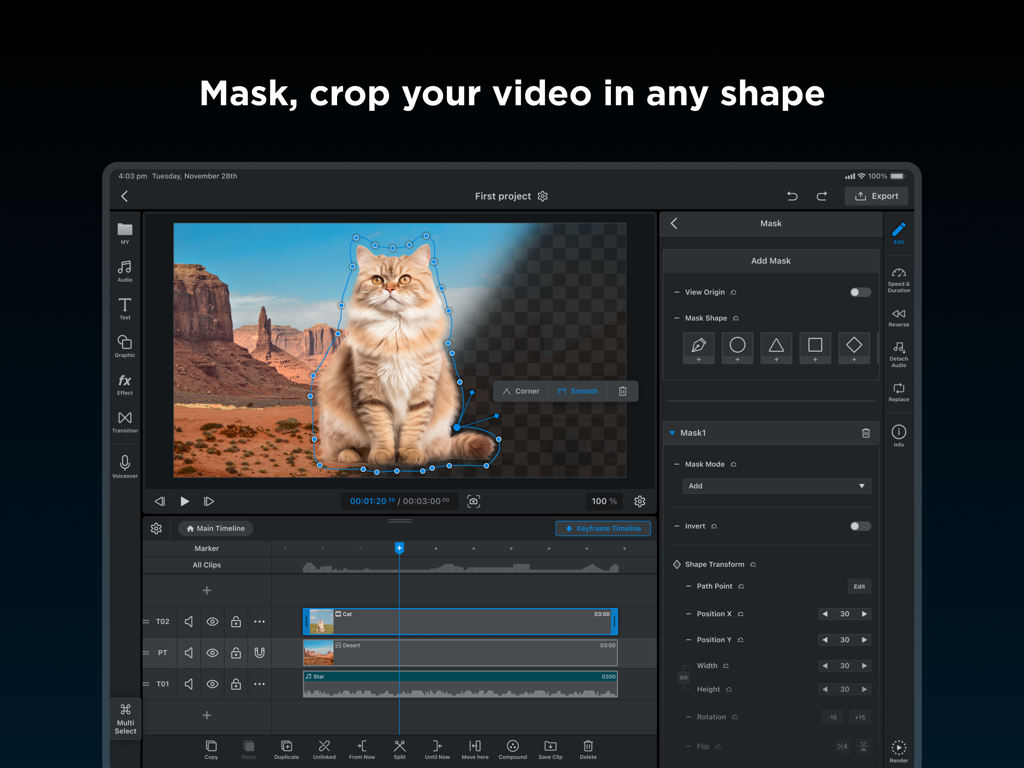
WEILO video editor on iPad showing a cat being masked with a pen tool for custom cropping

WEILO video editor on iPad showing a cat being masked with a pen tool for custom cropping

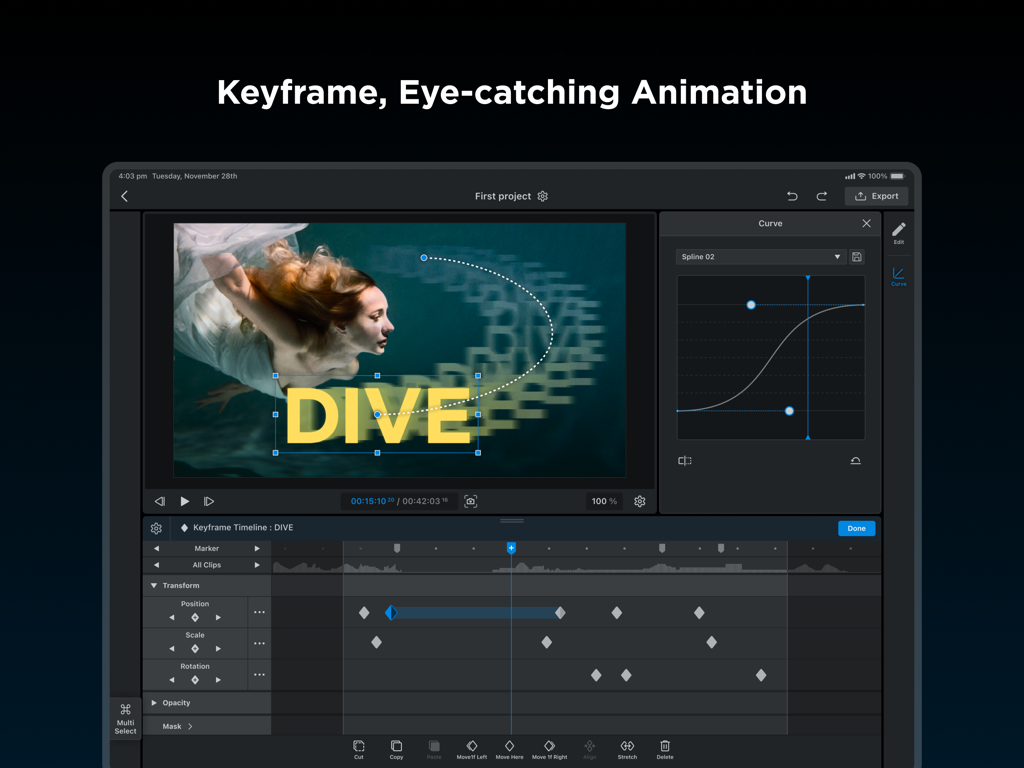
WEILO video editor for iPad showing keyframe animation timeline and motion curve adjustment.

WEILO video editor for iPad showing keyframe animation timeline and motion curve adjustment.

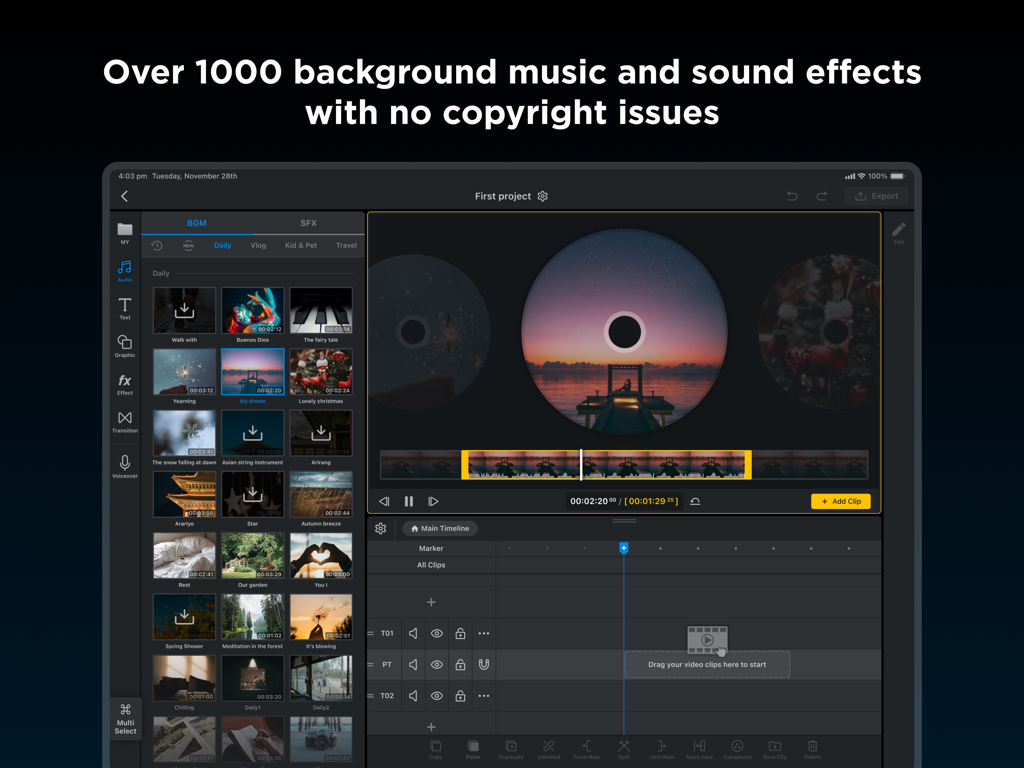
WEILO iPad app interface showcasing a library of over 1000 royalty-free background music and sound effects tracks.

WEILO iPad app interface showcasing a library of over 1000 royalty-free background music and sound effects tracks.

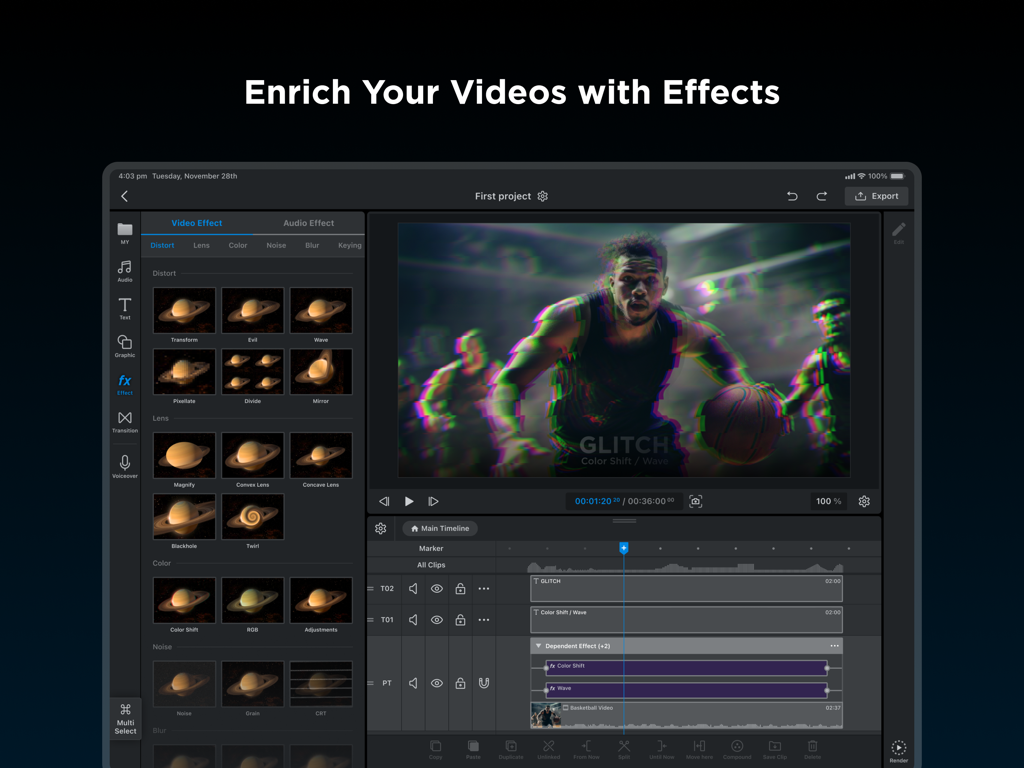
The WEILO app interface on iPad showing a professional video editing timeline and distortion effects library

The WEILO app interface on iPad showing a professional video editing timeline and distortion effects library

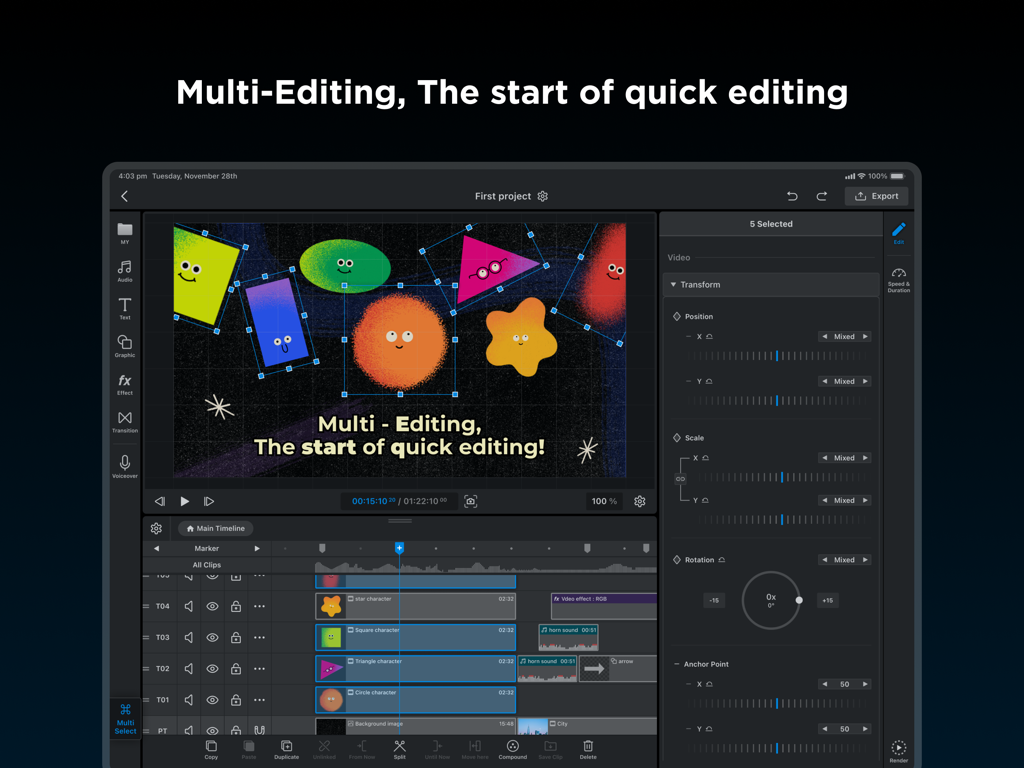
A screenshot of the WEILO video editor on iPad showing the multi-editing feature with multiple animated clips selected for simultaneous transformation.

A screenshot of the WEILO video editor on iPad showing the multi-editing feature with multiple animated clips selected for simultaneous transformation.

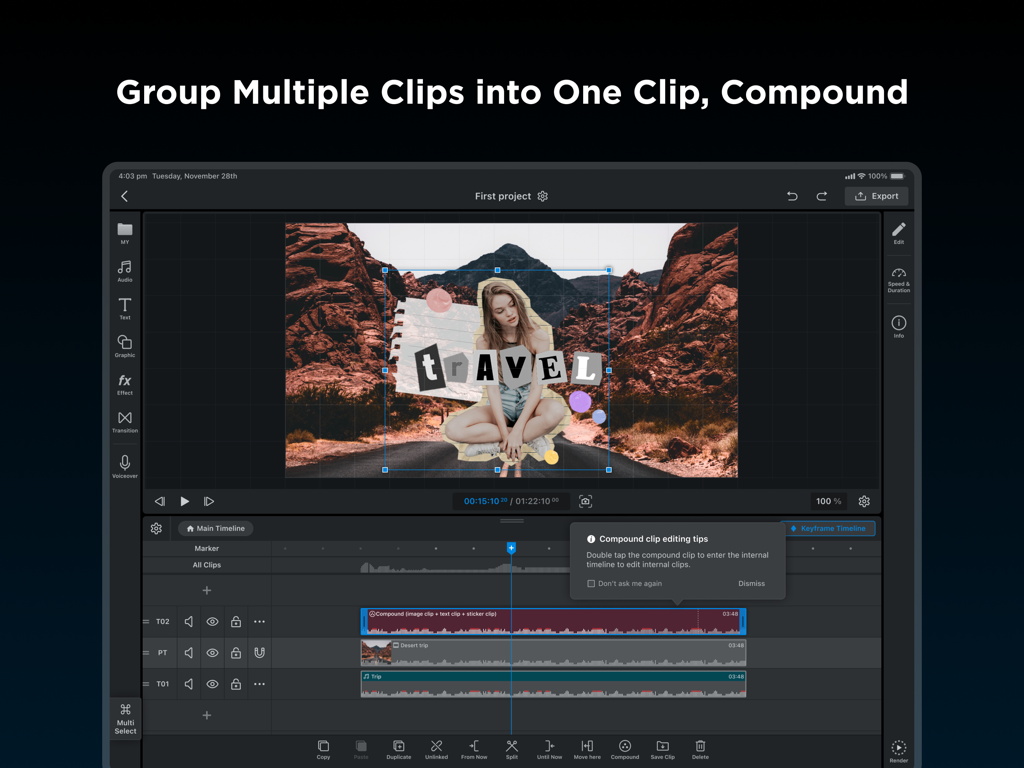
Professional iPad video editing interface in WEILO showing compound clips feature on the timeline

Professional iPad video editing interface in WEILO showing compound clips feature on the timeline

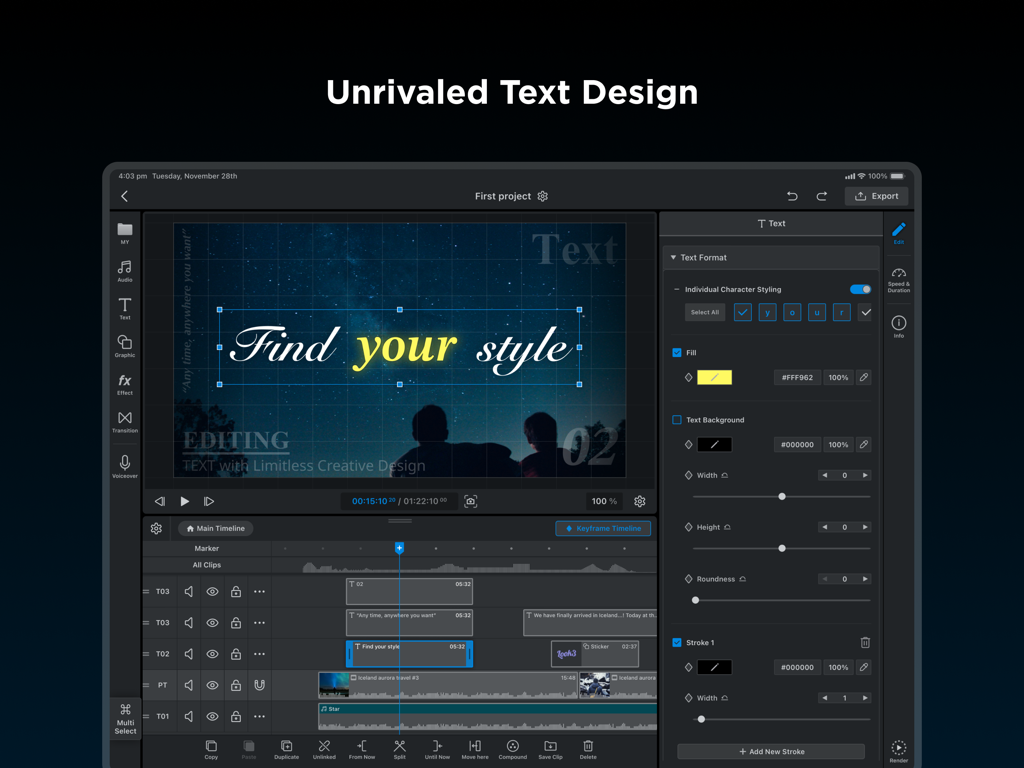
WEILO video editor for iPad showing professional text design and individual character styling features

WEILO video editor for iPad showing professional text design and individual character styling features

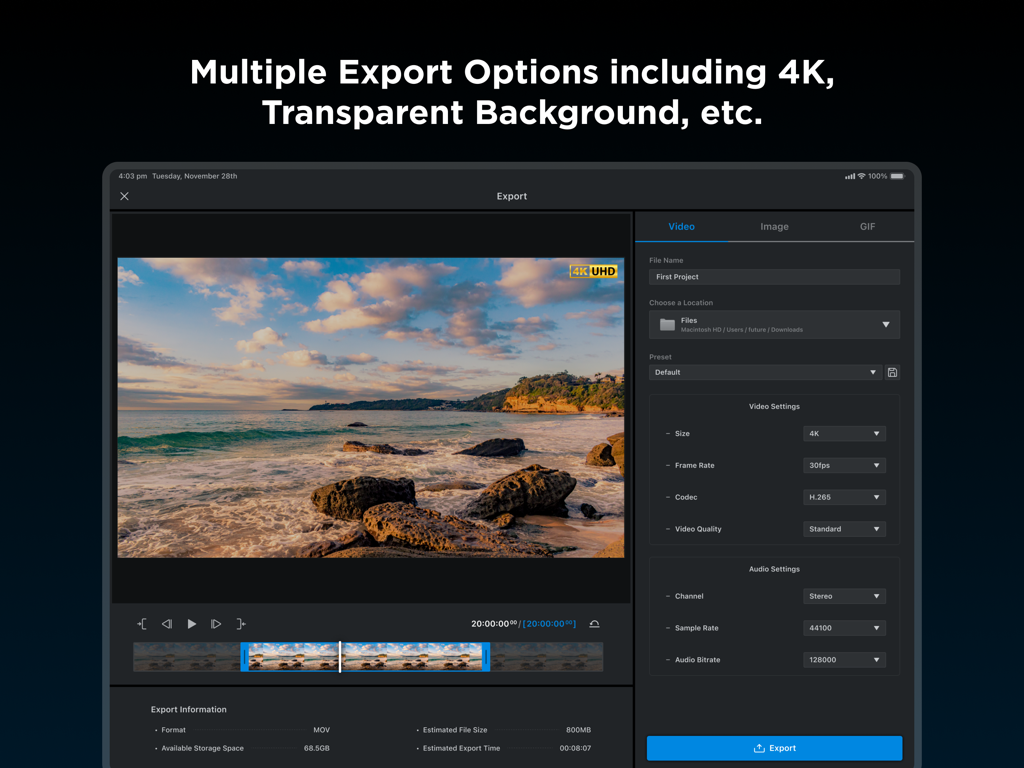
WEILO video editor export interface on iPad showing 4K resolution settings and professional output options

WEILO video editor export interface on iPad showing 4K resolution settings and professional output options

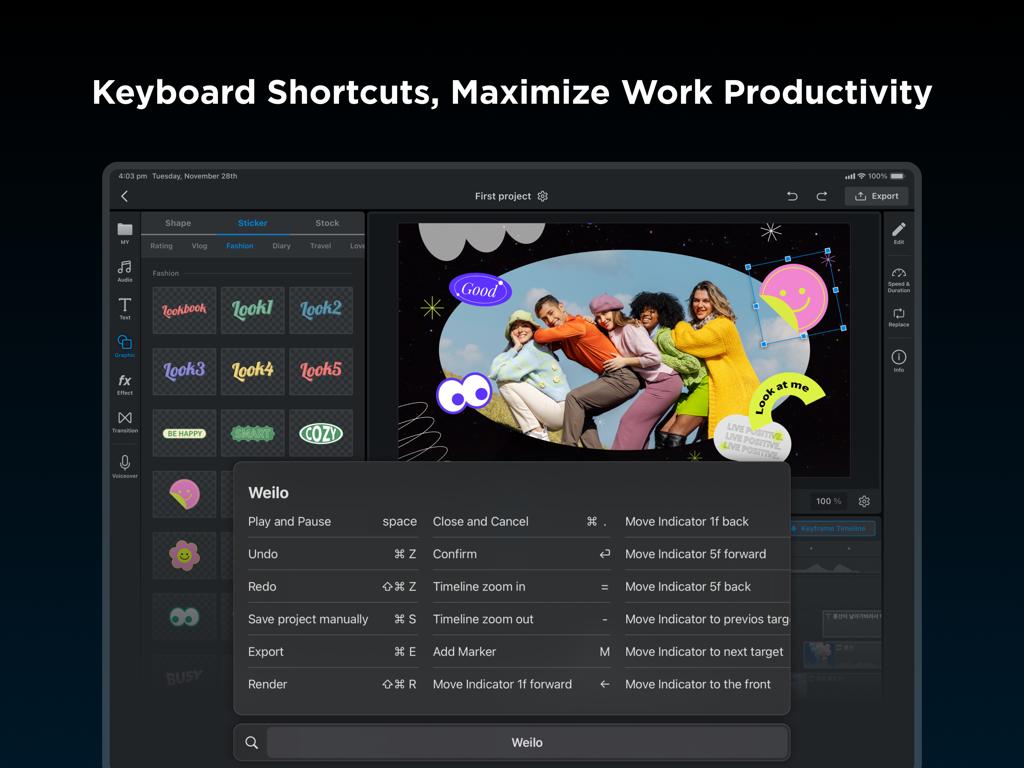
WEILO iPad video editor interface showing a list of keyboard shortcuts for professional editing productivity

WEILO iPad video editor interface showing a list of keyboard shortcuts for professional editing productivity

Desktop-Class Power. Zero Subscription Fatigue.

The tools that make this app stand out, trusted by 368K+ users.

🖋️

Surgical Precision with Pen Tools

Go beyond generic templates. Use your Apple Pencil to create custom masks and shapes for artistic control that rivals high-end desktop software.

💎

Advanced Keyframe Animation

Master your motion. Control every parameter with individual keyframes and adjustable interpolation for smooth, professional-grade visual storytelling.

Pro Workflow without the Lag

Optimized for M1/M2 silicon. Experience lightning-fast multi-clip editing and 4K exports designed for the high-performance creator on the move.

Loved by users worldwide

Trusted by 368K+ people who love this app.

"

"WEILO has completely replaced my desktop software. The precision of the pen tool combined with the Apple Pencil allows me to create complex masks and animations that I used to think were only possible on a PC. It's incredibly smooth on my M2 iPad Pro, and the 'no watermark' policy is a breath of fresh air for independent creators."

Marcus Chen
"

"As a social media manager, I need to edit on the go without sacrificing quality. This app is a powerhouse—the multi-select editing and compound clips save me hours of work. Being able to export in 4K with custom frame rates right from my iPad has streamlined my entire workflow. It’s easily the most professional mobile editor I’ve ever used."

Elena Rodriguez

About the app

Everything you need to know about WEILO - My Last Video Editor.

Description

My Last Video Editor, WEILO This is a powerful iPad-only video editor that never lags behind PC editors. Create any video you can imagine with WEILO. Free users can also use all editing features without restrictions. # A New Standard in iPad Video Editing • Experience professional-level editing anytime, anywhere with the portability of iPad and features comparable to PC editors • It's easy to create artistic and innovative videos and images • From beginners to experts, we provide an intuitive interface so that anyone who wants to become good at video editing can quickly learn advanced editing functions and use them easily • An interface optimized for iPad allows for faster and more detailed editing using touch gestures and Apple Pencil [ Mask, Crop Your Video In Any Shape ] • Create masks freely with the pen tool • Add multiple masks on a single clip • For seamless blending, adjust parameters such as roundness or feather [ Keyframe, Eye-catching Animation ] • Adjust interpolation between keyframes for dynamic motion speed control • Use individual keyframes for each parameters (size, position, etc.) [ Various Built-in Assets ] • Free background music, sound effects, design text, graphics, effects, and transitions that are updated periodically • 1700+ copyright-free BGM and sound effects • 5000+ vector stickers, frames, and templates that won't break even when enlarged [ Enrich Your Videos with Effects ] • Various video effects including Adjustments, Glitch, Gaussian Blur, Chromakey, Wave, Mosaic, etc. • Detailed audio effects such as Echo, Reverb, EQ, Distortion, Pitch, etc. [ Multi-Editing, The start of quick editing ] • Use the multi-select button to edit multiple clips all at once, just like in PC • From cutting clips to changing detailed property values, use multi-editing to complete your video faster [ Group Multiple Clips into One Clip, Compound ] • You can move or edit compounded clips at once • You can enter the selected compound and edit individual clips inside it [ Unrivaled Text Design ] • Edit the appearance of each character in the text, such as size, color and more • Save the style of your text and reuse it whenever you want • Add as many text strokes and shadows as you want [ Professional Export Options ] • 4K ultra-high definition export • Transparent export without background • GIF, video, image export • 24, 30, 60fps export [ Keyboard Shortcuts, Maximize Work Productivity ] • Shortcuts for essential editing features boost your editing performance [ Etc ] • Save all clips(video, audio, text, graphic, transition, compound, etc.) in the browser to reuse it anytime • Edit even heavy projects in a comfortable environment through rendering • No watermark left even if you don't pay • All videos you edit are automatically saved in “My Project” • All editing actions can be easily restored/reapplied with unlimited Undo/Redo functions • You can preview the video you are working on in full screen • Smart Guides(Snapping) and Grid make it easy to adjust the position, scale, and angle when placing assets or media If you have any issues while using the app, please contact us via [Help] - [Contact Us] within the app or email us at weilo.cs@vimosoft.com ** This software is optimized for M1 and M2 chips, and the execution speed may vary depending on the device specifications. For optimal performance, we recommend using the latest devices.

Latest Version

1.42.4

Size

627.5 MB

First Released

Jan 21, 2024

Ready to Make This Your Last Video Editor?

Join over 360,000 creators who have ditched desktop lag for iPad precision. Experience professional-grade masking, keyframing, and 4K exports for free—no watermarks, no subscriptions, just pure creative power optimized for your M1/M2 chip.

Download on App Store
FAQ

Frequently Asked Questions

Everything you need to know about WEILO - My Last Video Editor

Is WEILO - My Last Video Editor free to use?

Yes, WEILO allows free users to access and use all editing features without any restrictions. The app also exports videos without a watermark, even for free users.

What features does WEILO offer for video masking?

WEILO allows users to create masks freely with a pen tool, add multiple masks on a single clip, and adjust parameters like roundness or feather for seamless blending.

Does WEILO support 4K video export?

Yes, WEILO - My Last Video Editor supports professional export options, including 4K ultra-high definition. It also offers transparent export, GIF, video, and image exports at 24, 30, or 60fps.

Can I use keyframes for animation in WEILO?

Yes, WEILO allows users to create eye-catching animations with keyframes. You can adjust interpolation between keyframes for dynamic motion speed control and use individual keyframes for each parameter.

Does WEILO provide built-in music and sound effects?

Yes, WEILO provides over 1700 copyright-free background music and sound effects that are updated periodically. It also includes more than 5000 vector stickers, frames, and templates.

Is WEILO optimized for iPad and Apple Pencil use?

Yes, WEILO features an interface optimized for iPad, allowing for faster and more detailed editing. Users can utilize touch gestures and the Apple Pencil for intuitive control.

How does WEILO handle multi-clip editing?

WEILO enables multi-editing, allowing users to select and edit multiple clips simultaneously. This feature, similar to PC editors, allows for quick adjustments from cutting clips to changing detailed property values.

Can I group clips together in WEILO?

Yes, WEILO features a 'Compound' function that allows users to group multiple clips into one. Compounded clips can be moved or edited together, and individual clips inside them remain editable.

What types of video and audio effects are available in WEILO?

WEILO offers various video effects like Adjustments, Glitch, Gaussian Blur, Chromakey, Wave, and Mosaic. Detailed audio effects include Echo, Reverb, EQ, Distortion, and Pitch.

Does WEILO provide keyboard shortcuts for faster editing?

Yes, WEILO includes keyboard shortcuts for essential editing features. These shortcuts are designed to boost editing performance and maximize work productivity on the iPad.