CamScanner HD

CamScanner HD

Download on App StoreDownload on Google Play
Spark by MWM logo
Logo of CamScanner HD

CamScanner HD: The All-in-One Professional Document Scanner and Manager for iPad

Digitize your workflow with high-resolution scanning, smart OCR, and seamless cloud sync. Join over 60 million professionals and students transforming their iPad into a powerful portable office.

Publisher

Shanghai Linguan Data Co.,Ltd

Category

Productivity

Downloads

3M+

User Rating

3.5/5

Total Ratings

1K+

Locales

14

Precision in View

Discover the interface used by 3M+ users.
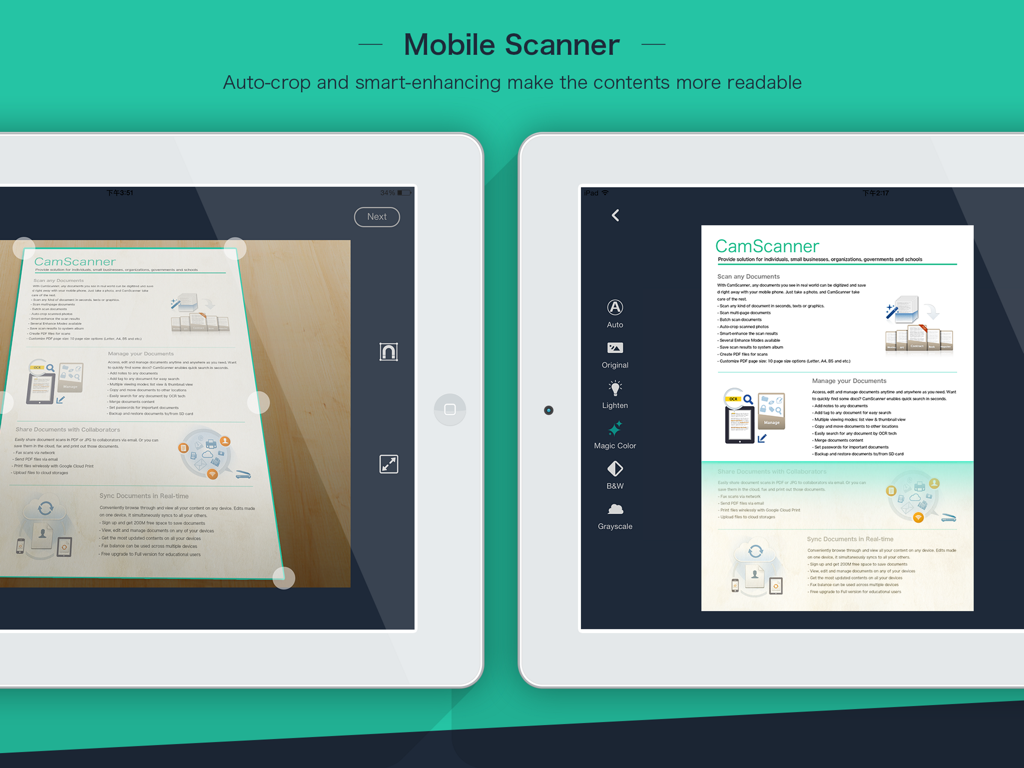
CamScanner HD app on iPad showing auto-crop and document enhancement features for mobile scanning

CamScanner HD app on iPad showing auto-crop and document enhancement features for mobile scanning

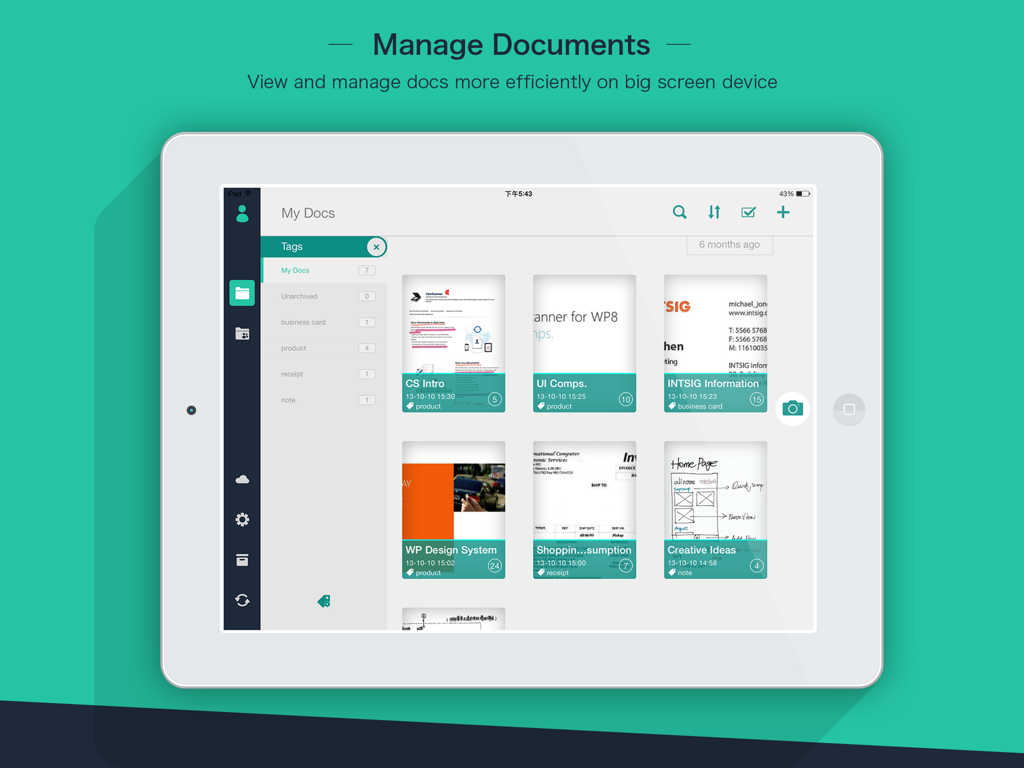
CamScanner HD app interface on an iPad displaying scanned documents and organization tags

CamScanner HD app interface on an iPad displaying scanned documents and organization tags

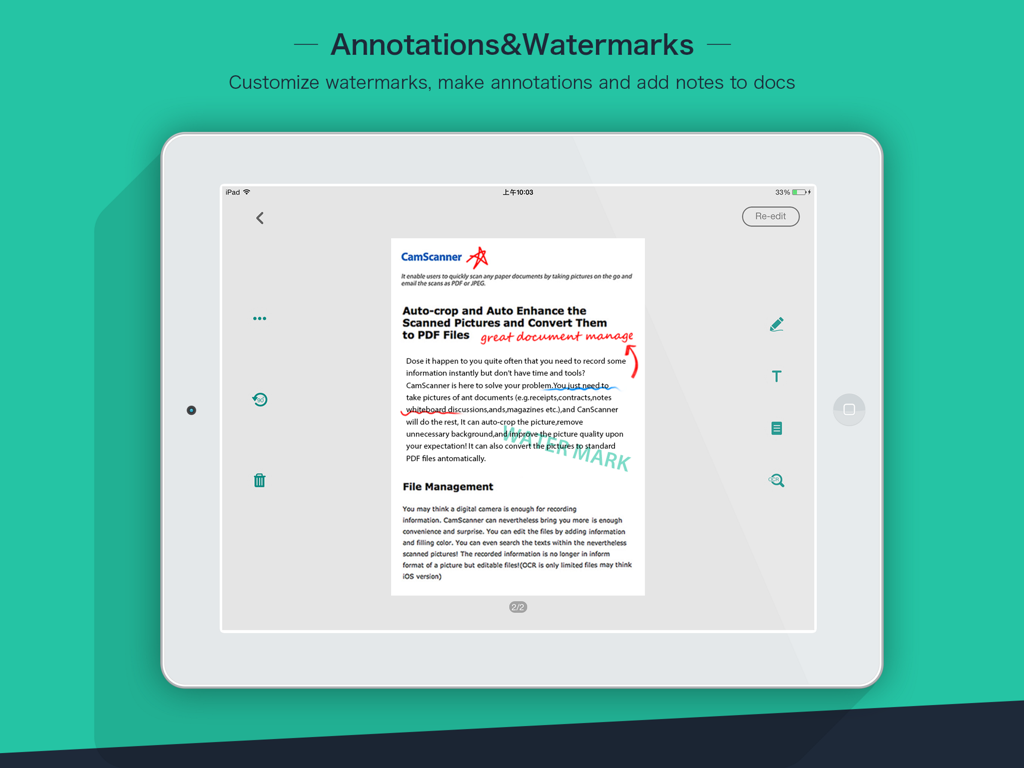
CamScanner HD app on iPad showing document annotations and custom watermarks

CamScanner HD app on iPad showing document annotations and custom watermarks

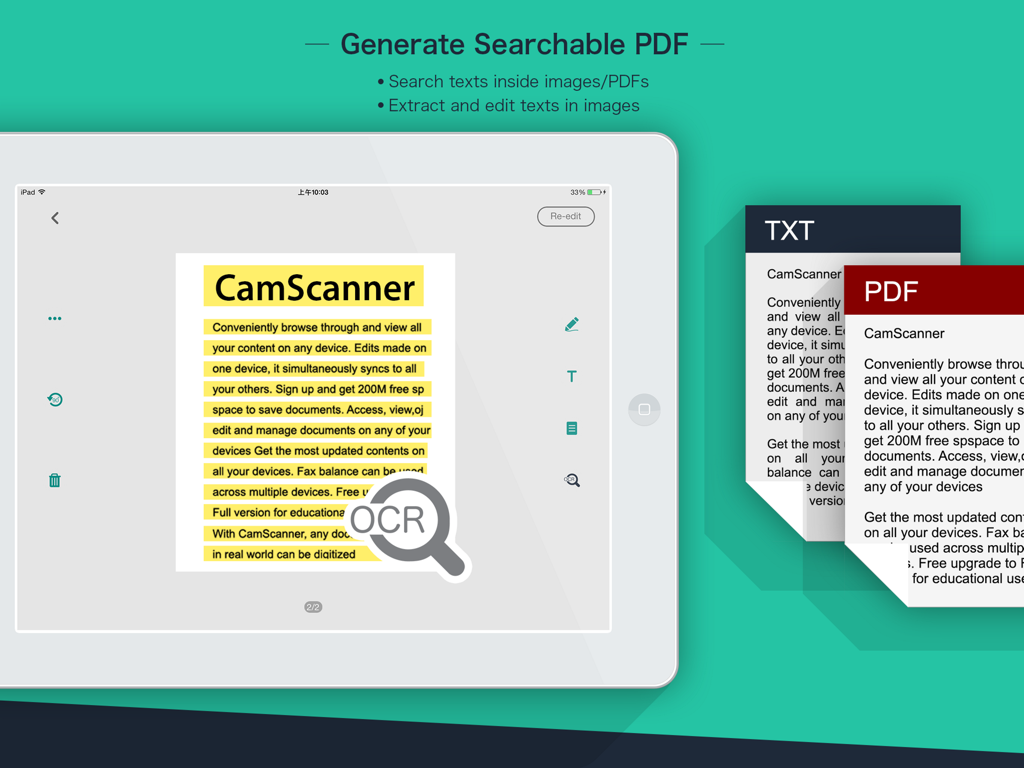
CamScanner HD OCR feature on iPad for generating searchable PDFs and extracting text

CamScanner HD OCR feature on iPad for generating searchable PDFs and extracting text

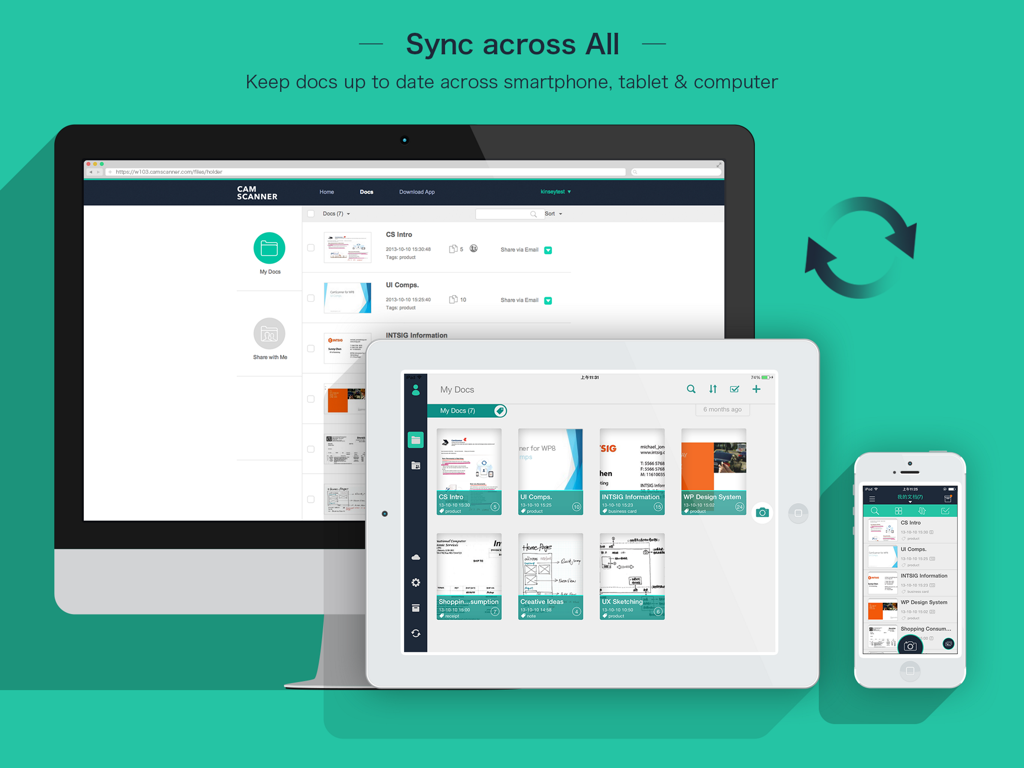
CamScanner HD document synchronization between desktop, iPad, and iPhone

CamScanner HD document synchronization between desktop, iPad, and iPhone

Your Professional Document Powerhouse

The tools that make this app stand out, trusted by 3M+ users.

Pro-Grade Scan Quality

Say goodbye to blurry photos. Our smart-cropping and auto-enhancing algorithms ensure every document looks sharp, clear, and professional in high resolution.

🔍

Advanced OCR Technology

Unlock the text within your images. Extract data from receipts, notes, or contracts to search, edit, or export documents with lightning speed.

☁️

Seamless Cloud Collaboration

Sync your files across all devices instantly. Securely share PDFs, add annotations, and collaborate with your team or classmates in real-time.

Loved by users worldwide

Trusted by 3M+ people who love this app.

"

"CamScanner HD is an absolute game-changer for my real estate business. I can scan multi-page contracts right at a closing, annotate them on my iPad, and sync them to my office's Google Drive instantly. The image quality is so crisp that my clients often ask if I brought a flatbed scanner with me to the property!"

Sarah Jenkins, Real Estate Broker
"

"As a medical student, I am constantly dealing with heavy textbooks and whiteboard diagrams. This app makes digitizing everything effortless. The OCR feature is a lifesaver; I can search through my scanned notes for specific medical terms in seconds. It is the perfect companion for my iPad productivity workflow."

David Chen, University Student

Review Analysis

Insights from user reviews.

Sentiment Score

12%
Negative

Summary

This app receives overwhelmingly negative feedback from users, primarily stemming from a significant discrepancy in functionality and user experience compared to the mobile version. Many users report persistent login issues, numerous bugs, and a noticeable lack of features crucial for productivity, even among premium subscribers. Additionally, the app suffers from poor adaptation to various iPad models, resulting in display problems like incorrect screen ratios and black bars, alongside synchronization failures that hinder seamless workflow between devices. Despite a few positive remarks about its free nature for tablets or general scanning utility, these are largely overshadowed by a litany of unresolved technical and usability concerns.

Common Themes

Feature Disparity with Mobile(13)
Bugs & Instability(7)
iPad Compatibility & Display(7)
Login & Access Issues(6)
Billing & Monetization(5)
Synchronization Problems(3)

About the app

Everything you need to know about CamScanner HD.

Description

The world’s No. 1 mobile document scanning and sharing today! * Installed on over 60 million devices in over 200 countries around the world * Over 50,000 new registrations per day * CamScanner, 50 Best iPhone Apps, 2013 Edition – TIME * App Store 2011/2012 Rewind Top Productivity App * “The application employs its own image cropping and enhancing algorithm that leads to clearer images.” – Makeuseof.com * “CamScanner may just be the best deal for scanning documents on your iPhone.” – CNET.com CamScanner helps you scan, store, sync and collaborate on various contents across smartphones, iPads, tablets and computers. Features: *Quickly Digitize Document Just use your iPad camera to scan and digitize all kinds of paper documents: receipts, notes, invoices, whiteboard discussions, business cards, certificates, etc. *Optimize Scan Quality Smart cropping and auto enhancing ensures the texts and graphics in scanned documents are clear and sharp with premium colors and resolutions. *Extract Texts from Image OCR (optical character recognition) feature recognizes texts in document images and extract them from images for later searching, editing or sharing. (Paid app only) *Share PDF/JPEG Files Easily share documents in PDF or JPEG format with friends via various ways: post on social media, send attachment or document download link through email. *AirPrint & Fax Documents Instantly print out any documents in CamScanner with nearby printer via AirPrint; directly select document and fax to over 30 countries from the app. *Collaborate on Documents Want to get feedback on your documents? Invite friends or colleagues to collaborate on documents. They can view, comment and exchange ideas on documents in groups. (Registrants only) *Advanced Document Editing Make annotations on documents with a full set of editing tools. Also adding customized watermarks are made available to mark your own documents. *Quick Search When you have plenty of documents, you can use Tags to categorize and easily find them. In addition, OCR for Search helps you find texts inside image and notes. Just enter one keyword, you can quickly find the document you want. *Secure Important Documents If you want to protect confidential contents, you can set passcode for viewing important documents; also, while sending document download link, you can set password to protect others from seeing it. *Sync across Platforms Sign up to sync documents on the go. Just sign in to any smartphone, tablet or computer (visit CamScanner website) you own and you can view, edit and share any document. (Registrants only) Premium Subscription Service: 1. Edit OCR results and notes of the entire doc, exporting as .txt file 2. Add 10G cloud space 3. Add 40 extra collaborators 4. Send doc link with password protection and expiration date 5. Batch download PDF files in web app 6. Everything benefit registrants enjoys 7. Everything paid app offers Payment models for Premium subscription: -$ 4.99/month -$49.99/year Please note the subscription is automatically renewed within 24-hours prior to the end of the period unless you choose to cancel the subscription. Subscriptions may be managed by going to your iTunes Account Settings after purchase.  For Privacy Policy, please visit http://s.intsig.net/r/terms/PP_CamScanner_en-us.html CamScanner users scan and manage * Bill, Invoice, Contract, Tax Roll, Business Card… * Whiteboard, Memo, Script, Letter… * Blackboard, Note, PPT, Book, Article… * Credential, Certificate, Identity Documents… 3rd Party Cloud Storage Services Supported: -Box.com, Google Drive, Evernote, Dropbox, Check out other INTSIG’s products: CamCard - Business Card Reader CamDictionary - Snap Translator We’d love to hear your feedback: isupport@intsig.com Follow us on Twitter: @CamScanner Like us on Facebook: CamScanner Follow us on Google+: CamScanner

Latest Version

3.12.0

Size

64.8 MB

First Released

Mar 26, 2018

Join the Paperless Revolution

Transform your iPad into a high-powered scanner today. Download CamScanner HD and join over 60 million professionals and students managing documents with professional precision.

Download on App StoreDownload on Google Play
FAQ

Frequently Asked Questions

Everything you need to know about CamScanner HD

What is CamScanner HD?

CamScanner HD is a top mobile document scanning and sharing application. It enables users to scan, store, sync, and collaborate on various documents across smartphones, iPads, tablets, and computers.

Can CamScanner HD digitize physical documents?

Yes, CamScanner HD can quickly digitize documents. Users simply use their device camera to scan various paper documents, such as receipts, notes, invoices, business cards, and certificates.

Does CamScanner HD have an OCR feature for text extraction?

Yes, CamScanner HD features OCR (optical character recognition). This allows users to extract texts from document images for later searching, editing, or sharing. This is a paid app only feature.

How can I share documents using CamScanner HD?

CamScanner HD allows easy sharing of documents in PDF or JPEG format. Users can share files with friends via social media, email attachments, or by sending a document download link.

Does CamScanner HD support printing and faxing documents?

Yes, CamScanner HD supports both AirPrint and faxing. Users can instantly print documents with nearby printers via AirPrint or directly fax documents to over 30 countries from the app.

Can I collaborate on documents with CamScanner HD?

Yes, CamScanner HD enables document collaboration. Registrants can invite friends or colleagues to view, comment, and exchange ideas on documents within designated groups.

Can users add watermarks to documents in CamScanner HD?

CamScanner HD offers advanced editing tools, including the ability to make annotations. Users can also add customized watermarks to their documents to mark them as their own.

How does CamScanner HD organize and allow searching for documents?

CamScanner HD helps organize documents with Tags, allowing quick categorization and finding. The OCR for Search feature also facilitates finding text inside images and notes using keywords.

Are there security features to protect documents in CamScanner HD?

Yes, CamScanner HD provides security features. Users can set passcodes for viewing confidential documents and add passwords to document download links to restrict access.

Does CamScanner HD sync documents across different devices?

Yes, CamScanner HD allows documents to sync across platforms for registrants. Users can sign in on any smartphone, tablet, or computer to access, edit, and share their documents.

What benefits are included with CamScanner HD Premium Subscription?

The CamScanner HD Premium Subscription includes editing OCR results, 10GB cloud space, 40 extra collaborators, password-protected links with expiration dates, and batch PDF downloads in the web app.

What is the price for CamScanner HD Premium Subscription?

The CamScanner HD Premium Subscription costs $4.99 per month or $49.99 per year. Subscriptions renew automatically unless canceled within 24 hours before the period ends.

Can CamScanner HD connect to other cloud storage services?

Yes, CamScanner HD supports integration with several third-party cloud storage services. These include Box.com, Google Drive, Evernote, and Dropbox for enhanced storage and access options.