
Iriun Webcam for PC and Mac



Stop settling for grainy laptop cameras. Transform your iPhone into a professional-grade wireless 4K webcam for Zoom, Teams, and streaming in seconds.
Publisher
Category
Photo & VideoDownloads
4M+User Rating
Total Ratings
1K+Locales
1Discover the interface used by 4M+ users.
The tools that make this app stand out, trusted by 4M+ users.
Leverage your iPhone's superior camera technology to deliver professional-grade video quality for meetings, classes, and streams.
Connect instantly via Wi-Fi for a clutter-free desk. Move your phone freely to showcase products, sketches, or different angles.
No complex setup. Install the drivers, launch the app, and you're ready to go with Zoom, Teams, OBS, and Discord.
Trusted by 4M+ people who love this app.
"Iriun is a total game-changer for my remote meetings. My laptop's built-in camera was blurry and dark, but now I look crisp and professional using my iPhone. Setup took less than two minutes!"
"As a student on a budget, I couldn't afford a high-end webcam for my streaming setup. This app saved me! The 4K quality is incredible, and I love the freedom of not having wires trailing across my desk."
Everything you need to know about Iriun Webcam for PC and Mac.
Description
Latest Version
2.9.1
Size
1.4 MB
First Released
Dec 14, 2018
Don't waste money on a new webcam. Join over 4 million resourceful professionals and creators who use Iriun to turn their iPhone into a high-definition 4K camera in seconds.
Everything you need to know about Iriun Webcam for PC and Mac
Iriun Webcam transforms your iPhone's camera into a wireless webcam for PC and Mac computers. It delivers your iPhone's sharp image for use with various video applications.
Yes, Iriun Webcam supports both PC and Mac operating systems. Users install necessary drivers on their computer to utilize the iPhone camera as a webcam.
Iriun Webcam connects the iPhone to your computer wirelessly using a WiFi network. The phone automatically connects after launching the app and server on both devices.
You must install Iriun Webcam drivers for your computer (PC/Mac) by downloading the software from https://iriun.com. Then run the installer and follow the on-screen instructions.
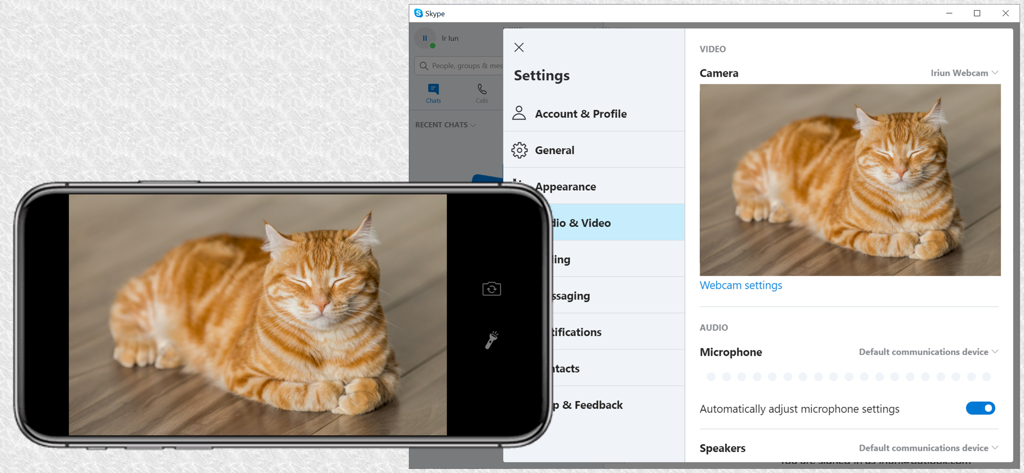
Yes, you can configure PC/Mac applications, such as Skype, to use Iriun Webcam as a video source. The provided screenshot demonstrates its integration within Skype's video settings.
Apps with similar features and user experience

Remote Sunrise LTD

Reincubate Ltd

DEV47 APPS LTD.

datronicsoft Technology GmbH

俊红 柴

耀 阮

Touchbits Inc.

Human Things, Inc

Astro HQ LLC